Fifty brain slides in one calm blue look, from two halves and four thinking styles to ideas around a brain, memory steps and a head profile. Change the colours and fonts, fill them with your own content, and download them as PowerPoint.
This brain template pack gives you 50 slides that use a simple brain as the picture for thinking, ideas, brainstorming, focus, memory, learning and decisions. Every slide is complete, with sample content and round figures you can replace in minutes.
Use it as a PowerPoint brain template or edit it right here. The forms range from a top view of two halves, a side view in four coloured areas and a head profile with a brain inside to ideas around a brain, hexagons, numbered pins, focus bars by time of day and memory steps beside a round photo, on light, white and navy grounds.
Your Own Brain Deck In This Look
Describe your topic and the AI builds a deck of your own in this blue brain style, with your ideas, your figures and your words.
Every slide with its words. Open one in the editor to change it 1:1.
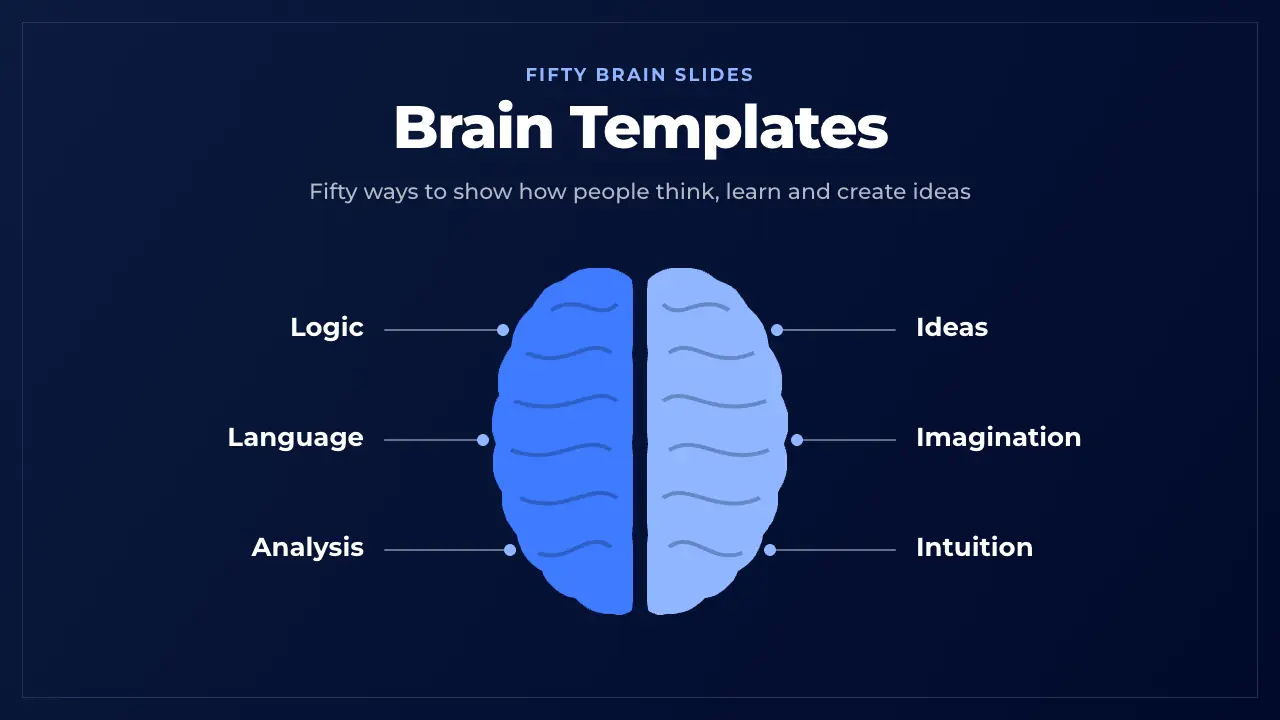
1 · Title Slide With A Brain Of Two HalvesA title slide that is a brain diagram itself: kicker, headline and lead stand centred over a brain of two halves, three thinking words joined to each side. Use it to open a talk about thinking, learning, creativity or a workshop. Put your own words at the six labels.
2 · Left And Right Brain With IconsThe popular model of two thinking styles: a brain of two halves in the middle, three styles with icons on the left and three on the right. Use it to talk about how people prefer to work, to balance a team or to open a creativity workshop. Replace the six words with the styles you want to compare.
3 · Brainstorm Steps Beside A PhotoA tall photo of a team at work with a brain badge, and four numbered steps of a brainstorming session beside it. Use it to brief a workshop or to agree on how a team collects ideas. Change the four steps to fit your own session.
4 · Side View With Four Numbered AreasA side view of the brain in four coloured areas, each with a number, and a legend that names the areas in plain words. Use it for an introduction to learning, attention or how people take in information. Keep the legend short: one line per area.
5 · Six Idea Cards Around A BrainA large brain in the centre and six cards around it, each a source of ideas with an icon and a short line. Use it to open an innovation workshop or to plan where a team looks for new ideas. Swap the six sources for your own.
6 · Side View Brain With Key FiguresA soft side view of the brain beside one large key figure and three small ones underneath. Use it to report the result of a brainstorm, a workshop or a survey about ideas. Put your headline number at the top and the facts behind it below.
7 · Brain Disc On A Full PhotoA full photo under a navy veil, a large brain disc on the right and three numbered steps on the left. Use it for a talk about decisions, mindfulness at work or a calm way to handle pressure. Keep the steps short: a word and one line each.
8 · Brain In Four Thinking QuartersA brain seen from above, cut into four coloured quarters, with one thinking style in each corner of the slide. Use it for team workshops, self-assessments or to explain why people approach the same task differently. Match each style to the colour of its quarter.
9 · Brain Between Inputs And OutputsA brain in the middle, three inputs flowing in from the left and three outputs flowing out to the right. Use it to show how a team turns information into results, or how a customer comes to a decision. Change the six labels to your own inputs and outputs.
10 · Round Photo With Three Memory StepsA round photo beside three steps of memory on one vertical line: take in, keep and recall, with a brain at the centre step. Use it in training, onboarding or any talk about learning. Add a practical tip to each step.
11 · Brain Beside Focus BarsA brain seen from above beside five horizontal bars, one for each hour of a working day, the peak in the highlight. Use it to plan meetings and deep work, or to show the results of a team survey about focus. Put your own hours and values on the bars.
12 · Head Profile With A Brain InsideA head in profile with a brain inside it, and four factors beside it that shape a decision, each with an icon and one line. Use it for talks on decision-making, buyer behaviour or leadership. Swap the four factors for the ones that matter in your case.
13 · Hexagon Brain With Five HabitsA brain in a large hexagon at the top, linked to five hexagons in a row, each a habit with an icon, a title and one line. Use it for wellbeing at work, productivity training or team rules. Replace the five habits with your own.
14 · Three Growing Brains Beside A PhotoThree brains of rising size on one line, from beginner to expert, beside a photo of someone learning. Use it for training plans, career paths or skill models. Name your own three levels and what marks each one.
15 · Two Brains ComparedTwo brains side by side, one quiet and one bright, each with a title and three short statements. Use it to compare two mindsets, two working styles or a before and after. Keep the statements parallel so the contrast is easy to read.
16 · Side View Brain With Five PinsA side view of the brain with five numbered pins from front to back, and a legend of five steps beside it. Use it to explain a process of thinking: a decision, a review or how a customer makes up their mind. Keep each step to a word and one line.
17 · Five Rules Beside A PhotoA photo of a team at work with a brain badge, and five ground rules for brainstorming beside it, each with a check mark and one line. Use it at the start of a workshop so everyone plays by the same rules. Add or swap rules to fit your team.
18 · Brain Halves With Two PercentagesA large brain of two halves, each carrying a percentage, with a title and a line on each side. Use it to share the result of a team survey, a split of preferences or any two-part figure. Change the two figures and the two descriptions.
19 · Side View Brain Over Four RoundsA brain at the top and four cards under it, one for each round of a brainstorm, with an icon, a title and one line. Use it to run a session step by step or to explain a method to a new team. Change the rounds and their timing to fit.
20 · Quote On A Photo With A BrainA full photo under a navy veil with a brain disc, a short quote in large type and a quiet source line. Use it to open or close a workshop, or to set the tone for a session about ideas. Put in a line your team believes in.
21 · Half Brain, Half CircuitA brain whose left half is drawn with soft folds and whose right half carries circuit lines, with three human strengths on one side and three machine strengths on the other. Use it for talks on AI at work, automation or how people and tools share a task. Change the six strengths to fit your topic.
22 · Brain Inside A Light BulbA brain drawn inside a light bulb, with four creative techniques around it, each with an icon, a title and a line. Use it to open an ideas workshop or to teach simple methods for fresh thinking. Replace the techniques with the ones your team uses.
23 · Brain And Three Memory StoresA small brain and three boxes of rising size joined by arrows: the sensory, short-term and long-term stores of memory. Use it in training, learning design or onboarding to explain why repetition matters. Each store can carry one practical tip.
24 · Focus Tips Beside A PhotoFour tips for focused work on the left, a photo on the right and a brain badge where they meet. Use it in productivity training, team agreements or a talk about deep work. Change the four tips to your own rules.
25 · Brain Inside Three ArcsA brain with three nested arcs around it, each a layer of attention, and a legend in matching colours. Use it to talk about focus, distraction or how people take in a busy environment. Rename the layers to fit your model.
26 · Brain In Four Puzzle PiecesA brain split into four pieces pulled slightly apart, an icon on each piece and its name in the nearest corner. Use it to show what a solution needs, the parts of a project brief or four skills a team brings together. Rename the pieces and keep one line for each.
27 · Thought Bubbles Beside A PortraitA round portrait with a small brain above it and three thought bubbles beside it, each a title and one question a customer asks. Use it for buyer personas, sales training or a talk about what goes on in a customer's mind. Put in the questions your customers really ask.
28 · Brain And Heart Side By SideA brain on the left and a heart on the right, a thin line between them and three short points under each. Use it to show the rational and the emotional side of a decision, a sale or a change. Keep the points parallel so the two sides read as a pair.
29 · Team Roles On Four Brain AreasA side view of the brain in four coloured areas, each with the icon of a team role, and a legend that says what each role does. Use it to introduce a team, a new structure or how work is shared. Match each role to the colour of its area.
30 · Brain Beside Five Rising StepsA brain on the left and five steps rising to the right, each with a number, a title and one line. Use it for problem solving, improvement work or any method that builds step by step. Change the steps and keep each line short.
31 · Photo Beside A Key FigureA photo on the left and a key figure on the right: four hours of deep work a day, with three short tips under it. Use it to set a focus target for a team, open a talk on productivity or close a workshop with clear habits. Change the figure and keep each tip to one line.
32 · Six Thinking Modes Around A BrainA brain in the centre with six cards around it, each a way of looking at one plan. Use it in a workshop to review a plan, a proposal or a decision from every side in turn. Go round the six cards and give each a few minutes.
33 · Learning Curve With Four StagesA rising curve runs across the slide with four stages on it and a small brain at its end. Use it for training plans, onboarding or any talk about how people learn a new skill. Name the stages of your own course and keep each line short.
34 · Icons On A BrainA large brain with six icons on its two halves, each joined to a skill and one line about it. Use it to show what a team needs, the roles in a project or the skills of a training plan. Swap the icons and labels for the six skills that matter to you.
35 · Fast And Slow Thinking With PhotoTwo cards side by side, fast thinking and slow thinking, each with an icon and three points, and a rounded photo on the right. Use it to talk about decisions, bias or when to stop and think. Keep the points parallel so the two ways read as a pair.
36 · Five Memory Tips On An ArcA top view of a brain at the bottom with five numbered tips on an arc above it, each with a title and a short caption. Use it for learning, training or onboarding to share habits that help people remember. Keep each caption to one short sentence.
37 · Brain With Three Key FiguresA large side view of a brain on the left and three stacked figure cards on the right: ideas collected, selected and launched. Use it to show the result of a brainstorm or an innovation funnel. Replace the sample numbers with your own.
38 · Photo Band Over Four CardsA wide photo across the top and four cards under it, each with an icon, a title and a caption. Use it for workshops, team rules or ways of working. Swap the photo for one of your own team at work.
39 · Brain Beside Three Priority BarsA top view of a brain on the left and three priority bars on the right, from must do to could do, each with its share of attention. Use it for time management, focus or planning talks. Change the shares so they add up to 100 %.
40 · Honeycomb Of Six Around A BrainA centre hexagon with a brain icon and six hexagons around it, each with an icon, a title and a caption. Use it for creativity, culture or values where every part matters equally. Keep the six titles to one word each.
41 · Quote Beside A BrainA large quote on the left with a quiet source line, and a calm top-view brain in soft fills on the right. Use it to open a workshop, a strategy session or a planning day. Swap the quote and the source for your own words.
42 · Photo Beside A Decision ChecklistA tall photo of a team with a brain badge on the left, and a checklist of five questions on the right, each with a check tile and one line. Use it before a team makes a choice, in a review or a planning meeting. Tick the questions off one by one or swap them for your own.
43 · Bridge Between Two Brain HalvesTwo top-view brain halves pulled apart, logic on the left and imagination on the right, with three stacked cards bridging the gap. Use it to show practices that bring analytical and creative thinking together. Replace the three practices with your own.
44 · Thoughts Inside A Customer HeadA head in profile, filled pale, with a brain inside and four thought cards fanning out from it: needs, doubts, hopes and questions. Use it in sales, marketing or product talks to show what goes on in a buyer's mind. Rewrite the four thoughts for your own customers.
45 · Brain Areas As Shares Of TimeA side-view brain cut into four coloured areas, each carrying its share of a team's thinking time, with a legend of bars on the right. Use it to show how time or effort splits across planning, solving, creating and reviewing. Change the four shares to your own figures.
46 · Photo Beside Creative TipsFour numbered tips against a creative block on the left, a photo of someone at work on the right. Use it in a workshop, a training on creativity or a team talk about getting unstuck. Keep each tip to a short title and one line.
47 · Stairs Of LearningFour rising steps from remembering to creating, a brain icon on each. Use it for a training plan, a skills model or a talk about how people learn. Rename the levels to fit your own model.
48 · Questions Around A BrainA brain seen from above in the centre, two question cards on each side. Use it to open a workshop, frame a problem or start a brainstorm. Swap in the questions your team should ask itself.
49 · Key Figures On A Full PhotoA full photo under a navy overlay, a brain disc and three key figures of a workshop in a row. Use it to report the result of a brainstorm, an innovation day or a team offsite. Put in your own figures and one line each.
50 · Key Takeaways Beside A BrainA brain seen from above on the left, four numbered takeaways on cards on the right. Use it as the closing slide of a talk about thinking, creativity or decisions. Keep each takeaway to a title and one line.
What Is Inside The Pack
Top-view brains of two halves, a side view in four coloured areas, a head profile with a brain inside, ideas and hexagons around a brain, four thinking styles, two brains compared, numbered pins with a legend, focus bars by time of day, memory steps, growing brains on one baseline, rules of brainstorming and brains beside photos and key figures. Every shape, text and colour stays editable.
How To Use This Brain Template
01
Pick A Form
Choose the brain template that fits your point: two halves for a contrast, four quarters for thinking styles, ideas around a brain for a brainstorm.
02
Set Your Colours
Use the colour and font bar to match your brand; every slide follows at once.
03
Write Your Ideas
Replace the sample ideas, steps and figures with your own, and drop the cards or pins you do not need.
04
Present Or Download
Present straight from the browser or download the slides as a PPTX file for PowerPoint.
Which Brain Slide To Choose
Two halves side by side suit a contrast, such as logic and creativity or plan and intuition. Four quarters suit four thinking styles, and a side view in coloured areas suits any topic of a few named parts.
Use ideas or hexagons around a brain for a brainstorm, numbered pins for a sequence of steps, growing brains for levels of learning, and a brain beside bars or a key figure when one number carries the message.
Tips For Clear Brain Slides
Treat the brain as a picture for thinking rather than a medical drawing, and name each area in plain words. Keep every label short so it reads from the back of the room.
Give one idea to each card, pin or quarter, keep to six of them or fewer, and mark the one that matters most with the strongest colour.
Frequently Asked Questions
Is this brain template free?
Yes. You can view and edit every slide of this brain template for free, and download the deck as PPTX with a free account.
Can I use it as a PowerPoint brain template?
Yes. Download the slides as a PPTX file and open them in PowerPoint; the brain shapes, icons and texts stay editable there.
Which topics suit these slides?
Anything about thinking: brainstorming, ideas, creativity, focus, memory, learning, decisions and ways of working together. The sample content is general, so it fits any field.
Are the brain areas medically accurate?
No. The brain is drawn as a simple picture for thinking and working together, and its areas are named in plain words as in a simple model. Do not use the slides as medical material.
Can I change the colours and fonts?
Yes. The colour and font bar changes every slide of the brain template at once, and you can still adjust single shapes in the editor.
Can I move or recolour the parts of a brain?
Yes. Every half, quarter and area is a shape of its own that you can recolour, move or delete, and the labels change like any other text.
Can the AI build a deck from my topic?
Yes. Fill With AI takes your topic and builds a new deck of your own in this look, with your ideas, figures and words.
Try ExpertSlides AI For Free — The Ultimate AI Presentation Maker
Describe any topic or upload a document, and ExpertSlides designs and writes the whole deck — editable in the browser and as a PowerPoint file.