Buyer Persona Template: 50 Editable Slides For Every Buyer You Sell To
Fifty buyer persona slides in one blue look, each a different form of the same idea: who buys, why and how. Profiles with a photo, goals and challenges, buying criteria as bars, a day in the life, objections and answers, the buying committee and personas compared. Change the colours and fonts of all of them at once, let the AI build your own deck in this look, download them as PowerPoint or edit each slide in the editor.
This buyer persona template holds 50 slides, and each one shows a buyer in a different form: a classic profile card with a round portrait and key facts, goals and challenges in two columns, buying criteria as weighted bars, a day and a week in the life, an empathy map, personality sliders, the buying journey in five chevrons, the buying committee on one line and three personas side by side. All of them share one blue look on light, white and navy grounds, so any six of them sit in one deck without looking borrowed.
Most persona files give you one empty sheet with a silhouette and a few boxes. Here every slide is finished, with neutral sample content that fits any market: personas named by their role — the Operations Manager, the IT Director, the Finance Director, the Marketing Lead —, never by an invented name, and round sample figures for age, team size, budget and buying time. Replace them with what your interviews, surveys and sales data say.
If you searched for a buyer persona PowerPoint template, a free account downloads the slides as a PPTX file whose texts and shapes stay editable. You can also stay in the browser: pick your colours and fonts in the bar above the slides, describe your buyers and let the AI build your own deck in this look, or open the slides one to one in the editor.
Your Buyers In This Buyer Persona Look
Describe who buys from you, what they want, what holds them back and where they look for answers. Or attach your interview notes, a survey summary or a sales report. ExpertSlides builds your own deck in this look in a few minutes, with your personas, your figures and your messages.
Every slide is a complete buyer persona view with neutral sample content — roles instead of names, short general texts and round figures — that fits any market. Replace its texts and figures with yours.
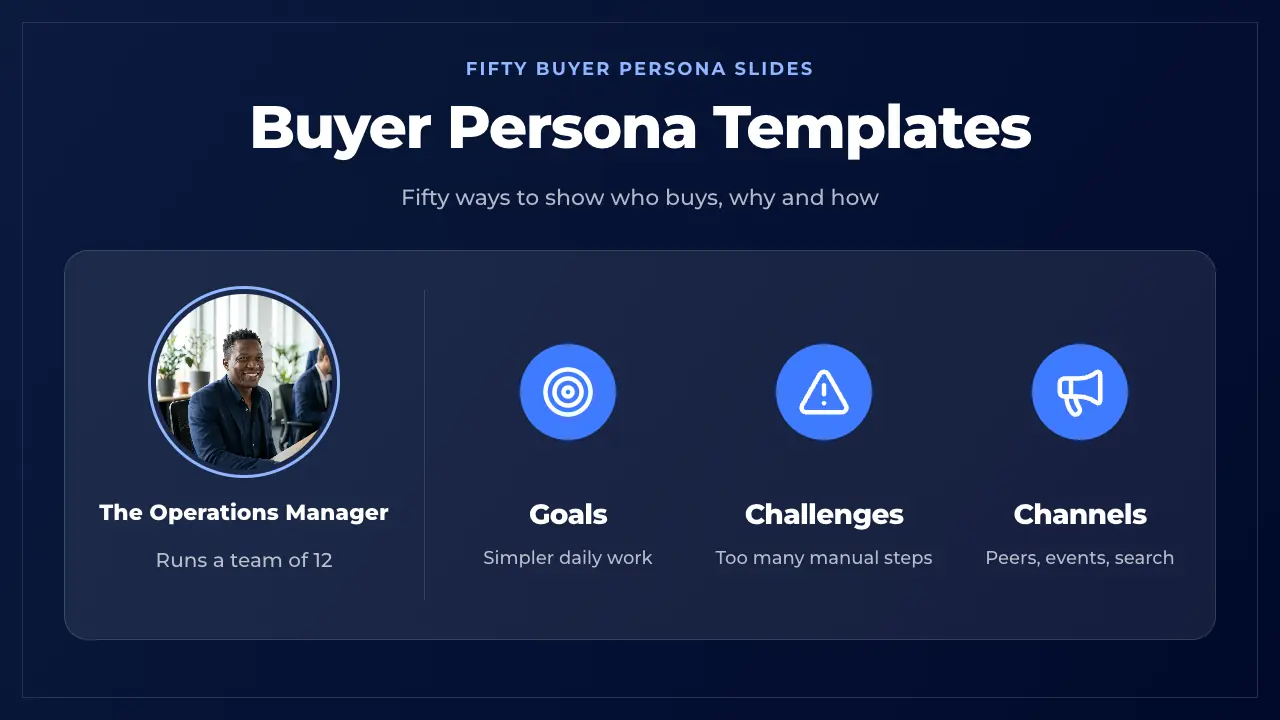
1 · Title Slide With A Persona CardA title slide that is a buyer persona itself: a round portrait with the role, and beside it the persona's goals, challenges and channels in three columns. Use it to open a persona deck for marketing, sales or product teams.
2 · Classic Persona Profile With PhotoThe classic persona profile: a card with a round portrait, the role and four key facts, and beside it three cards for goals, challenges and buying criteria. Use it as the first page of any persona and fill it from interviews and sales data.
3 · Goals And Challenges In Two ColumnsTwo columns set what a persona wants against what stands in the way: three goals with check marks and three challenges with crosses. Use it to show the gap your offer closes for one buyer.
4 · Persona Beside A Full-Height PhotoA persona told in one look: the role, one line on what they do, a quote in their own words and three key facts, beside a full-height portrait. Use it to bring a persona to life before going into goals and criteria.
5 · Day In The Life On One LineA day in the life of one persona, from the morning inbox to the evening report: five times on one line, each with a card on what the persona does. Use it to show when and where your message can reach them.
6 · Buying Criteria As Weighted BarsFive buying criteria ranked by their weight in the decision, each as a bar on a pale track with its share at the end. Use it to show sales and marketing what a persona really compares when choosing a supplier.
7 · Preferred Channels In Five ColumnsFive channels side by side, each with an icon, the share of buyers who use it and what they do there. Use it to decide where a persona will see your message first and where to spend the marketing budget.
8 · Objections Beside Their AnswersThree typical objections of one persona, each beside the answer that sales gives. Use it to prepare a sales team for the questions a buyer will raise before signing.
9 · Quote By Role With Round PortraitOne sentence in the buyer's own words, large, beside a round portrait and the role. Use it to open or close a persona with the voice of the customer, taken from an interview.
10 · Three Persona Cards ComparedThree persona cards side by side, each with the same three lines: the goal, the pain and the channel. Use it to show at a glance how the buyers in one deal differ and why each needs its own message.
11 · Empathy Map Around The PersonaFour cards around the persona show what goes on in their head: what they think, feel, say and do. Use it after customer interviews to turn notes into a picture the whole team shares.
12 · Personality Sliders Beside A ProfileA profile card with three traits beside five sliders between two opposite poles, each with a knob where the persona stands. Use it to show how a persona thinks and decides, so the tone of sales and marketing fits them.
13 · Buying Journey In Five ChevronsThe five stages of a buying journey as chevrons, with what the persona does in each stage under it. Use it to plan which content and which contact fits each moment from the first doubt to the renewal.
14 · Persona Card On A Full PhotoA persona on a full photo: the role, one key figure that defines their power in the deal, and a white card with goal, challenge, criteria and channel. Use it for the decision maker who signs the budget.
15 · Key Figures On Four CardsFour key figures that sum up a persona, each on a card with an icon, the figure and what it means. Use it as a quick fact sheet before a sales meeting or a campaign brief.
16 · Four Numbered Pain Point CardsFour pain points of one persona on four cards, each with a number, an icon, a short title and two or three lines on why it hurts. Use it to show which problems your offer solves first.
17 · Motivations And Fears In Two HalvesTwo halves set what drives a persona against what worries them: three motivations on a pale panel and three fears on a white one. Use it to write messages that speak to the hope and answer the fear.
18 · Buying Committee On One LineThe five roles of a buying committee in a row, each with the person who usually holds it and what they care about. Use it in complex sales to make sure every member of the committee gets the right message.
19 · Key Figure Card Beside Four SourcesOne large figure on a blue card beside the four sources a persona uses to research a purchase. Use it to show how much of the decision is made before sales is even in the room.
20 · Goals As Rising StairsFour goals of one persona as stairs that rise from the short term to the long term, each with its time, its goal and one line on what success means. Use it to show what a buyer wants now and where they want to be in a few years.
21 · Persona Around A Round PortraitA round portrait in the middle with six facts around it: who the persona is on the left and what drives their choices on the right. Use it to introduce one persona in a single calm view.
22 · One Message For Each PersonaThree rows, one for each persona: the role, an arrow and the one message it needs to hear, with the proof that backs it up. Use it to align sales and marketing on what to say to whom.
23 · Negative Persona With Four ReasonsA negative persona: the buyer a team decides not to chase, with four reasons why. Use it to keep marketing spend and sales time on the buyers who stay and grow.
24 · Daily Tools As Bars Of HoursSix tools a persona works with, each with an icon and a bar of the hours spent in it every week. Use it to show where your product has to fit in and which tools it should connect to.
25 · Week In The Life On Day CardsA working week of one persona: five day pills on one line and a card for each day on what they do. Use it to find the best day and the best moment to reach a buyer.
26 · Trigger Events Flowing Into A SearchFour trigger events on the left, each flowing into the one moment on the right when the persona starts to search. Use it to time campaigns and outreach to the events that really open a buyer's mind.
27 · Persona Beside A Tall PhotoA tall photo beside a calm persona sheet: the role, one line on what they own, and their goals, challenges and channels. Use it when one persona needs a full page in a sales or marketing plan.
28 · Success Measures As Progress RingsThree progress rings show the numbers a persona is judged on, each with a short title and one line on what it means. Use it to show which results your offer should improve for this buyer.
29 · Two Personas Mirrored Head To HeadTwo personas face each other, with four topics in the middle and each buyer's answer level with it. Use it to show why one offer needs two different stories for two kinds of buyer.
30 · Research Figures Behind A PersonaFour figures show where a persona comes from: interviews, a survey, sales calls and data, with a band on how often it is reviewed. Use it to make a persona credible before you present it.
31 · Content Formats As A Column ChartFive content formats as columns, from the one a persona trusts most to the one they barely read. Use it to plan which content to make first for a buyer and which to leave out.
32 · Buyer Quotes On A Full PhotoOne large quote in the buyer's own words, with three shorter quotes of other personas under it, all on a calm photo under a navy overlay. Use it to let the customer speak before you show your plan.
33 · Questions Before Buying In BubblesFour questions a persona asks before they buy, set as speech bubbles in two staggered rows above the persona who asks them. Use it to prepare the answers before the first meeting.
34 · Six Months Alternating On One AxisThe buying cycle of one persona month by month on one axis, the steps set above and below it in turn so that each has room. Use it to show sales when to expect a trial, a business case and a signature.
35 · Persona Spectrum From Buyer To UserOne track from the person who decides the budget to the person who uses the product every day, with four personas placed along it. Use it to show that one sale has several buyers who need different arguments.
36 · Persona Snapshot With Round PhotoA one-look snapshot of a persona: the role, six facts in two calm columns and a large round portrait. Use it as a quick reference card in a sales playbook.
37 · Needs As A Stepped PyramidA stepped pyramid sorts a persona's needs into must have, should have and nice to have, with the needs of each level beside it. Use it to decide what an offer has to show first and what can wait.
38 · Before And After In Two CardsTwo cards set a persona's week today against the week with your offer: three pains with crosses, three gains with checks. Use it to make the change you promise easy to see.
39 · Four Values In HexagonsFour values of a persona, each in a hexagon with an icon, a short title and one line on what it means. Use it to check that your brand and your offer speak to what the buyer cares about.
40 · Touchpoints Along A Curved RoadFive touchpoints along one curved road, from the first search to the first day of use, each with a short line on what happens there. Use it to map the path a persona takes and where each team takes over.
41 · Three Round Portraits On One LineThree round portraits side by side introduce the core personas, each with its share of sales and one line on what it wants. Use it as the overview slide before you present each persona in depth.
42 · Budget Split As One Stacked BarOne wide bar splits a persona's yearly budget into five parts, with a legend that says what each part pays for. Use it to show where your offer competes for money and which budget it should come from.
43 · Influencers Around The PersonaThe persona in the middle with the four groups that shape the decision around it: the boss, peers, the team and outside advisers. Use it to plan who else your message has to reach.
44 · Deal Makers Beside Deal BreakersTwo columns list what makes a persona say yes and what makes them walk away. Use it to check an offer against a buyer's hard rules before a pitch.
45 · Persona Beside A Half PhotoA full-height photo beside a short persona: the role, one line on the business and three rows for the goal, the challenge and the channels. Use it for small business buyers who decide everything themselves.
46 · Jobs, Pains And Gains In Three CardsThree cards list what a persona has to get done, what gets in the way and what they hope to gain. Use it to link each part of your offer to a job, a pain or a gain of the buyer.
47 · Years As Large FiguresFour years set as large figures over one thin line, each with one word and one line on how the persona's job looks then. Use it to plan for the buyer you will sell to in five or ten years.
48 · Fit Checklist Beside A Key FigureA checklist of five signs that a lead matches a persona, beside one figure on what a good fit is worth. Use it to help sales qualify leads against the persona in the first call.
49 · One-Page Persona With PhotoA whole persona on one page: a profile card with photo and facts, and four fields for goals, challenges, channels and a quote. Use it as the hand-out version of a persona that sales and marketing keep at hand.
50 · Four Habits Beside A Team PhotoFour habits on one vertical line beside a team photo: interview, update, share and check. Use it to close a persona deck with how the team will keep its personas true over time.
Fifty Forms Of A Buyer Persona In One Blue Look
A title slide that is a persona card itself; the persona as a classic profile with photo and facts, beside a full-height photo, on a full photo under a navy overlay, around a round portrait, as a snapshot with six facts, beside a half photo and on one page; its goals and challenges in two columns, its goals as rising stairs, four numbered pain points, motivations and fears in two halves, jobs, pains and gains in three cards, its needs as a stepped pyramid and its values in hexagons; buying criteria as weighted bars, deal makers beside deal breakers and five signs of a good fit; preferred channels in five columns, four research sources beside a key figure, trusted content as a column chart and touchpoints along a curved road; a day and a week in the life, the tools it uses as bars of hours and its personality as sliders; objections beside their answers, questions in speech bubbles, a quote by role and buyer quotes on a photo; the buying journey in five chevrons, six months to a decision, trigger events flowing into a search and the buying committee on one line; personas compared as three cards, head to head, on a spectrum from buyer to user and as three round portraits; one message for each persona, a negative persona, the influencers around a buyer, the budget as one stacked bar, success measures as progress rings, how the buyer changes from 2027 to 2035, the research behind a persona and four habits that keep it current. Seventeen slides stand on navy and thirty-three on light blue or white, thirteen of them with a photo.
How To Use This Buyer Persona Template
01
Pick Your Persona Slides
Look through the 50 slides and note the forms that fit what you want to show: a profile for each buyer, their goals and pains, the buying journey, the objections. Most persona decks need five to eight of them.
02
Set Colours And Fonts
Choose your colours and your font in the bar above the slides. The whole buyer persona template changes at once, so you see your brand on every slide before you download anything.
03
Put In Your Research
Press Fill With AI and describe your buyers, or press Edit Slides and replace the sample roles, goals, pains and figures by hand, slide by slide, in the editor.
04
Download Or Present
Download the slides as a PPTX file with a free account and copy them into your own PowerPoint deck, or present them to your sales and marketing team straight from the browser.
Which Slide Fits Which Part Of Your Persona
Start with who the buyer is. The classic profile (slide 2) puts a portrait, four key facts and three cards for goals, challenges and buying criteria on one slide; the persona around a round portrait (21) and the persona snapshot (36) give six facts at a glance, and the persona on one page (49) adds the channels and a quote, which suits a hand-out for the sales team. When one figure says the most, take the persona card on a full photo (14) or the four key figures on cards (15).
Then show what drives the buyer. Goals and challenges in two columns (3), the four pain points (16), motivations and fears (17) and jobs, pains and gains (46) cover the why; the stepped pyramid (37) sorts needs into must have, should have and nice to have, and the weighted bars (6) and deal makers beside deal breakers (44) show what decides the choice.
For the how, the buying journey in five chevrons (13) and six months to a decision (34) follow the buyer from the first doubt to the signature; the trigger events (26) show what starts the search, the preferred channels (7), the research sources (19) and the touchpoints along a curved road (40) show where to meet them, and the buying committee (18) and the influencers around the persona (43) show who else has a say.
When you sell to more than one buyer, compare them: three persona cards (10), two buyers head to head (29), the spectrum from buyer to user (35) and the three round portraits (41) each set personas side by side, and one message for each persona (22) turns the comparison into what sales should say. The negative persona (23) names the buyer you choose not to chase.
How To Build A Buyer Persona In PowerPoint With This Pack
Download the pack as a PPTX file and open it in PowerPoint. Every text is a text box and every card, bar, chevron and disc is a shape, so you change a goal by typing over it and recolour a bar by clicking it. Copy the slides you need into your own presentation and delete the rest.
Build each persona from evidence, not from guesses: interviews with customers and lost deals, a short survey and what your sales team hears on calls. The research slide (30) shows where a persona comes from, and the closing slide (50) shows how to keep it current. Name each persona by its role, give it one goal and one pain that matter most, and write the objections in the buyer's own words.
Buyer Persona Template FAQ
Is This Buyer Persona Template Free?
Yes. All 50 slides of the buyer persona template are free. You can look at every slide and try colours and fonts on this page without an account; a free account, with no credit card, downloads the PPTX file or opens the slides in the editor.
Is There A Buyer Persona PowerPoint Template To Download?
Yes. With a free account you download the 50 slides as one PPTX file that opens in PowerPoint. Every text, card and bar stays editable, so you can copy single slides into your own deck.
What Goes Into A Buyer Persona?
A role, a few facts such as age range, team size and budget, the goals and pains that drive the choice, the buying criteria, the channels where the buyer looks for answers, the usual objections and a quote in their own words. This buyer persona template has a slide for each of them.
Why Are The Personas Named By Role And Not By Name?
A role such as the Operations Manager or the Finance Director tells your team at once who sits across the table and what they care about. An invented first name adds nothing to that, so every slide uses roles and you can rename them as you like.
How Many Personas Should I Make?
Most businesses do well with two to four personas: the buyers who bring in most of your sales. The slides that compare personas, such as the three persona cards and the three round portraits, are made for that number, and the negative persona shows who to leave out.
Can The AI Build Personas For My Own Business?
Yes. Press Fill With AI, describe your buyers or attach your interview notes and survey results, and ExpertSlides builds your own deck in this look, with your roles, goals, pains and figures.
Can I Change The Colours And Fonts?
Yes. The bar above the slides changes the colours and the font of all 50 slides at once, and the slides you download or open in the editor keep your choice.
Try ExpertSlides AI For Free — The Ultimate AI Presentation Maker
Describe any topic or upload a document, and ExpertSlides designs and writes the whole deck — editable in the browser and as a PowerPoint file.