Customer Profile Template: 50 Editable Slides For Every Customer Segment
Fifty customer profile slides in one blue look, each a different form of the same idea: who your customers are, what they need and how they buy. Segment cards, age and income bands, jobs, pains and gains, buying behaviour, lifetime value, the ideal customer profile and segments compared. Change the colours and fonts of all of them at once, let the AI build your own deck in this look, download them as PowerPoint or edit each slide in the editor.
This customer profile template holds 50 slides, and each one describes a customer segment in a different form: a segment card with its share of all customers, the customer side of the value proposition canvas as one circle, age bands as bars, household income as a column chart, jobs to be done on numbered cards, pains ranked by large figures, the ideal customer profile as a target, lifetime value under an arc and six segments side by side. All of them share one blue look on light, white and navy grounds, so any six of them sit in one deck without looking borrowed.
A customer profile describes a group of customers, not one invented person: who they are in round figures, the jobs they want done, what bothers them, what they hope for and how they buy. Every slide comes finished with neutral sample content that fits any market — segments named by their type, such as Busy Professionals, Young Families or Value Seekers, and round sample figures for age, income, basket size and loyalty. Replace them with what your surveys, interviews and sales data say.
If you searched for a customer profile PowerPoint template, a free account downloads the slides as a PPTX file whose texts and shapes stay editable. You can also stay in the browser: pick your colours and fonts in the bar above the slides, describe your customers and let the AI build your own deck in this look, or open the slides one to one in the editor.
Your Customers In This Customer Profile Look
Describe your customer segments, what they need, what holds them back and how they buy. Or attach your survey results, interview notes or a sales report. ExpertSlides builds your own deck in this look in a few minutes, with your segments, your figures and your findings.
Every slide is a complete customer profile view with neutral sample content — segments named by their type, short general texts and round figures — that fits any market. Replace its texts and figures with yours.
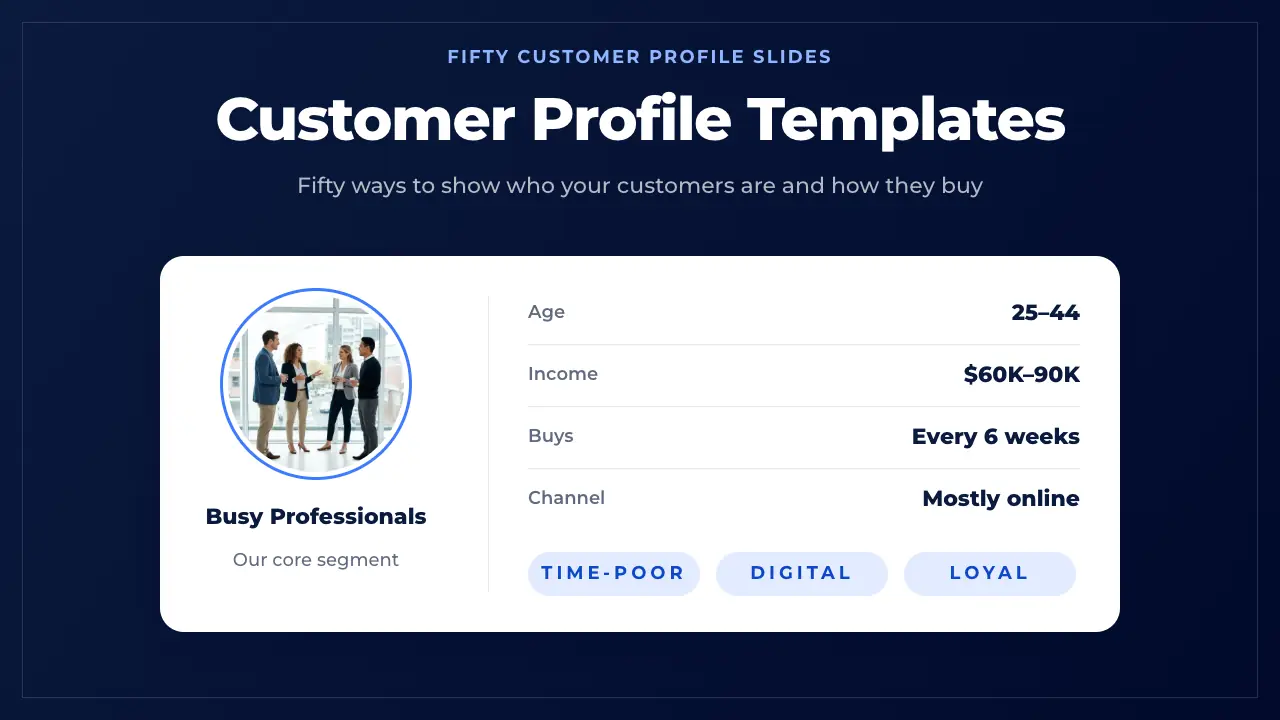
1 · Title Slide With A Customer CardA title slide that is a customer profile itself: a customer card with a round photo, the segment's name, four key facts and three traits. Use it to open a deck on your customer segments for marketing, sales or product teams.
2 · Segment Card With Three Profile RowsThe classic customer profile: a segment card with its share of all customers beside three cards for demographics, needs and buying behaviour. Use it to introduce one segment on a single slide.
3 · Customer Profile Canvas CircleThe customer side of the value proposition canvas: one circle split into jobs, pains and gains, with a short note on each at the right. Use it to sum up what a segment wants to get done, what bothers it and what it hopes for.
4 · Segment Profile Beside A Full PhotoOne customer segment beside a full-height photo: its name, a short description and three key figures. Use it to give each segment its own slide in a segmentation deck.
5 · Age Bands As Horizontal BarsThe age profile of the customer base as five horizontal bars, the largest band highlighted, and a card with the key figure. Use it for the demographics part of a customer profile.
6 · Four Job Cards With NumbersThe jobs to be done of a customer segment as four numbered cards: a functional, an emotional, a social and a supporting job, each with an icon and a short note. Use it to show why customers choose an offer, not only who they are.
7 · Three Segment Cards ComparedThree customer segments side by side, the core segment highlighted in the middle: each with its share of customers, its average spend, how often it buys and what it wants most. Use it to compare segments before you decide whom to focus on.
8 · Pains Ranked With Large FiguresThe main pains of a customer segment as four ranked rows, each with the share of customers who name it, a short title and a note. Use it for the pains part of a customer profile, straight from survey results.
9 · B2B Customer Profile With Tall PhotoAn ideal customer profile for business customers: a tall photo beside the segment's name and six facts in two columns, from company size and revenue to who decides and how they found you. Use it for B2B sales and marketing.
10 · Gains As Rising StairsThe gains a customer hopes for as four rising steps: required, expected, desired and unexpected gains, each with a short note. Use it to show what meets the basic need and what wins a customer's loyalty.
11 · Buying Behaviour In Four FiguresHow a customer segment buys, in four key figures: how often, how much, through which channel and how many visits come before the first order. Use it for the buying behaviour part of a customer profile.
12 · Ideal Customer Profile As A TargetThe ideal customer profile as a target: core fit in the centre, good fit and poor fit around it, and the five criteria that put an account in the centre. Use it to agree with sales and marketing whom to go after first.
13 · Income Bands As A Column ChartThe income profile of a customer base as five columns, from under $30K to over $120K a year, the largest band highlighted. Use it for the demographics part of a customer profile or to set price levels.
14 · Segment Profile Under A Photo BandA customer segment under a wide photo band: its name, a one-line description and four key facts with icons. Use it to open the section on one segment with a strong picture.
15 · Acquisition Channels As A Stacked BarWhere new customers first come from, as one bar split into five channels with a legend under it and the yearly total over it. Use it for the channels part of a customer profile or to plan the marketing budget.
16 · Lifetime Value Under An ArcThe lifetime value of one customer as a large figure under an arc, and under it the three figures it is made of: the average order, the orders a year and the years as a customer. Use it to show what a segment is worth over time.
17 · Needs As A Stepped PyramidCustomer needs in three levels, stacked as a pyramid: basic needs at the bottom, performance needs in the middle and the needs that delight at the top, each with an example. Use it to rank what a segment must have and what wins it over.
18 · Segment Around A Round PhotoOne customer segment around a round photo in the centre: two facts at the left and two at the right, each with a short note. Use it to introduce a segment with a face and its key facts on one calm slide.
19 · Segments As Discs By SizeFour customer segments as discs on one line, each as large as its share of all customers, with the segment's name and what drives it underneath. Use it to show at a glance which segments matter most.
20 · Pains And Gains In Two HalvesThree pains of a customer segment on the left and the three gains that answer them on the right, joined by an arrow. Use it to show how an offer turns what bothers customers into what they hope for.
21 · Segments Along A Price SpectrumFour customer segments placed along one track from 'price comes first' to 'quality comes first', each with a short note on how it decides. Use it to show where segments differ in what they value and to set price levels.
22 · Choice Drivers Beside A Half PhotoThe four drivers behind a customer's choice, ranked by the share of customers who call each the most important, beside a photo filling the right half. Use it to show what really decides a purchase in a segment.
23 · Firmographics On Four CardsThe firmographics of a business customer segment on four cards: industry, company size, annual revenue and who makes the decision. Use it for the B2B part of a customer profile or an ideal customer profile.
24 · Loyalty In Three Progress RingsThe loyalty of a customer segment in three progress rings: how many buy again, how many are satisfied and how many recommend you. Use it for the loyalty and retention part of a customer profile.
25 · Profile Statement On A Full PhotoA customer profile summed up in one sentence on a full photo under a navy overlay, with three cards for who the customers are, what they buy and why. Use it as the summary slide of a customer profile.
26 · Customer Profile Matched To The OfferThe two sides of the value proposition canvas in three matched rows: each job, pain and gain of the customer profile on the left, and the part of the offer that answers it on the right. Use it to check that an offer fits its customers.
27 · Customer Card With Round Photo And TagsA customer segment as one card, like an ID card: a round photo, the segment's name and a one-line description, four key facts and four tags for its traits. Use it to give every segment the same short, memorable card.
28 · Five Frustrations As A Numbered ListThe five biggest frustrations of a customer segment, ranked from one to five along a vertical line, beside a card with the key figure. Use it for the pains part of a customer profile, straight from interviews.
29 · Two Segments As Mirrored BarsTwo customer segments head to head: four measures in a centre column, with one segment's bars running left and the other's running right. Use it to show at a glance where two segments differ most.
30 · Household Types As A DonutThe households of a customer base as a donut of four types, from couples to shared homes, with the number of households surveyed in the centre and a legend at the right. Use it for the demographics part of a customer profile.
31 · Job Steps Beside A Tall PhotoThe main job a customer segment wants done, broken into four steps along a vertical line beside a tall photo. Use it to show where in the job a product helps, from defining the need to setting it up.
32 · Customer Tiers As Paired ColumnsThree customer tiers, from occasional to top customers, each with two columns: its share of all customers and its share of sales. Use it to show that a small group of customers brings most of the revenue.
33 · Online Or In Store In Two CardsWhere a customer segment buys, split in two: a bar shows the share online and in store, and two cards say how each group behaves. Use it for the channels part of a customer profile.
34 · Five Core Needs As HexagonsThe five core needs of a customer segment as a row of hexagon tiles, the top need highlighted in the middle, each with a short note. Use it for the needs part of a customer profile.
35 · Customer Base In Three Figures With PhotoThe customer base summed up in three large figures, its age, where it lives and its income, beside a photo. Use it as a short opening to the demographics part of a customer profile.
36 · Decision Criteria As A Lollipop ChartWhat decides a purchase for a customer segment, as five lollipops rising from one baseline, each criterion scored out of ten with an icon on top. Use it for the decision criteria part of a customer profile.
37 · Six Segments In Two RowsA whole customer base in six segments, each on a card with an icon, its name and its share of all customers. Use it as the overview before a profile of each segment.
38 · Orders Over A Week As A LineWhen a customer segment buys, as one line across the seven days of the week, the peak marked and the weekend share as a key figure. Use it for the buying behaviour part of a customer profile or to plan campaigns.
39 · Loyal Customer Traits Beside A PhotoWhat the most loyal customers have in common, in four traits with icons, beside a photo filling the left half of the slide. Use it to show which customers to look for and to keep.
40 · Years As Large FiguresHow a customer segment is expected to change, in four large years from 2027 to 2033, each with a short title and note. Use it to plan for the customer you will have, not only the one you have today.
41 · Good Fit And Poor Fit ColumnsWho fits and who does not, in two columns: four traits of a good-fit customer on the left and four of a poor-fit customer on the right. Use it to help sales and marketing spend their time on the right accounts.
42 · Customer Profile On One PageA complete customer profile on one page: six fields for who the customers are, their jobs, pains and gains, how they buy and where they can be reached. Use it as the one-page summary of a segment.
43 · Key Figures On A Full PhotoThe whole customer base in four key figures, on glass cards over a full photo under a navy overlay: how many customers, the average order, how long they stay and how satisfied they are. Use it to open or close a customer profile.
44 · Attitudes And Values As SlidersThe attitudes and values of a customer segment on five sliders between opposite poles, from price or quality to local or global, beside a card with the segment's traits. Use it for the psychographics part of a customer profile.
45 · Needs By Life Stage As ChevronsHow customer needs change from one life stage to the next, as four chevrons from student to retired, each with its main need and a short note. Use it to profile customers by life stage and to tailor offers.
46 · Retention On A Five-Year TrackHow long customers stay, as one track of five years with the share of a year's new customers still buying in each, beside a card with the average stay. Use it for the loyalty and retention part of a customer profile.
47 · Research Sources Beside A PhotoThe research a customer profile is built on, in three large figures: survey replies, interviews and months of sales data, beside a photo. Use it to show that the profile rests on evidence, not on guesses.
48 · Customers Against The Market In BarsOur customers against the market average in four pairs of bars: orders a year, average basket, online share and satisfaction. Use it to show where a customer base stands out from the market.
49 · Segments On Two AxesFour customer segments placed on two axes, price sensitivity across and need for service up, each as a disc as large as its share. Use it to see which segments want what and where an offer should aim.
50 · Profile To Action With PhotoHow each team puts a customer profile to work, in three steps down a line: marketing, sales and product, beside a photo. Use it as the closing slide of a customer profile, to turn the profile into action.
Fifty Forms Of A Customer Profile In One Blue Look
A title slide that is a customer card itself; a segment as a classic profile with three rows, beside a full-height photo, under a photo band, around a round photo, as an ID-like customer card, in one sentence on a full photo and on one page in six fields; the customer side of the value proposition canvas as one circle, jobs to be done on four cards, pains ranked by large figures, five top frustrations in a numbered list, gains as rising stairs, pains turned into gains in two halves, needs as a stepped pyramid, five core needs as hexagons and needs by life stage as chevrons; the profile matched to the offer; demographics as age bars, income columns, a donut of household types and three large figures beside a photo; firmographics on four cards and a small business card with six facts; buying behaviour in four figures, orders over a week as a line, online or in store, decision drivers with bars, decision criteria as lollipops and the channels that bring new customers as one stacked bar; lifetime value under an arc, loyalty in three progress rings and retention on a five-year track; the ideal customer profile as a target, good fit beside poor fit and the traits of the most loyal customers; segments compared as three cards, as discs by size, head to head, on a price spectrum, on two axes, as six cards and as customer tiers by value; attitudes as sliders, our customers against the market, how the customer changes from 2027 to 2033, the research behind the profile and how each team puts it to work. Seventeen slides stand on navy and thirty-three on light blue or white, fourteen of them with a photo.
How To Use This Customer Profile Template
01
Pick Your Profile Slides
Look through the 50 slides and note the forms that fit what you want to show: a card for each segment, its demographics, its jobs, pains and gains, how it buys. Most customer profile decks need six to ten of them.
02
Set Colours And Fonts
Choose your colours and your font in the bar above the slides. The whole customer profile template changes at once, so you see your brand on every slide before you download anything.
03
Put In Your Research
Press Fill With AI and describe your customers, or press Edit Slides and replace the sample segments, needs and figures by hand, slide by slide, in the editor.
04
Download Or Present
Download the slides as a PPTX file with a free account and copy them into your own PowerPoint deck, or present them to your marketing, sales and product teams straight from the browser.
Which Slide Fits Which Part Of Your Profile
Start with who the customers are. The classic segment profile (slide 2) puts the share of all customers beside three rows for who they are, what they need and how they buy; the segment beside a full-height photo (4), under a photo band (14) and around a round photo (18) introduce one segment each, and the customer card (27) and the profile on one page (42) sum a segment up for a hand-out. For the numbers behind it, take the age bands (5), the income columns (13), the household donut (30) or the three large figures beside a photo (35); for business customers, the small business card (9) and the firmographics on four cards (23).
Then show what drives them. The canvas circle (3) sets jobs, pains and gains side by side, the job cards (6) split the jobs into functional, emotional, social and supporting ones, and the ranked pains (8), the five top frustrations (28), the gains as stairs (10), the pains turned into gains (20), the needs pyramid (17), the five core needs (34) and the needs by life stage (45) go deeper. The profile matched to the offer (26) checks that what you sell answers what they need.
For buying behaviour, the four key figures (11), the orders over a week (38), online or in store (33), the decision drivers (22) and the decision criteria as lollipops (36) show how and why customers buy, and the stacked bar of channels (15) shows where they first find you. Lifetime value (16), loyalty rings (24) and retention over five years (46) show what a customer is worth over time.
Customer Profile, Buyer Persona Or Empathy Map
A customer profile describes a segment: a group of customers who share a type, needs and buying behaviour, with figures that hold for the whole group. A buyer persona describes one typical buyer as if it were a person, and an empathy map shows what a user thinks, feels, says and does. The three work well together, but this pack stays with the segment — every slide speaks about groups and round figures, never about one invented individual.
When you serve several segments, compare them before you profile each one. Three segments compared (7), the discs by size (19), two segments head to head (29), the price spectrum (21), the segments on two axes (49) and the six segment cards (37) set them side by side, the customer tiers (32) show which customers bring most of the sales, and the ideal customer profile as a target (12) with good fit beside poor fit (41) tells sales and marketing whom to go after first.
Questions About The Customer Profile Template
What is a customer profile?
A customer profile is a short, data-based description of a customer segment: who the customers are in round figures, the jobs they want done, their pains and gains, their needs and how they buy. Marketing, sales and product teams use it to decide whom to serve and how to reach them.
Is this customer profile template free?
Yes. You can look at all 50 slides, change their colours and fonts and fill them with AI without paying. A free account downloads the customer profile template as an editable PPTX file.
Is there a customer profile PowerPoint template I can download?
Yes. With a free account you download the slides as a PPTX file that opens in PowerPoint, with every text, shape and chart part editable.
How is a customer profile different from a buyer persona?
A customer profile describes a whole segment with figures that hold for the group, such as age bands, basket size or share of all customers. A buyer persona describes one typical buyer as if it were a person. This customer profile template stays with segments and names them only by their type.
Which sections should a customer profile include?
Most profiles cover who the customers are, their jobs to be done, their pains and gains, their needs, how and where they buy, and what they are worth over time. Many teams add the ideal customer profile and a comparison of segments. The 50 slides cover each of these parts in several forms.
Can the AI fill the slides with my own customer data?
Fill With AI builds your own deck in this look from what you describe or attach, such as survey results, interview notes or a sales report. It writes your segments, needs and figures into new slides in the same design.
Can I change the colours and fonts?
Yes. Pick your colours and your font in the bar above the slides and all 50 change at once. You can also apply your own Design Kit with your brand colours, fonts and logo.
Try ExpertSlides AI For Free — The Ultimate AI Presentation Maker
Describe any topic or upload a document, and ExpertSlides designs and writes the whole deck — editable in the browser and as a PowerPoint file.