Fifty goals slides in one calm blue look, from a single goal with its measures to SMART checks, goal ladders, progress rings and five-year plans. Every slide is neutral, so your own goals, figures and owners drop straight in.
This goals template brings together 50 slides for setting, showing and tracking goals: one goal with three measures, the five SMART letters, a pyramid from vision to weekly tasks, targets against progress, quarterly and yearly goals, team goals with owners and a countdown to the deadline. Each slide is a finished infographic on a navy, light or white ground.
Use it as a goals PowerPoint template for a planning day, a team kick-off, a quarterly review or a personal development talk. The sample content is general: round figures such as $1.5M revenue, 500 new customers or 90 % satisfaction, and roles such as Head Of Sales instead of names, so nothing has to be cleaned out before you present.
Your Own Goals, Built By AI
Describe your goals, targets and deadlines, or attach your plan, and the AI builds your own deck in this blue look.
Every slide with its words. Open any of them in the editor and change the goals, figures and owners to your own.
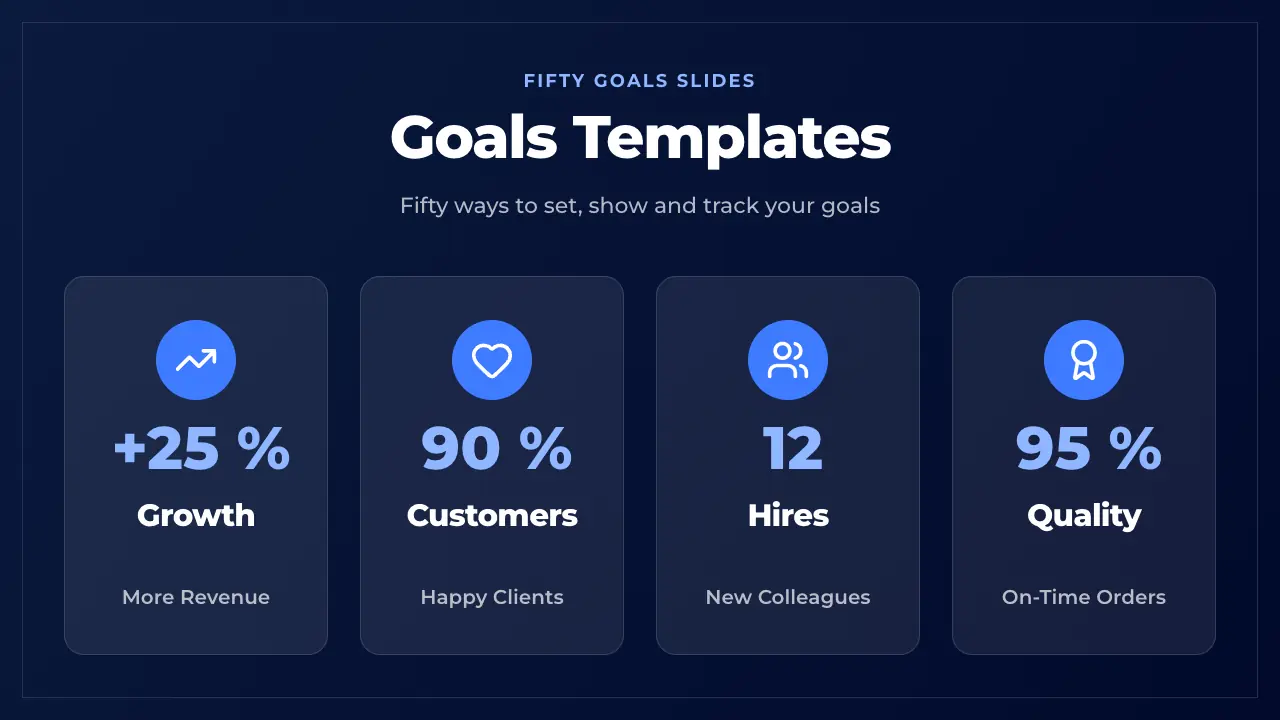
1 · Title Slide With Four Goal CardsA title slide that is a goals slide itself: kicker, headline and lead stand centred over four equal cards, one for each goal. Each card shows an icon, its target figure and the goal with a one-line caption. Use it to open a goals presentation for a year, a team or a whole organisation.
2 · One Goal With Three MeasuresOne goal on the left and the three measures that show progress towards it on the right. Each measure has its target figure and a progress bar with the share reached so far. Use it when a single goal needs a clear set of figures behind it.
3 · SMART Goals Beside A PhotoThe five SMART criteria, each with its letter in a blue tile, a title and one line on what it asks of a goal, beside a photo of a team at work. Use it to explain how good goals are written before a planning round or a workshop.
4 · Goal Pyramid From Vision To TasksA stepped pyramid shows how goals break down: the vision at the top, then strategic goals, annual goals, quarterly targets and the tasks of each week at the base. Beside each level one line says what it holds. Use it to show how daily work connects to the long-term vision.
5 · Targets Against Progress BarsFour goals, each on its own card with the target, a bar for the share reached so far and the per cent at the end. Use it in a monthly or quarterly review to show at a glance how close each goal is to its target.
6 · Four Goal Cards With TargetsFour goals for the year side by side, each on a soft card with an icon, a title, two or three lines on what it means and its target in a dark pill. Use it to present the annual goals of a team or an organisation on one slide.
7 · One Goal On A Full PhotoOne goal stated in large type on a full photo under a navy overlay, with the three figures that define it underneath. Use it to open a strategy talk or a kick-off with the single goal that matters most.
8 · Goal Ladder As Rising StairsFour steps rise from today to the goal, each with its date, a title and the figure it stands for. The top step carries a trophy for the goal itself. Use it to break a large goal into steps a team can reach one after another.
9 · Team Goals In Three ColumnsThree teams, three columns: each with an icon, the team name, its one goal, the target as a large figure and a line on how progress is measured. Use it when every team should see its own goal next to the others.
10 · Three Progress RingsThree rings show the progress of three goals, the share reached as a large per cent in the middle and the goal with its figures under each ring. Use it in a quarterly review to show at a glance how far the year has come.
11 · Development Goals Beside A PhotoThree personal development goals, each with an icon, a short title and two lines on what will be done, beside a calm photo. Use it in a development talk, an appraisal or a personal plan for the year.
12 · Short, Medium And Long-Term BandsThree bands start at the same edge and reach further each time: a short-term goal for next year, a medium-term goal for 2029 and a long-term goal for 2032. Under each band the goal and one line on what it means. Use it to show how near and far goals build on each other.
13 · Goal Cascade To Three TeamsOne goal for the whole company at the top, linked down to the three teams that carry it, each with an icon, its part of the goal and one line on how. Use it to show how a top goal is split between departments.
14 · Goal-Setting Process In Five ChevronsThe five steps of setting a goal in a row of chevrons: define, measure, plan, act and review, each with an icon and a short description, and the rhythm of the review underneath. Use it to explain how goals are set in a team before a planning round.
15 · Big Goal Figure Beside A PhotoOne goal as a very large figure, with a line on what it means and the three measures that lead to it, beside a photo that runs to the edge of the slide. Use it when one number is the goal of the year and everyone should remember it.
16 · Milestones Towards A Flag GoalOne axis runs across the slide with four milestones, each with its quarter, a short title and one line on what is reached, and ends in a flag for the goal itself. Use it to show the way to a yearly goal quarter by quarter.
17 · Minimum, Target And Stretch GaugeOne bar in three zones shows the levels of a goal: the minimum, the target and the stretch, each with its figure, and a pointer marks where we stand today. Three cards below say what each level means. Use it when a goal has a floor and a reach as well as its plan.
18 · Goal Rows With Owners And ProgressFive goals in calm rows, each with its owner in a soft pill, a thin progress bar and the share reached so far. Use it when every goal needs one person who answers for it and the team should see who owns what.
19 · From Today To The Goal In Three ColumnsThree goals in three columns: what we have today on a quiet card, an arrow down, and the goal on a bright card. Large figures make the gap easy to see. Use it to show where a team stands and where it wants to be.
20 · Vision, Mission And Goals In TiersA photo band opens the slide; under it the vision and the mission stand on two cards and three goals in pills below them, read from top to bottom. Use it to show how the goals of a year follow from the vision and the mission.
21 · One Goal With Four ActionsOne goal stands in a large disc on the left; four numbered actions on the right are linked to it by thin lines, each with a title and one line on what is done. Use it to show what a team will do to reach a single goal.
22 · Quarterly Goals On Four CardsFour quarter pills over four cards, the current quarter highlighted. Each card holds the goal of the quarter, two or three lines on it and its target. Use it to plan a year quarter by quarter or to report where the year stands.
23 · Monthly Bars Towards A Target LineSix monthly bars climb towards a target line drawn across the chart; a card beside the chart shows the gap that is still left. Use it to show a team how close a monthly goal is and how much is still missing.
24 · Goals Of Each Role With PortraitsThree round portraits stand on one line, each with a role, the goal that role owns and its target in a pill. Use it to show who carries which goal in a team or a management group, by role rather than by name.
25 · Climb To The SummitA route climbs a mountain from the base camp over two camps to the summit, where a flag marks the goal. Each stop names what is reached there. Use it to show a big goal as a climb with clear stops on the way.
26 · SMART Check Of A Sample GoalA sample goal stands on a card at the top; under it the five SMART letters each answer how the goal meets them. Use it in a workshop to test a draft goal before the team agrees on it.
27 · Three Priorities As Big NumeralsThree goals ranked by priority, each under a large numeral on one line, with a title and two lines on what it means; the first priority is highlighted. Use it when a team has to agree on what comes first.
28 · Three-Year Goals Beside A PhotoThree years stand one under another on a vertical line, each with its year as a large figure, a goal and one line on what it means, beside a photo that runs to the edge of the slide. Use it for a mid-term plan of three years.
29 · Target And Actual Bars By QuarterFour pairs of bars, the target in pale blue and the actual figure in royal blue, compare each quarter with its goal; a card beside the chart gives the result of the year. Use it in a year-end review or a quarterly report.
30 · Anatomy Of A Good GoalOne goal on a card in the centre, written in its five parts; callouts on both sides say what each part is for. Use it to teach a team how to write a goal that can be tracked.
31 · Funnel From Ideas To Three GoalsA funnel of four bands narrows from twenty ideas to three goals, each stage with its count and a line on how the choice was made. Use it to show how a team chose its goals from a long list in a workshop.
32 · Customer Goals Under A Photo BandA photo band runs across the top of the slide; under the headline four cards each hold an icon, a target figure and what it measures. Use it to present the goals a team sets for its customers: satisfaction, speed, reliability and loyalty.
33 · Gauge Of The Annual GoalA half ring fills up to the share of the year's goal reached so far, with the per cent large in its middle; beside it three figures say what is reached, what is still to go and how many months are left. Use it in a quarterly update on one big annual goal.
34 · Six Goals In HexagonsSix goals for the year stand in a row of hexagons, each with an icon, a short title and its target. Use it when a year has several goals of equal weight across growth, customers, people, quality, costs and learning.
35 · Today And Goal Side By SideTwo large cards stand side by side: today on the left, the goal for 2028 on the right, each with the same three figures, and a big arrow between them. Use it to show in one look how far a team wants to go.
36 · Goal With Milestones Beside A PhotoOne goal stated in large type with four milestones under it, two done and two still open, beside a photo that fills the right half of the slide. Use it to show progress towards a single goal that takes more than a year.
37 · Goal Ladder With Five RungsA ladder of five rungs climbs from the tasks of this week to the vision: quarterly targets, the annual goal and the strategic goal lie between. Each rung has its time horizon on the left and a sample on the right. Use it to show how small steps add up to a long-term goal.
38 · One Goal In Four SegmentsOne long bar stands for one goal, split into its four parts; the parts that are done are filled, the one in progress is half filled and the last one is still open. Each part has its title, its status and a line on what it holds. Use it to report progress on a goal that has clear stages.
39 · Five Areas Of Personal GoalsFive areas of personal goals stand in a row: health, learning, career, finance and family, each with an icon in a disc and one goal for the year. Use it for a personal plan, a coaching session or a talk on balance at work.
40 · Countdown To The Goal On A PhotoA large countdown of the days left stands on a photo under a navy overlay, with three figures at the foot: what is reached, what is still to win and what is needed each month. Use it to give a team a sense of urgency in the last months of a goal.
41 · Department Progress Bars To The GoalSix departments, six bars, one goal line: each bar shows how far a department has come towards its goal, with the share at the end of the row. Use it in a management review to compare progress across teams at a glance.
42 · Three Goals Beside A TargetThree goals with their figures stand on the left; on the right a target of rings with a flag at its centre marks the aim they share. Use it to show the main goal of a year and the two goals that support it.
43 · Curved Road To The GoalA road curves up from the start to a trophy at its end; four milestones stand along it, each with a title and a month. Use it to tell the story of a year as a journey towards one goal.
44 · Team Goals Beside A PhotoA photo of a team stands on the left; on the right four team goals each have a progress bar and their share, with the overall progress in a pill at the foot. Use it in a team meeting to look at shared goals together.
45 · Five Years As Large FiguresFive columns divided by thin lines, one for each year from 2027 to 2031, each with the year as a large figure, a short goal and two lines on what it means. Use it for a five-year plan of goals without a timeline axis.
46 · Goals And Non-Goals In Two ColumnsTwo columns set what a team will aim for against what it will leave out on purpose: four goals with ticks on the left and four non-goals with crosses on the right. Use it at the start of a project or a year to keep the focus clear.
47 · Goal Check-In By StatusThree columns sort the goals of the year by their status: on track, at risk and off track, each goal on its own card with one line on where it stands. Use it in a monthly check-in to see at once where help is needed.
48 · Revenue Goal Bars Beside A PhotoBars rise year by year from 2027 to the goal for 2030, which stands as an outlined bar with its figure in blue; a narrow photo of two colleagues at work stands beside the chart. Use it to show a long-term revenue goal and the path to it.
49 · Goals In Three HorizonsThree rings around one centre stand for three horizons: one year, three years and five years; beside them each horizon has its goal and one line on it. Use it to show how near goals sit inside longer ones.
50 · Next Steps Beside A PhotoFour numbered next steps lead from agreeing the goals to the review in June, each with a title and one line, beside a photo of a team. Use it to close a goals presentation with clear actions and dates.
What Is Inside The Pack
Fifty goals slides in many forms: goal cards, SMART tiles, a goal pyramid and a goal ladder, progress bars, rings and a gauge, target-and-actual charts, stairs, a climb to the summit, a curved road, milestones, quarterly goals, three horizons, goals and non-goals, a status check-in and next steps. Thirteen slides carry a photo, and every text, shape and icon stays editable.
How To Use This Goals Template
01
Pick The Slides You Need
Start from the goals template slide that fits your message: slide 2 for one goal with its measures, slide 4 for a pyramid from vision to tasks, slide 18 when every goal needs an owner.
02
Set Your Colours And Fonts
Use the colour and font bar above the slides, or apply your Design Kit, and all 50 slides follow at once.
03
Write Your Own Goals
Replace the sample goals, target figures and deadlines with yours. Keep each goal short and give it one measure and one owner.
04
Download Or Present
Download the slides as PPTX with a free account, edit them one to one in the editor, or present straight from the browser.
Goals Slides For Every Kind Of Goal
Company goals sit on slides such as the cascade on slide 13, where one goal is split between three teams, or the pyramid on slide 4 that links the vision to the work of each week. Personal goals have their own slides: three development goals beside a photo on slide 11 and five areas of life on slide 39.
For progress there are bars against targets on slide 5, three progress rings on slide 10, a gauge of the year's goal on slide 33 and a check-in sorted by status on slide 47. Long-term goals stand on slide 12 with short, medium and long-term bands and on slide 45 with five years as large figures.
How To Write A Goal That Can Be Tracked
A good goal has five parts: what you want to reach, the measure that shows progress, the target figure, one owner and a deadline. Slide 30 takes one goal apart into exactly these parts, and slide 26 tests a sample goal against the five SMART letters.
Keep the number of goals small. Slide 27 ranks three priorities, slide 31 shows how twenty ideas become three goals, and slide 46 sets the goals against what the team leaves out on purpose.
Frequently Asked Questions
Is this goals template free?
Yes. You can view and edit every slide of the goals template for free, and download it as PPTX with a free ExpertSlides account.
Can I use it as a goals PowerPoint template?
Yes. The download is a PowerPoint file in which every text, shape, icon and photo stays editable, so it works as a goals PowerPoint template for any team.
Does the pack include SMART goals slides?
Yes. Slide 3 explains the five SMART letters beside a photo, and slide 26 checks one sample goal against each letter.
How is this different from an OKR template?
This goals template shows a goal with its target figure, measure, owner, deadline and progress. It has no pairs of objectives and key results, so it fits teams that plan with plain goals and targets.
Can I change the colours to my brand?
Yes. Pick colours and fonts in the bar above the slides or apply your own Design Kit, and every slide follows.
Can the AI write my goals slides for me?
Yes. Describe your goals or attach your plan, and Fill With AI builds your own deck in this look with your goals, figures and deadlines.
Which slides show progress towards a goal?
Progress bars on slides 5, 18, 41 and 44, rings on slide 10, a gauge on slide 33, monthly bars towards a target line on slide 23 and target against actual by quarter on slide 29.
Try ExpertSlides AI For Free — The Ultimate AI Presentation Maker
Describe any topic or upload a document, and ExpertSlides designs and writes the whole deck — editable in the browser and as a PowerPoint file.