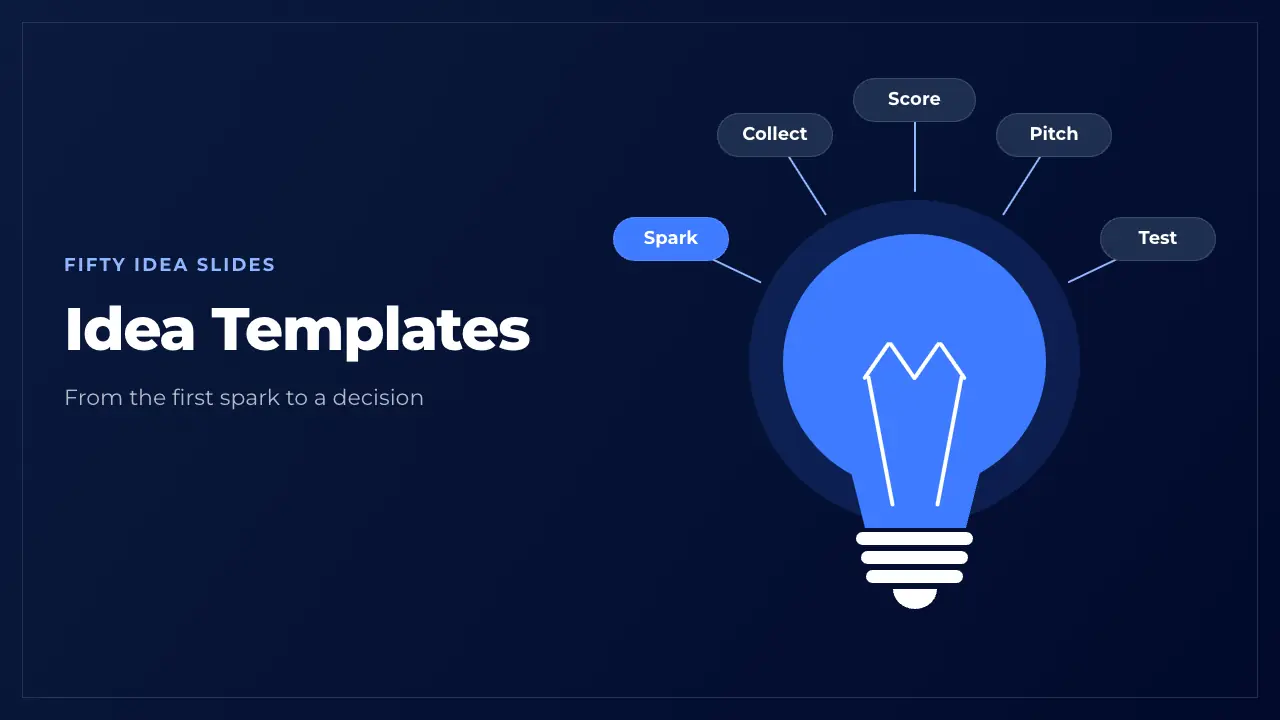
Fifty idea slides in one calm blue look, from a light bulb and a brainstorming board to idea funnels, scoring, pitches and a first test. Change the colours and fonts, fill them with your own content, and download them as PowerPoint.
This idea presentation template follows an idea from the first spark to a clear decision, in 50 complete slides with sample content and round figures you can replace in minutes. Use any slide as an idea template for a workshop, an innovation review or a pitch inside your team.
The forms range from a light bulb drawn from editable shapes, sticky-note boards and mind-style clusters to idea funnels, an impact and effort matrix, score bars, a backlog board, a three-minute pitch and a 14-day test plan, on light, white and navy grounds.
Your Own Idea Deck In This Look
Describe your topic and the AI builds a deck of your own in this blue style, with your ideas, your figures and your words.
Every slide with its words. Open one in the editor to change it 1:1.
1 · Light Bulb Cover With Ideas Around ItThe title slide of the pack: a large light bulb built from editable shapes, with the five steps of an idea around it. Use it to open a workshop, an innovation review or a pitch. Change the five labels to the stages your team uses.
2 · Labelled Light Bulb AnatomyA light bulb with four labelled parts explains what an idea is made of: its spark, its insight, its value and the base that carries it. Use it to introduce a common language before a workshop.
3 · Four Criteria Beside A PhotoFour short tests tell a good idea from a merely interesting one: useful, new, feasible and worthwhile. Use it to agree how ideas will be judged before the first one is presented.
4 · Hub With Six SourcesA mind-style cluster shows the six places ideas come from: customers, team, partners, data, trends and mistakes. Use it to widen the search before a brainstorm, and replace a source with your own.
5 · Sticky Note Brainstorming BoardA board of notes sorted into problems, wishes, ideas and questions, with the ideas column in blue. Use it to show the output of a workshop, or as an empty structure to fill together.
6 · Funnel Chart With Stage NotesA real funnel chart follows a year of ideas through five stages, with a short note on what happens at each. Edit the values in the chart and rename the stages to match your own process.
7 · Impact And Effort MatrixFour fields sort ideas by impact and effort: quick wins, big bets, fill-ins and ideas to drop. Move the chips to place your own ideas and agree what the team does first.
8 · Column Chart With Key FigureA real column chart shows how many ideas were raised each quarter, beside a card with the total for the year. Replace the values with your own count of ideas.
9 · Vertical Agenda Beside A PhotoA vertical line walks twelve people through a 90-minute brainstorm in five blocks, with a photo of a workshop beside it. Change the times to fit the length of your own session.
10 · Donut Chart With Two Key SharesA real donut chart shows where the 120 ideas of the year came from, with the two largest shares called out beside it. Edit the chart data and the two figures together.
11 · Five Chevrons From Spark To DecisionFive chevrons in one row show the path of an idea: spark, shape, score, test and decide, each with an icon and a short caption. Use it as the overview of your idea process.
12 · Two Overlapping Idea CirclesTwo circles overlap and the new idea stands in the middle, with three steps for combining ideas beside them. Use it in a workshop when a group has many small ideas and needs a stronger one.
13 · Three Question Cards On A PhotoThree cards on a full photo give a team the openings that shift a discussion: what if, why not and how might we. Use it to restart a brainstorm that has run dry.
14 · Score Bars With A TotalFive bars rate one idea on impact, feasibility, cost, speed and fit, with a line at the score it must reach and a tile with the total. Resize the bars to your own scores.
15 · Kanban Board Of IdeasA kanban board keeps the idea backlog in four columns: new, shortlisted, testing and done. Move a card to the next column as an idea progresses, and keep the board up to date.
16 · Stepped Road With Six StopsA stepped line climbs across the slide through six stops, from a first thought to a launch. Use it to show how far an idea has come and what the next stop is.
17 · Segmented Pitch Bar With PhotoA bar splits a three-minute pitch into problem, idea, proof and ask, with the seconds for each part and a line on what it must do. Use it to prepare anyone who presents an idea inside a team.
18 · Rising Stairs Of MaturityFive rising steps show the maturity of an idea from a first thought to a launch. Use it to say where an idea stands today and what it needs to reach the next level.
19 · Mind Map Tree With Six BranchesOne topic stands in the middle and branches left and right into six directions, each with a short leaf. Use it to open up a question before choosing where to dig deeper.
20 · Three Figures Under A Photo BandA wide photo band carries the headline, and three large figures below it tell the story of a year of ideas. Use it as the summary slide of an innovation review.
21 · Bulb With Rays To Four SignsA light bulb sends four rays to four signs of a bright idea: it solves a real problem, is simple to explain, is quick to test and excites others. Use it as a checklist before an idea goes further.
22 · One-Page Canvas Of Six FieldsSix joined fields put a whole idea on one page: problem, idea, audience, value, cost and first test. Use it to compare ideas on equal terms before anyone starts to build.
23 · Smooth Line Chart By YearA real line chart shows how the number of ideas grows from 120 in 2027 to a planned 280 in 2031, with three key figures under it. Edit the chart data to show your own years.
24 · Before And After Idea PanelsTwo panels show the same idea twice: once as a vague wish and once as a precise statement with an audience, a measure and a date. Use it to teach a team how to sharpen an idea.
25 · Honeycomb Of Six PromptsSix hexagons interlock into a honeycomb of creative prompts: reverse, combine, remove, enlarge, borrow and simplify. Use it in a workshop whenever the flow of ideas slows down.
26 · Large Statement Beside A PhotoOne large sentence beside a calm photo gives a presentation a pause. Use it to open a workshop or to encourage a team to share ideas that are not finished yet.
27 · Three Diamond Gates On One LineOne line runs from an idea to a first test through three diamond gates: desirable, feasible and viable. Use it to agree the questions an idea must answer before money is spent on it.
28 · Ranked Leaderboard Of IdeasFive ideas stand in order of their score, each with a bar and a figure. Use it after a scoring session to show which ideas go forward and how close the race was.
29 · Gantt Bands Across Four QuartersFive ideas run as bands across the four quarters of a year, each marked with its current stage. Use it to show a leadership team what is in the pipeline and when each idea is due.
30 · Equation Of TilesThree tiles add up to a fourth: problem plus insight plus effort equals an idea worth testing. Use it to explain why a thought alone is not yet an idea.
31 · Speech Bubbles In Story OrderFour speech bubbles tell an idea as a short story: situation, conflict, idea and outcome. Use it when an audience needs to feel the problem before it hears the solution.
32 · Stepped Pyramid With Side NotesFour layers build a pitch from the evidence at the base through value and idea up to the ask. Use it to prepare anyone who has to win support for an idea inside a team.
33 · Round Portraits Of Four RolesFour round portraits stand on one line, each with a role and the question that role will ask. Use it to prepare a pitch by thinking through who has to agree and why.
34 · Question And Answer RowsFour rows set the likely objections against short, calm answers. Use it to prepare for a pitch, or show it when the room raises the same doubts again and again.
35 · One-Page Summary With FiguresOne panel sums up the problem, the idea and the ask, with three key figures for budget, duration and team beside a photo. Use it as the single slide that goes to a decision maker.
36 · Hypothesis Card With Four FieldsOne large card turns a hunch into a testable statement in four fields: what we believe, for whom, what it will result in and how we will know. Use it before any first test.
37 · Fourteen-Day Axis With CardsFour pills on one axis divide a first test into prepare, launch, measure and decide, with a card under each. Use it to plan a small test that gives an answer within two weeks.
38 · Grouped Columns With A ResultA real grouped column chart compares three measures without and with the idea, and a band under it states the main result. Replace the values with the results of your own test.
39 · Decision Fork With Three OutcomesOne test result forks into three decisions: scale it, change it or stop it. Use it to agree before a test what each result will mean, so the decision is quick when the numbers arrive.
40 · Bubble Map Of Six IdeasSix circles show ideas by effort from left to right, each sized by its expected value per year. Resize and move the circles to compare your own ideas at a glance.
41 · Rating Rows With Five LightsFour ideas stand in rows, each rated with up to five lights. Use it for a fast vote in a meeting when a full scoring round would take too long.
42 · Prioritised List With Status PillsSix ideas stand in order of priority, each with the role that owns it and a status pill. Use it in a regular review so that everyone can see what comes next.
43 · Now, Next, Later Beside A PhotoThree columns sort the work into now, next and later, with a quarter and one clear action in each. Use it to give a team a simple roadmap for its ideas.
44 · Four Role Cards Under A PhotoFour cards under a wide photo name the roles of a good workshop: facilitator, timekeeper, note taker and challenger. Use it to hand out the roles before a session starts.
45 · Six Numbered Rules In Two RowsSix large numbers carry the rules of a good brainstorm in two rows. Use it at the start of a session, and leave it on the screen while the group works.
46 · Horizontal Bars Of ReasonsA real horizontal bar chart shows why 80 of the 120 ideas did not pass the first screening, with the two totals beside it. Use it to explain how ideas are filtered, and edit the chart data freely.
47 · Checklist Beside A PhotoSix short checks tell a team whether an idea is ready for a first test: goal, audience, measure, budget, owner and end date. Tick them off together before the test begins.
48 · Growing Circles On One LineFive circles grow along one line, from a seed of a thought to a full launch. Use it to show that an idea earns more time and money at every stage.
49 · Chain Of Bulbs On One WireFive bulbs hang from one wire and show how one idea sets off the next, from a first note to a launch. Use it to encourage a team to share ideas early.
50 · Three Next Steps Beside A PhotoThe closing slide turns the talk into action: write the idea down today, share it this week and test it this month. Use it as the last slide of a workshop or a pitch.
What Is Inside The Pack
Light bulbs built from shapes, brainstorming boards, hubs and mind maps, overlapping circles for combined ideas, funnels, an impact and effort matrix, score bars and leaderboards, backlog boards, a one-page idea canvas, pitch structures, a hypothesis card, a 14-day test plan and a decision fork. Charts stay real charts you edit by their data, and every shape, text and colour stays editable.
How To Use This Idea Template
01
Pick A Form
Choose the idea presentation template slide that fits your point: a board for a workshop, a matrix for priorities, a pitch bar for a short talk.
02
Set Your Colours
Use the colour and font bar to match your brand; every slide follows at once.
03
Write Your Ideas
Replace the sample ideas, scores and figures with your own, and remove the notes or cards you do not need.
04
Present Or Download
Present straight from the browser or download the slides as a PPTX file for PowerPoint.
Which Idea Slide To Choose
To collect ideas, use a brainstorming board, a hub of sources or a mind map. To narrow them down, use a funnel, the impact and effort matrix, score bars or a ranked leaderboard.
To win support, use the one-page canvas, the three-minute pitch or the answers to hard questions. To move on, use the hypothesis card, the 14-day test plan and the fork that ends in scale, change or stop.
Tips For Presenting An Idea
Start with the problem rather than the solution, and say the idea in one plain sentence. People support an idea more readily when they can repeat it to someone else.
Bring one piece of evidence, name what you need and by when, and propose a small first test. A short test with a clear measure is easier to approve than a full launch.
Frequently Asked Questions
Is this idea template free?
Yes. You can view and edit every slide of this idea presentation template for free, and download the deck as PPTX with a free account.
Can I use it in PowerPoint?
Yes. Download the idea presentation template as a PPTX file and open it in PowerPoint; the shapes, icons, texts and charts stay editable there.
Which topics suit these slides?
Anything that starts with a new thought: product ideas, process improvements, innovation programmes, workshops, internal pitches and team suggestions. The sample content is general, so it fits any field.
Can I edit the light bulb?
Yes. Each bulb is built from separate shapes, so you can recolour, move, resize or delete its glass, thread and filament like any other shape.
Are the charts real charts?
Yes. The funnel, column, donut, line and bar charts are real charts: change their data and the figures and shapes follow.
Can I change the colours and fonts?
Yes. The colour and font bar changes every slide of the pack at once, and you can still adjust single shapes in the editor.
Can the AI build a deck from my idea?
Yes. Fill With AI takes your topic and builds a new deck of your own in this look, with your ideas, figures and words.
Try ExpertSlides AI For Free — The Ultimate AI Presentation Maker
Describe any topic or upload a document, and ExpertSlides designs and writes the whole deck — editable in the browser and as a PowerPoint file.