Numbers Template: 50 Editable Numbered Slides For PowerPoint
Fifty slides in one blue look whose design is made of large numerals: numbered steps, lists of rules and tips, one giant key figure, rows of figures, rankings, countdowns, scores and ratios. Change the colours and fonts of all of them at once, let the AI build your own deck in this look, download them as PowerPoint or edit each slide in the editor.
This numbers template pack holds 50 slides, and on every one of them the numbers are the design: numbered steps from 01 to 08, a list of rules with large numerals, one key figure of 98 % filling the slide, four key figures in a row, a top-five ranking with bars, a countdown from five to one, three score rings, a podium of the top three and a project at step 3 of 6. All of them share one blue look on light, white and navy grounds, so any five of them sit in one deck without looking borrowed.
Most numbered slides are a plain list with a digit in front of each line. Here every slide is a finished infographic, written out with neutral sample content any team can use — the steps of a project, the rules of a meeting, the results of a survey, the goals of a year — with roles instead of names and round sample figures. You see how many items and words each form carries before you choose it, and the numerals stay large enough to be read from the back of the room.
A free account downloads the slides as a PPTX file whose texts and shapes stay editable in PowerPoint. You can also stay in the browser: pick your colours and fonts in the bar above the slides, describe your topic and let the AI build your own deck in this look, or open the slides one to one in the editor.
Your Numbers In This Look
Describe your steps, your key figures or your results, or attach the report you already have. ExpertSlides builds your own deck in this look in a few minutes, with your numbers and your words.
Every slide is a complete numbered slide with neutral sample content — general steps, short titles, roles instead of names and round figures — that fits any team. Replace its words and figures with yours.
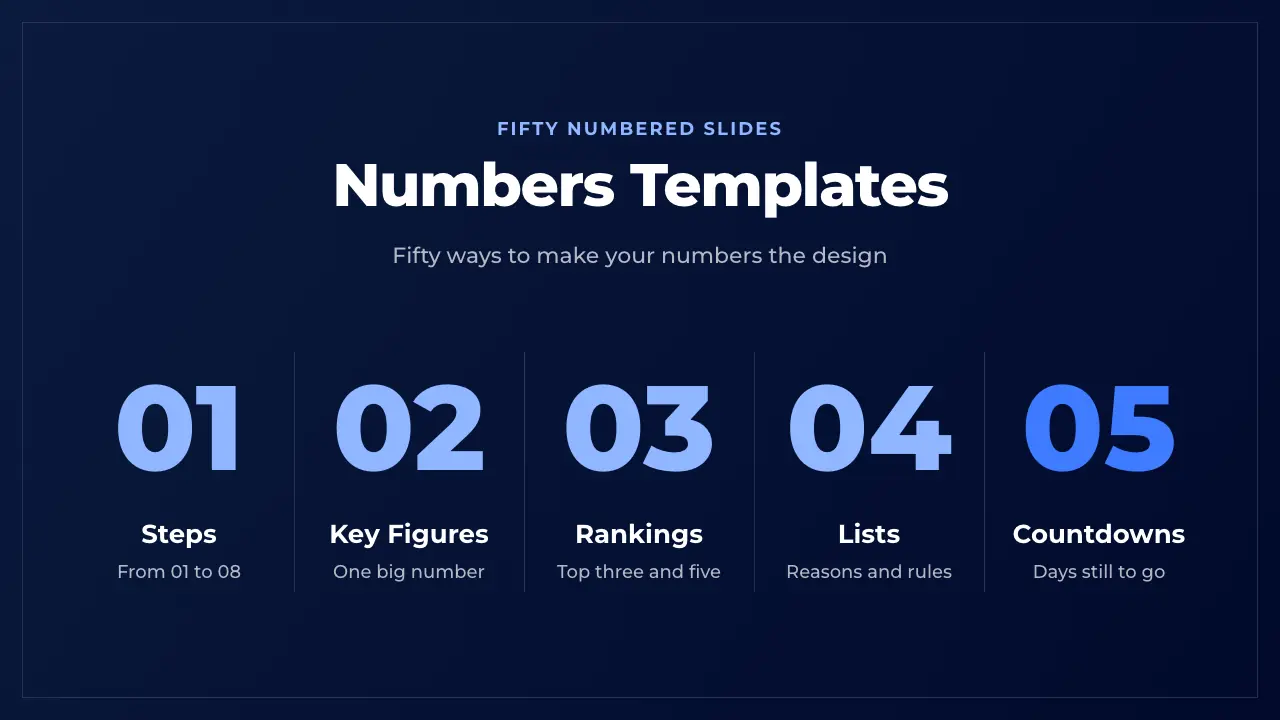
1 · Five Numerals Title SlideThe opening slide of the pack: five large numerals in five calm columns, each naming a kind of numbered slide. Use it as the cover of a report or a talk that is built around figures, and rename the five columns to the parts of your own deck.
2 · Four Numbered CardsFour equal cards, each opened by a large numeral, a short blue rule, a title and a short text. Use it for any four steps, reasons or rules where the order matters; replace the titles and texts with your own and keep them short.
3 · Numbered List Beside A PhotoA photo on the left and a numbered list of four points on the right, each with a large blue numeral, a title and one line of text. Use it for tips, rules or reasons that need a human face; swap the photo for one of your own team.
4 · One Giant Key FigureOne very large figure carries the slide, with one line that says what it means and three smaller figures under a hairline that back it up. Use it when one number tells the story: a satisfaction score, a market share, a growth rate.
5 · Eight Numbered Steps In Two RowsEight steps in two even rows, each a large numeral, a one-word title and a short caption, the rows divided by a hairline. Use it for a longer process that still has to be read at a glance; the first row in royal blue, the second in a deeper tone.
6 · Top Five Ranking With BarsA ranking of five items, each with a large rank numeral, a title, a bar and its per cent figure. Use it for survey answers, best sellers or priorities; the bars are drawn to scale, so set their length to your own values.
7 · Countdown On A Full PhotoA countdown of five large numerals over a full photo, each with a short label and a caption for what happens that day. Use it for the last days before a launch, an event or a deadline; the last numeral is set in the highlight.
8 · Three Huge NumeralsThree very large numerals carry three short rules, each with a title and a two-line text. Use it for principles, values or rules that a team should remember; the middle numeral is set in navy for rhythm.
9 · Row Of Four Key FiguresFour key figures side by side, divided by hairlines, each with a short title and a two-line caption, and a quiet band for the source. Use it for an annual review, a company profile or the first slide of a report.
10 · Numbered Tips Beside A Key FigureA numbered list of six short tips on the left and one key figure on a card on the right that says why they matter. Use it for best practices, guidelines or a checklist with one fact that backs it up.
11 · Key Figure Beside A PhotoOne large figure with its meaning and three numbered points on the left, a photo running to the slide edge on the right. Use it to introduce a team, a site or a customer base with one number and three facts.
12 · Numbered Rising StairsFive blocks rise from left to right like a staircase, each with a large numeral, a title and a caption standing on its step. Use it for levels, stages of growth or a maturity model where every step builds on the one before.
13 · Six Numbered HexagonsSix hexagons in one row, each with a large white numeral, a one-word title and a short caption, and a quiet band that ties them together. Use it for the building blocks, pillars or ingredients of a plan.
14 · Numbered ChevronsFive arrow shapes in one row, each carrying a large numeral, with a title and a short text under each. Use it for a process that moves forward stage by stage; the arrows darken from the first stage to the last.
15 · Photo Band Over Three NumbersA wide photo across the slide and three numbered steps under it, each with a large numeral, a title and a two-line text. Use it for onboarding, a customer journey or any short process that deserves a picture.
16 · Three Score RingsThree rings show how far three goals are reached, each with its per cent figure in the middle, a title and one line of detail. Use it for targets, completion rates or survey scores; set the arc of each ring to your own value.
17 · Numbered AgendaAn agenda of seven numbered items, each with a title, a short note and its start time, the current item marked by a pale band. Use it at the start of a meeting or a workshop and move the band as the day goes on.
18 · Before And After FiguresTwo cards set a figure before and after a change side by side, joined by an arrow, with the gain in one line under them. Use it to show the effect of a new process, a campaign or an investment.
19 · Round Photo With Three FiguresA round photo on the left and three key figures on the right, each with a title and one line of detail, divided by hairlines. Use it for customer facts, a market profile or the results of a survey.
20 · Top Three PodiumA podium of three blocks with the large numerals 1, 2 and 3, an icon and a title over each block and the votes under it. Use it for the winners of a vote, the best sellers or the three strongest results.
21 · Numbered Tabs As A StaircaseFive numbered tabs stacked one under the other, each band a little longer than the one above, with a title and one line of text. Use it for habits, principles or steps that build on each other.
22 · A Big Ten And Ten RulesOne large numeral names the count, and ten short numbered rules stand beside it in two calm columns. Use it for rules, tips or a checklist of ten points that should be read in one look.
23 · Key Figures On A Full PhotoThree large figures over a full photo under a navy overlay, each with a title and one line of detail. Use it as a strong opener for a company profile or a sales deck, with a photo of your own market.
24 · Numbered Discs With ArrowsFour large discs with numerals, joined by arrows, each with a title and a two-line text under it. Use it for a simple process of three to five steps that runs from left to right.
25 · Growing Figures On CardsThree cards, one per year, each with a large figure, a slim bar that grows towards the goal and a short note. Use it for growth over three periods: users, customers, revenue or team size.
26 · Numbered QuestionsFive questions in numbered rows, each with a light numeral, the question in bold and a short hint on the right. Use it for a briefing, a kick-off or a checklist of questions a team should answer together.
27 · Countdown Beside A PhotoA countdown in three large numerals on the left, each with a title and a two-line task, and a photo of the venue on the right. Use it for the last weeks before an event, a launch or a move.
28 · Cascade Of Numbered DiamondsFour numbered diamonds step down and to the right like a cascade, each with a title and one line of text. Use it for a short sequence where each step follows from the one before, such as a decision or an approval.
29 · One Giant NumeralOne very large numeral fills the left third and names the count; three takeaways with check marks stand beside it. Use it to close a talk or a chapter with the points the audience should keep.
30 · A Ratio Told With IconsA ratio set as one large figure and shown again as four tiles, one of them in the highlight, with a note on the trend. Use it for shares that are easier to grasp as one in four than as 25 per cent.
31 · Numbered Photo CardsThree cards side by side, each with a photo at the top, a round number badge, a title and two lines of text. Use it for services, offers or ways of working that are easier to grasp with a picture.
32 · Vertical Numbered Path With FigureFive numbered discs on a vertical line lead from the first contact to the signed deal, and a card beside them holds the one figure that sums them up. Use it for a sales process, an approval path or any short sequence with one result.
33 · Per Cent Figures In DiscsFour results of a survey, each a per cent figure in a pale disc with a short title and a two-line caption. Use it for survey results, ratings or shares that belong together.
34 · Six Numbered Icon TilesSix tiles in one row, each with a small numeral over it, a white icon, a one-word title and a short caption, and one shared note under the row. Use it for services, features or departments.
35 · Top Five Beside A PhotoA full-height photo on the left and a ranking of five on the right, each row with a large rank numeral, a name and its share. Use it for the top markets, products or channels of a business.
36 · Step 3 Of 6 ProgressA large line names the step the project is at, and six numbered squares show in their colour which steps are done, which one runs now and which come next. Use it for a status update in any project with a fixed number of stages.
37 · Split Key Figure With DriversOne large figure fills the left half with its change and a short note; a card on the right lists the three numbered drivers behind it. Use it to explain a result: revenue, savings, growth or reach.
38 · Tall Numbered ColumnsFour tall cards, each with a blue band holding a large numeral, a short title and a three-line text. Use it for principles, values or promises that carry equal weight.
39 · Stacked Figures Beside A PhotoThree figures stacked on the left, each with one line that says what it counts, and a photo of the moment on the right. Use it to report on a workshop, an event or a campaign in three numbers.
40 · Seven-Day CountdownSeven tall day cards count down from 7 to 1: the days behind are faint, today is set in the highlight and the days ahead stand ready. Use it in the last week before an opening, a launch or a deadline.
41 · Three Growing ArrowsThree upward arrows, each taller than the one before, carry the numerals 1, 2 and 3, with a title and a short text under each. Use it for growth, improvement or levels that build on each other.
42 · Numbered Tiles Above And BelowSix numbered tiles sit on one line, and their titles and texts alternate above and below it so that each has room. Use it for a process of five to eight steps that would be too tight in one row.
43 · Time Figures On A PhotoThree large figures for hours, days and days of the year stand over a full photo under a navy overlay. Use it for service promises, opening hours or anything that runs around the clock.
44 · Columns Under Pale NumeralsFour columns divided by hairlines, each under a large pale numeral, with a title and a short text. Use it for pillars, principles or parts of a system when the numerals should set the rhythm without shouting.
45 · Two Figures ComparedTwo large figures face each other across a hairline, each with a title and a two-line text. Use it to show the two main effects of a change, or two results that belong together.
46 · Eight Numbered CardsEight faint cards in two even rows, each with a large numeral and a one-word title. Use it for principles, values or rules that are best named in one word each; add a line of text in each card where you need it.
47 · Ringed Numerals Beside A PhotoThree steps on the left, each with its numeral in a thin ring, a title and a two-line text, and a calm photo on the right. Use it for tips, habits or a short routine that people can follow at once.
48 · Gauge Over One FigureA half ring fills to three quarters around one large figure, and three numbered notes under it show what each quarter added. Use it for the progress towards a yearly goal, a budget or a target.
49 · A Year As Key FigureA year set as one large figure on the left, and five numbered goals with their target figures on the right. Use it for the goals of a strategy, a budget year or a long-term plan.
50 · Five Takeaways Beside A PhotoA closing slide with a photo running to the edge on the left and five numbered takeaways on the right, one line each. Use it as the last slide of a talk, a training or a report.
Fifty Forms Of Numbered Slides In One Blue Look
A title slide that is made of numerals itself, with five large numbers from 01 to 05; four numbered cards, eight steps in two rows, three huge numerals, numbered chevrons, six numbered hexagons, rising stairs, numbered discs joined by arrows, a cascade of diamonds, growing arrows, tiles above and below one line, tall numbered columns, columns under pale numerals and eight numbered cards for steps and principles; a numbered agenda, five numbered tabs, five questions, ten rules beside a large ten and three takeaways beside a giant three for lists; one giant key figure, a row of four key figures, a split key figure with its drivers, before and after, two figures compared, three score rings, four per cent discs, a gauge over one figure, a ratio of one in four told with icons, growing figures on cards and a year as a key figure for results; a top-five ranking with bars, a top-three podium and step 3 of 6 for rankings and status; a countdown on a full photo, three weeks to an event and a seven-day countdown for the days still to go; and numbered slides beside a tall photo, on a full photo, under a photo band, beside a round photo, in three photo cards and beside a photo running to the slide's edge. Seventeen slides stand on navy, seventeen on light blue and sixteen on white, thirteen of them with a photo.
How To Use This Numbers Template
01
Pick Your Numbered Slides
Look through the 50 slides of the numbers template and note the forms that fit your message: numbered steps for a process, one giant figure for a result, a ranking for a vote, a countdown for a date. Most decks need three to five of them.
02
Set Colours And Fonts
Choose your colours and your font in the bar above the slides. The whole pack changes at once, so you see your brand on every form before you download anything.
03
Put In Your Numbers
Press Fill With AI and describe your topic, or press Edit Slides and replace the sample steps, figures and words by hand, slide by slide, in the editor.
04
Download Or Present
Download the slides as a PPTX file with a free account and copy them into your own PowerPoint deck, or present them straight from the browser.
Which Numbered Slide Fits Which Job
A process wants its order. Four numbered cards (slide 2) give each step room for a short text and a week, the numbered chevrons (14) move from left to right, and the eight steps in two rows (5) carry a longer project without crowding. When the steps build on each other, take the rising stairs (12) or the growing arrows (41); when one step follows from the last, the cascade of diamonds (28).
A result wants one figure. The giant key figure (4) lets 98 % fill the slide with three smaller figures under it, the split key figure (37) sets the figure beside the three drivers behind it, and before and after (18) shows the change in two cards. For progress towards a goal, the three score rings (16), the gauge (48) and step 3 of 6 (36) say at once how far the work has come.
A list wants its count. Ten rules beside a large ten (22) name the number before the reader starts, five questions (26) set a light numeral before each question, and three takeaways beside a giant three (29) close a talk with the points to keep. For an order of the day, the numbered agenda (17) marks the item that runs now.
A ranking wants its places. The top-five ranking with bars (6) draws each value to scale, the top-three podium (20) puts the winner in the middle, and the top markets beside a photo (35) give each place its share. For the last days before a date, the countdown on a full photo (7) and the seven-day countdown (40) count down to the day itself.
How To Write Numbers That Read At A Glance
Keep one figure per idea and round it: 1,500 customers reads faster than 1,487, and 40 % faster than 39.6 %. Say what the figure counts in one short line under it, in plain words, and leave the source for a quiet note at the foot of the slide, as the year in numbers (9) does.
Give the numerals the size and let the words stay short. A title of one to three words under a large numeral is read in a second; a sentence beside it is read only when someone wants to. Use the same kind of number on one slide — all per cent, all counts or all steps — so the eye can compare them without thinking.
Questions About The Numbers Template
What is a numbers template?
A numbers template is a set of slides whose design is built on large numerals: numbered steps, numbered lists, key figures, rankings and countdowns. This pack holds 50 of them in one blue look, each a different form with neutral sample content you replace with your own.
Is this numbers template free?
Yes. You can look at every slide, change its colours and fonts and edit it in the browser for free. Downloading the slides as a PowerPoint file needs a free account.
Can I use the slides in PowerPoint?
Yes. The download is a PPTX file whose texts, numerals and shapes stay editable, so you can change every figure and word in PowerPoint and copy single slides into your own deck.
What does Fill With AI do?
You describe your topic or attach a document, and ExpertSlides builds your own deck in the look of this pack, with your steps, your figures and your words. It does not simply fill in the 50 sample slides.
How many items fit on one numbered slide?
Most forms carry three to six items, a few carry eight, and the ten rules slide carries ten short ones. When you have more, split them over two slides or choose a form with shorter titles, so the numerals stay large.
Can I change the colours of the numbers template?
Yes. Pick your colours and your font in the bar above the slides and all 50 slides of the numbers template change at once. With a Design Kit, your brand colours, fonts and logo are applied for you.
Which slide should I use for one important figure?
Take the giant key figure (slide 4) when one number tells the story, the split key figure (slide 37) when you also want to show what drove it, and the gauge (slide 48) when the figure is a share of a goal.
Try ExpertSlides AI For Free — The Ultimate AI Presentation Maker
Describe any topic or upload a document, and ExpertSlides designs and writes the whole deck — editable in the browser and as a PowerPoint file.