Fifty objectives slides in one calm blue look, from the anatomy of a single sentence to SMART letters, cascades, priority matrices and mid-year reviews. Every slide is neutral, so your own objectives, owners, measures and dates drop straight in.
This objectives template shows what a piece of work must achieve, in 50 slides that fit a project, a meeting, a training course, a presentation or a whole department. Each objective is written as one clear statement with an owner, a measure and a date, so nobody has to guess what done looks like.
The pack begins with how to write an objective and how it differs from an aim and a task. It then follows objectives through the year: primary and secondary ones, the cascade from organisation to team to person, prioritising by impact, quarterly reviews and learning objectives by level. All figures are round samples that you replace with your own.
Your Own Objectives, Built By AI
Describe your project, course or team, or attach your plan, and the AI builds your own deck in this blue look.
Every slide with its words. Open any of them in the editor and change the objectives, owners, measures and dates to your own.
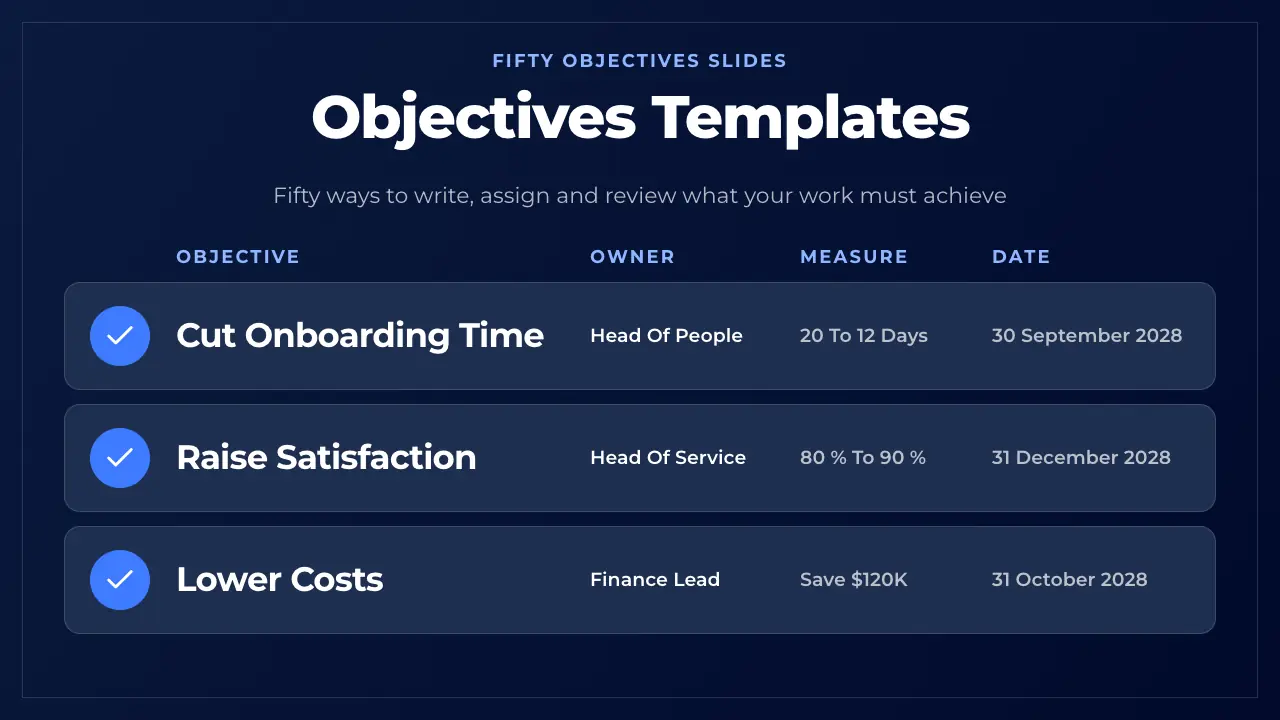
1 · Checklist Of Objective StatementsThe opening slide of the pack: its title above a checklist of three objective statements. Each statement names its owner, its measure and its date. Use it to open a planning session or replace the three lines with your own objectives.
2 · Annotated Objective SentenceOne objective sentence laid out as four coloured chips, each joined to a note that explains its part. Use it to teach a team how an objective is built, then swap in a sentence of your own.
3 · Nested Aim, Objective And TaskThree frames sit inside one another: the aim holds the objective, and the objective holds the task. Lines lead to a short definition of each. Use it to settle what your team means by the three words.
4 · SMART Letters Across The SlideThe five letters of SMART stand large across the slide, each with its word and one short line. A sample objective runs along the foot. Use it to brief a team before they write their own objectives.
5 · Equation Of An ObjectiveFour pills joined by plus signs add up to one objective, and a worked example sits under each pill. Use it as a writing aid in a workshop, and replace the example with one of your own.
6 · Vague Wishes Rewritten As ObjectivesThree vague wishes stand on the left and the clear objectives they become stand on the right. Use it in a workshop to show the difference a measure and a date make, then rewrite your own wishes the same way.
7 · Project Objective Beside A PhotoOne project objective stands over its three key figures: time, people and budget. A photo fills the right side. Use it at a kick-off so everyone hears the same objective.
8 · Sixty-Minute Meeting BarOne bar stands for a 60-minute meeting of 8 people, divided into parts as long as their minutes. Under each part stands the outcome it must deliver. Use it to agree what a meeting is for before you send the invitation.
9 · Course Outcomes Beside A PhotoA photo of a training session stands beside the four things a learner can do after the course. A key figure closes the list. Use it at the start of a course so learners know what they will take away.
10 · Know, Feel, Do RingsThree large rings name what an audience should know, feel and do after a presentation, and a band below turns them into one objective. Use it when preparing a talk, before a single slide is written.
11 · Four Department Objective CardsFour cards give four departments one objective each, with its measure and its date. Use it to show the whole organisation what each department has signed up to.
12 · Primary Card With Two SecondaryOne large card holds the primary objective and two smaller cards hold the secondary ones. The difference in size says what comes first. Use it when a piece of work has one result that must not be missed.
13 · Objectives Cascade TreeOne objective of the organisation branches into the objectives of three departments, joined by thin lines. Use it to show how each department contributes to the same result.
14 · Staircase From Organisation To PersonFour bands step down and to the right, from the organisation to one person. Each level restates the same objective in the terms of the people at that level. Use it to show what an objective means for each person.
15 · One Objective With Three SpokesA hexagon in the middle holds the objective and three spokes lead to what it cannot do without: one owner, one measure and one date. Use it as a simple rule for every objective you write.
16 · Objective Card With Owner PortraitA single card holds everything about one objective: the owner in a round portrait, the measure, the date and the progress so far. Use one card for each objective and keep them in the review pack.
17 · Impact And Effort Priority MatrixFour fields sort objectives by impact and effort, and five numbered dots show where each one lands. The list beside the matrix names them. Use it to decide what comes first when everything feels urgent.
18 · Ranked Objectives Bar ChartA horizontal bar chart ranks five objectives by the weight each carries. A card beside it names the heaviest. Edit the chart with your own weights to show what matters most this year.
19 · Pie Chart Of The Year's EffortA pie chart shows how the year's effort is shared across five objectives. Beside it stand the two largest shares. Edit the slices to match how your team really spends its time.
20 · Five Progress Bars At Mid-YearFive bars show how far each objective has come at the mid-year review, with the figure behind each one. Use it as the core slide of a progress review and update the bars each quarter.
21 · Quarter Chevrons Over A PhotoFour chevrons carry the year from setting objectives to closing them, one for each quarter, above a wide photo of a team at work. Use it to agree the rhythm of your reviews at the start of the year.
22 · Three Status LanesThree lanes sort the five objectives by status, each with its progress so far. Use it at a review to show at a glance where help is needed, and move the tags as the status changes.
23 · Line Chart Of Actual Against PlanA line chart follows one objective month by month against its plan, with the gap in a card beside it. Replace the figures with your own measure to show whether an objective is keeping pace.
24 · Monthly Savings Column ChartA column chart shows what one objective has delivered each month, and a card adds it up against the full objective. Use it for any objective that builds up over time.
25 · Staircase Of Four StepsA staircase of four steps breaks one objective into stages, each with the figure it should reach. Use it when an objective is too large to be reached in one move.
26 · One Statement On A Full PhotoOne objective stands in large type on a full photo under a navy overlay, with its owner, measure and date beneath it. Use it when the whole room should remember one sentence.
27 · Stepped Pyramid Of Learning LevelsSix stacked bars form a pyramid of learning, from recalling facts at the base to creating something new at the top. A line beside each level says what a learner does there. Use it to set learning objectives at the right level.
28 · Rising Columns Of VerbsSix columns rise from remembering to creating, each with verbs that fit its level. Use it when writing a course: choose the level first, then begin the learning objective with one of its verbs.
29 · Before And After With Round PhotoTwo panels compare what a learner can do before and after a course, with a round photo between them. Use it to make the value of a course visible in one look.
30 · Aim And Objective On One SpineA central spine carries four questions, with the answer for an aim on the left and the answer for an objective on the right. Use it to end the confusion between the two words.
31 · Yes Or No Test Beside A PhotoFive questions test any objective before it is agreed, each with a yes and a no to mark. A photo closes the slide on the right. Use it in a review: an objective with one no goes back to its owner.
32 · Honeycomb Of Five AreasFive hexagons interlock in a band, one for each area of the work, with an icon and the figure it must reach. Use it to show the full set of objectives as one connected whole.
33 · Three Discs Sized By WeightThree large circles hold the three primary objectives, each with its figure and date and each sized by the weight it carries. Use it to state the few objectives that matter most.
34 · Vertical Line Of Due DatesA vertical line runs through the five due dates of the year, each with its objective and its owner. Use it to see which objective falls due next and who answers for it.
35 · Five Owners In Round PortraitsFive round portraits show the five roles that own the objectives, each with the result it answers for. Use it to make clear that every objective has one person behind it.
36 · Tall Gauge Of Average ProgressA tall gauge fills to the average progress of all objectives, with a scale beside it and the count by status on the right. Use it as the one number of a progress review.
37 · Funnel From Ideas To ObjectivesA funnel narrows a long list of ideas to the few objectives a team can really carry. Use it to show that the objectives were chosen, and what was left out on purpose.
38 · Dot Ratings Of A Draft ObjectiveOne draft objective is scored on four criteria, each with a column of five dots, and the total stands in a band below. Use it to compare drafts before a team commits to one.
39 · Photo With Four Key FiguresA tall photo stands beside four key figures that sum up the objectives of the year at mid-year. Use it as a one-look summary for a leadership meeting.
40 · Five Chevrons To Write OneFive chevrons lead through the writing of an objective, from naming the result to checking it. A line under each says what to do. Use it as a guide in a workshop.
41 · Five Mistakes In A Photo GridFive cards name the common mistakes in objectives, each marked with a cross and followed by its fix. A photo takes the sixth place in the grid. Use it before a team writes its objectives.
42 · Tasks Linked To ObjectivesThin lines tie six tasks to the three objectives they serve. A task with no line to an objective is a question worth asking. Use it to check that the work and the objectives belong together.
43 · Stacked Chart By Four TeamsA stacked chart shows how four teams add up to one objective, month by month, under a row of each team's total. Use it when one objective is shared across several teams.
44 · Ruler From Baseline To ObjectiveA ruler runs from 70 % to 100 % with three marks: where we began, where we stand and where we must arrive. Use it for any objective with a single measure.
45 · Photo Band With Review AgendaA wide photo opens the slide and three questions below it set the agenda of any objectives review. Use it to keep a review short and on the point.
46 · Four Questions In Speech BubblesFour speech bubbles, staggered in two rows, hold the questions a team should ask before it agrees an objective. Use it to open a planning workshop and let the room answer each one.
47 · Round Photo With Personal ObjectivesA large round photo stands beside three personal objectives, each with a measure and a date, joined to it by an arc of markers. Use it in a personal development talk or an annual review.
48 · Zigzag From Objective To ActionFive numbered points run along a zigzag line from agreeing an objective to reviewing it, with each label on its own side of the line. Use it to show the path from a decision to the work.
49 · Twelve Month Calendar Of ObjectivesTwelve tiles show the year 2028, with the mid-year review and the five due dates marked. Use it to plan when each objective falls due and when you look at them together.
50 · Three Next Steps Beside A PhotoThe closing slide names the three next steps that turn a draft into agreed objectives, beside a photo of a team. Use it to end a planning session with clear actions.
What Is Inside The Pack
Fifty objectives slides in many forms: an annotated sentence, nested frames, SMART letters, a writing formula, a cascade tree, a priority matrix, ranked bars, progress bars, a tall gauge, a funnel, a ruler scale, a pyramid of learning levels, a task map, speech bubbles and a calendar of due dates. Thirteen slides carry a photo, six hold real charts you edit by their data, and the texts, shapes and icons stay editable.
How To Use This Objectives Template
01
Start With One Sentence
Use the objectives template's anatomy on slide 2 and the formula on slide 5 to write each objective as a verb, a result, a measure and a date.
02
Test It Before You Agree It
Hold each draft against the SMART letters on slide 4 and the five yes or no questions on slide 31. A single no sends it back for another draft.
03
Give It An Owner And A Place
Name one owner for each objective on slide 35, rank them by impact on slide 17 and show how they cascade to teams on slide 13.
04
Review It Every Quarter
Update the progress bars on slide 20 and the status lanes on slide 22 at each review, then close with the next steps on slide 50.
What Makes A Good Objective
A good objective says what will be different when the work is finished. It starts with a verb, names one result, gives a figure that proves it and ends on a date. Cut onboarding time from 20 to 12 days by 30 September is an objective. Improve onboarding is only a wish, and slide 6 shows the difference side by side.
One owner matters as much as the wording. When an objective belongs to everyone, nobody answers for it, so each sample in this pack names a single role and keeps the number of objectives small enough to review.
Objectives For Projects, Courses And Teams
The same structure works at every scale. Slide 7 frames the objective of a project with its time, people and budget, slide 8 divides a 60-minute meeting by what each part must deliver, and slide 10 sets what an audience should know, feel and do after a presentation.
For training, slides 9, 27 and 28 turn a course into learning objectives by level, from remembering a fact to creating something new, with verbs that fit each level. For a department, slides 11 and 14 carry one objective from the organisation down to a single person.
Objectives Template FAQ
What Is An Objectives Template?
An objectives template is a set of ready slides for stating what a piece of work must achieve, with an owner, a measure and a date for each objective. This one holds 50 slides in many forms, from a single statement to a full review.
Is This Objectives Template Free?
Yes. You can view all 50 slides here, edit them in the editor and download this objectives template as a PPTX file with a free account.
What Is The Difference Between An Aim And An Objective?
An aim gives the direction and can stay broad. An objective is a specific result with a figure and a date, and a task is the work that delivers it. Slides 3 and 30 show the three side by side.
How Do I Write A SMART Objective?
Make it specific, measurable, achievable, relevant and time-bound. Slide 4 explains each letter with a sample, and slide 5 gives a simple formula: a verb, a result, a measure and a date.
How Many Objectives Should A Team Have?
Few enough that each one gets real attention. The sample year in this pack uses five, three primary and two secondary, and slide 17 helps you decide what comes first.
Can I Use These Slides For Learning Objectives?
Yes. Slide 27 sets out six levels of learning, slide 28 gives verbs for each level, and slide 29 compares what a learner can do before and after a course.
Can The AI Build My Own Deck In This Look?
Yes. Describe your objectives or attach a brief, and Fill With AI builds your own deck in this blue look, in the colours and fonts you choose.
Try ExpertSlides AI For Free — The Ultimate AI Presentation Maker
Describe any topic or upload a document, and ExpertSlides designs and writes the whole deck — editable in the browser and as a PowerPoint file.