Fifty pyramid slides in one calm blue look, from a classic five-level pyramid to inverted, 3D and stepped forms. Change the colours and fonts, fill them with your own content, and download them as PowerPoint.
This pyramid template pack gives you 50 slides that show what builds on what: a strategy from purpose to actions, a hierarchy of needs, data to wisdom, an organisation's levels, a customer base or a learning path. Every slide is a complete pyramid with sample content you can replace in minutes.
Use it as a pyramid PowerPoint template or edit it right here. The forms range from nested triangles with side notes and icons to inverted pyramids, half pyramids, ziggurats of solid steps, a honeycomb of hexagons, a population pyramid and a 3D pyramid drawn in light and shade, on navy, light and white grounds.
Your Own Pyramid In This Look
Describe your topic and the AI builds a deck of your own in this blue pyramid style, with your levels, your figures and your words.
Every slide with its words. Open one in the editor to change it 1:1.
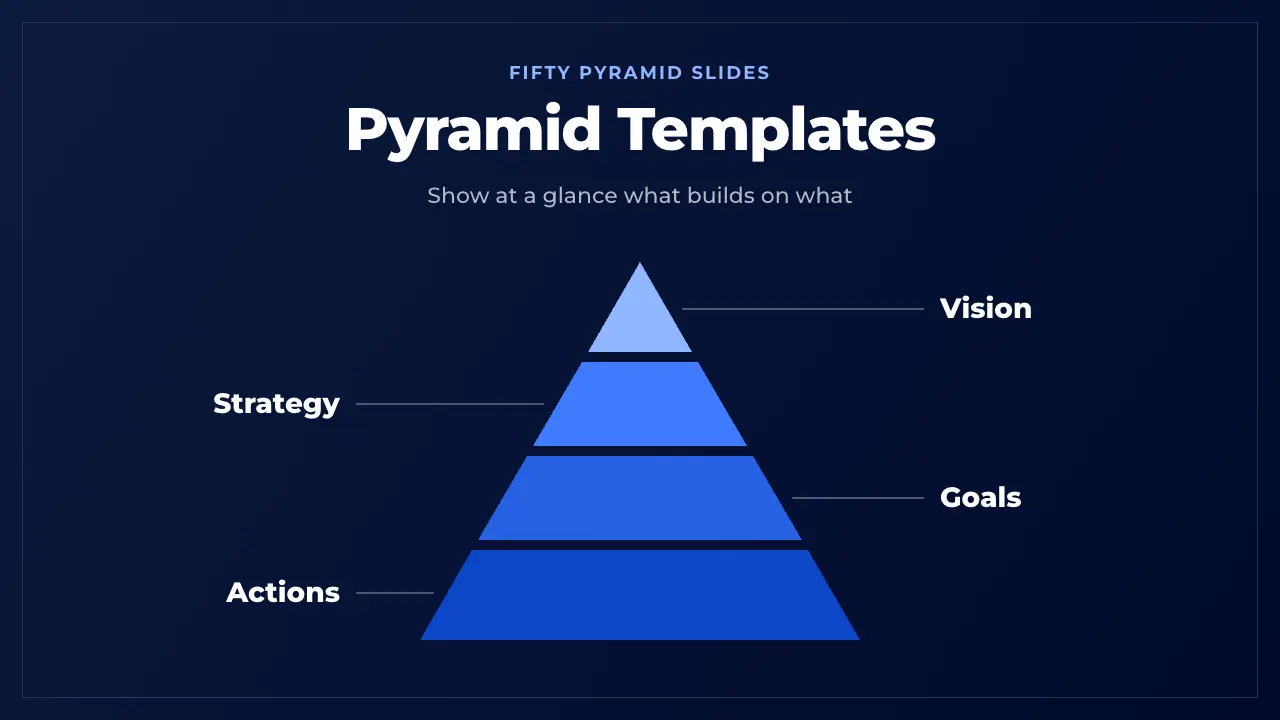
1 · Pyramid Templates Title SlideThe pack's title slide: a four-level pyramid under a centred headline, its levels named left and right. Use it to open a talk about how goals, strategy and daily work build on each other. Rename the levels to fit your own model.
2 · Classic Five-Level PyramidA classic five-level pyramid with every level named and explained on the right. Use it to show how purpose, vision, mission, goals and actions depend on each other. Keep each caption to one short line.
3 · Pyramid Beside A PhotoA four-level pyramid of teamwork beside a tall photo: trust at the base, then open debate, commitment and results. Use it in a team workshop or an offsite. Swap the photo for one of your own team.
4 · Step Pyramid Of Rounded BarsA step pyramid of five centred bars, the widest at the base, each with a short caption on the right. Use it for any model where one need or level only matters once the one below is met. Rename the bars and keep the captions to one line.
5 · Inverted Pyramid In Three LevelsAn inverted pyramid in three levels, the broadest at the top: the lead, the key details and the background. Use it to teach how to write news, reports or emails so that the most important part comes first. Each level has a title and a two-line explanation.
6 · 3D Pyramid With Side NotesA pyramid with a shaded right face that gives it depth, its four levels named on alternating sides. Use it to explain how data becomes information, knowledge and finally wisdom. The notes left and right keep the pyramid itself clean.
7 · Organisation Pyramid With PhotoA five-level pyramid of an organisation with the head count inside each level, the roles beside it and a photo on the right. Use it to show how a company is layered and how many people work at each level. Replace the sample counts with your own.
8 · Pyramid With Icon TilesA four-level pyramid with the number of pieces inside each level and an icon, title and caption beside it. Use it to plan a content mix: a few deep pieces at the top and many short ones at the base. Change the numbers to your own plan for a quarter.
9 · Pyramid Of Building BlocksA pyramid built from ten blocks in four rows, each row named on the right. Use it to show how the parts of a business stack up: the foundations at the base, operations and the offer in between, the vision on top. Rename the blocks to the parts of your own organisation.
10 · Six-Level Pyramid Of PrioritiesA six-level pyramid of priorities with notes alternating left and right. Use it to sort a long list of tasks or ideas and to agree what the team does now, later or never. The narrow top keeps the critical items few.
11 · Pyramid Principle With Round PhotoA three-level pyramid for structured writing and speaking: the message on top, the arguments under it and the facts at the base. Use it to plan a report, a pitch or an email that leads with its conclusion. The round photo and the statement on the right carry the rule in one line.
12 · Testing Pyramid With SharesThe testing pyramid in three levels with the share of all tests inside each level. Use it to agree on a healthy test mix for a software team: many fast unit tests, fewer integration tests and only a few end-to-end tests. Adjust the shares to your own target.
13 · Population-Style PyramidA population pyramid of a workforce: six age bands, women to the left and men to the right of a centre column, the share of all staff at the end of each bar. Use it in a people review or for workforce planning. Replace the sample shares with your own figures.
14 · Customer Pyramid With Key FigureA four-level customer pyramid with the share of customers inside each level and a card with a photo and a key figure. Use it to show how few customers bring most of the revenue and where loyalty work pays off. Swap the sample shares and the figure for your own.
15 · Half Pyramid With Staggered LabelsA half pyramid with a straight left edge and five levels, each named along its slope. Use it to describe a skill ladder from basics to mastery for a role or a training plan. The staggered labels follow the slope and read like a climb.
16 · Stacked Pills Pyramid With PhotoA pyramid of six stacked pills, each numbered, from observers at the base to champions at the top, beside a photo. Use it for communities, customer programmes or internal change, to show how people move up from watching to leading. Rename the levels to your own ladder.
17 · Two Pyramids Side By SideTwo pyramids side by side compare how leadership time is spent today and where it should be in 2030. Use it whenever a mix has to shift: time, budget, effort or head count. The level names sit once in the middle so both pyramids stay clean.
18 · Safety Pyramid With CountsA four-level safety pyramid with the number of events inside each level: one serious incident above ten minor injuries, thirty damage events and six hundred near misses. Use it in safety briefings to show why reporting near misses matters. Replace the counts with your own records.
19 · Brand Pyramid Filling The SlideA wide five-level brand pyramid: attributes, benefits and values written inside the broad levels, personality and essence named beside the narrow top. Use it in brand workshops to build from what customers see to the one thought the brand stands for. Fill each level with a few words.
20 · Price Tier Pyramid With CardsA three-level pricing pyramid with the monthly price inside each level and a card per plan beside it. Use it to present plan tiers or service levels, from the base plan most people take to the premium few need. Change the prices and the features to your own offer.
21 · Inverted Pyramid Of FocusAn inverted pyramid that narrows from a hundred ideas to one launch, the count of each stage inside its level and the stages named on alternating sides. Use it to show how a portfolio, a hiring round or a selection process narrows down. Change the counts to your own numbers.
22 · Pyramid On A Full PhotoA four-level leadership pyramid on a full-bleed photo under a navy overlay, the levels named on the left. Use it to open a leadership session or to frame what a manager does every day. Deliver is the base; inspiring people is the top.
23 · Pyramid With KPI ChipsA three-level KPI pyramid with the owner of each level and two sample measures as chips beside it. Use it to agree who watches which numbers, from the board's strategic KPIs to the teams' operational ones. Replace the chips with the measures you track.
24 · Wide Pyramid Beside A PhotoA wide four-level pyramid with every level named inside it, beside a tall photo. Use it for wellbeing programmes, team health checks or personal development: health at the base, then connection, growth and purpose. Keep the words inside each level short.
25 · Document Pyramid With IconsA five-level document pyramid with an icon, a title and a caption for each level on the left. Use it to explain how a management system is documented, from the few policies at the top to the many records at the base. Rename the levels to your own document types.
26 · Financial Pyramid Beside A PhotoA four-level pyramid of financial goals with every level named inside it, beside a photo. Use it in a planning talk or a workshop on personal or company finances: protection first, then savings, growth and legacy. It shows an order of priorities, not advice on any product.
27 · Ziggurat Of Six StepsA stepped pyramid of six solid blocks, one per level of automation, named on alternating sides. Use it to show where a process stands today and how far it could go, from manual work at the base to full automation at the top. Mark your current level in the brightest colour.
28 · Pyramid With YearsA five-level pyramid that builds a long-term plan from 2027 at the base to 2035 at the top, the year on the left of each level and its goal on the right. Use it for a strategy or a roadmap where every stage rests on the one before. Change the years and goals to your own plan.
29 · Inverted Pyramid Beside A PhotoAn inverted pyramid that narrows a broad problem down to one fix: problem, causes, root cause and fix, each named inside its level. Use it in a problem-solving workshop or a post-mortem. The photo on the right can show your own team at work.
30 · Pyramid With Progress BarsA four-level pyramid with a progress bar and a percentage beside each level. Use it to show how time, budget or effort is spread from strategy at the top to execution at the base. The bars are drawn to the same scale, so the shares compare at a glance.
31 · Pyramid With Icons InsideA four-level pyramid of customer needs with an icon inside every level and its name on the right. Use it to show that delight only works once the basics are met: function first, then reliability, ease and delight. Swap the icons for your own.
32 · Seven-Step Learning PyramidA seven-step learning pyramid with each way of learning and the share people remember written inside its bar. Use it in training design to argue for practice and peer teaching over lectures alone. The sample shares are the classic rounded figures; adjust them to your own data.
33 · Pyramid Beside A Bleeding PhotoA five-level career pyramid on the left and a photo that runs to the right edge of the slide. Use it in onboarding or talent reviews to show the steps of a career path and how the roles narrow towards the top. Rename the levels to your own job family.
34 · Block Pyramid Of Market SizeA pyramid of three stacked blocks that sizes a market: the total market at the base, the serviceable market above it and the share we can win on top. Use it in a pitch or a business plan. Replace the sample figures with your own estimates.
35 · Pyramid With A Rising ArrowA five-level maturity pyramid with an arrow beside it that shows the climb from ad hoc work to steady improvement. Use it to place a team or a process on a maturity scale and to plan the next level. Mark today's level in the brightest colour.
36 · Honeycomb Pyramid Of HexagonsA pyramid of six hexagons in three rows: three everyday habits at the base, two shared choices in the middle and one lead at the top, each row named on the right. Use it in team development to show which skills carry the others. Rename the hexagons to your own skills.
37 · Sales Pyramid With Key FigureA five-level sales pyramid with the count of each activity inside its level, a photo and a key figure on the right. Use it in a sales review to show how two hundred calls turn into three deals. Replace the counts with your own quarter.
38 · Pyramid Over A Row Of CardsA small four-level pyramid at the top, its levels numbered from the base, and a row of four cards below that explain each step. Use it when every level needs a sentence of its own. The numbers in the pyramid match the steps on the cards.
39 · Pyramid With A ChecklistA four-level quality pyramid with a checklist on a pale panel beside it, one checked line per level. Use it in quality or operations reviews to show how a team moves from inspecting at the end to building quality in. Tick off the levels you have reached.
40 · Pyramid With Two ColumnsA five-level planning pyramid with what each level means on the left and its time horizon on the right. Use it to connect a lasting purpose with this week's tasks in a strategy talk or an all-hands meeting. Change the horizons to the rhythm of your own planning.
41 · Pyramid With Icons Beside A PhotoA four-level pyramid of healthy habits with an icon, a title and a caption for each level, beside a tall photo. Use it for wellbeing programmes, health days or coaching: sleep at the base, then nutrition, movement and mindset. Swap the photo and icons for your own theme.
42 · Progress Pyramid With MarkerA five-level pyramid that shows progress: the reached levels solid, the current level marked with a We Are Here label and the levels still ahead pale. Use it in a status update or a strategy review. Move the label and the colours as you climb.
43 · Three Pyramids Side By SideThree pyramids side by side, one a year, each larger than the last, with the number of leaders, managers and staff inside. Use it to show how a team or an organisation grows over several years. Change the years and counts to your own plan.
44 · Pyramid Beside A Key FigureA three-level customer pyramid beside a large key figure: the top fifth of customers brings eighty per cent of revenue. Use it to argue for focus on key accounts or to explain the 80/20 rule. Replace the sample shares with your own data.
45 · Pyramid Beside A Photo BandA three-level innovation pyramid with the share of budget inside each level, beside a photo that runs from top to bottom. Use it to show how a portfolio balances improving the core with new markets and a few bold bets. Adjust the shares to your own mix.
46 · Inverted Organisation PyramidAn inverted pyramid that turns the classic org chart upside down: customers at the broad top, then the front line, managers and leaders at the point. Arrows on both sides show support flowing down and feedback flowing up. Use it to explain a service-led or servant leadership culture.
47 · Pyramid With ReadersA four-level information pyramid: each level's name and length on the left and who reads it on the right. Use it to plan a report or a dashboard so that every audience gets the depth it needs. Rename the readers to the roles in your organisation.
48 · 3D Pyramid From Two FacesA pyramid drawn in 3D: every level has a light left face and a darker right face, so the shape reads as a solid. Use it when a slide needs more presence, for three levels such as vision, strategy and execution. The notes on the right sit level with each band.
49 · Pyramid On A Landscape PhotoA centred four-level pyramid on a full mountain photo under a navy overlay, its levels named on both sides. Use it to close a strategy talk or an offsite with the idea that performance rests on purpose, people and process. Swap the photo for one of your own.
50 · Pyramid With Numbered StepsA closing slide: a five-level pyramid on the left and five numbered steps on the right that show how to build one. Use it at the end of a workshop or as a guide for the team. Replace the steps with your own next actions.
What Is Inside The Pack
Classic pyramids with three to seven levels, inverted pyramids, half pyramids, stepped bars and pills, building blocks, hexagons, two pyramids compared, a population pyramid, a progress pyramid with a We Are Here marker, pyramids with years, icons, key figures and photos, and a 3D pyramid. Every text, shape and colour stays editable.
How To Use This Pyramid Template
01
Pick A Form
Choose the pyramid template that fits your story: a classic pyramid for a hierarchy, an inverted one to narrow down, a 3D one for presence.
02
Set Your Colours
Use the colour and font bar to match your brand; every slide follows at once.
03
Write Your Levels
Replace the sample levels with your own, from the base that carries everything to the top it leads to.
04
Present Or Download
Present straight from the browser or download the slides as a PPTX file for PowerPoint.
When A Pyramid Works Best
A pyramid shows levels that rest on each other: the broad base is what everything else needs, the narrow top is what it all leads to. It suits strategy, needs, skills, priorities, quality, data and any model where order matters.
Turn it upside down when you narrow something down, from many ideas to one launch or from the main message to the background. Use stepped bars or blocks when each level needs a longer name.
Tips For Clear Pyramid Slides
Keep three to six levels and one short title per level. Put longer explanations beside the pyramid, joined by a thin line, so that the shape stays clean.
Use one colour family from light to dark, and save the brightest tone for the level you want people to notice first.
Frequently Asked Questions
Is this pyramid template free?
Yes. You can view and edit every slide of this pyramid template for free, and download the deck as PPTX with a free account.
Can I use it as a pyramid PowerPoint template?
Yes. Download the slides as a PPTX file and open them in PowerPoint; the shapes and texts stay editable there.
How many levels can a pyramid have?
The pack has pyramids with three to seven levels. Most slides use four or five, which is the easiest number to read at a glance.
Can I change the colours and fonts?
Yes. The colour and font bar changes every slide of the pyramid template at once, and you can still adjust single shapes in the editor.
What is an inverted pyramid used for?
An inverted pyramid narrows something down: from many ideas to one launch, from a broad problem to its fix, or from the key message of a text to its background.
Can the AI build a deck from my topic?
Yes. Fill With AI takes your topic and builds a new deck of your own in this look, with your levels, figures and words.
Which slide shows a 3D pyramid?
Slide 6 shades the right half of a pyramid for depth, and slide 48 draws a 3D pyramid from two faces in light and shade.
Try ExpertSlides AI For Free — The Ultimate AI Presentation Maker
Describe any topic or upload a document, and ExpertSlides designs and writes the whole deck — editable in the browser and as a PowerPoint file.