Business Proposal Template: 50 Editable Slides For Every Section
Fifty business proposal slides in one blue look, each section in a different form: the need in key figures, the solution as pillars, the scope in work packages, the timeline in bands, three pricing options, the payback and the signatures. Change the colours and fonts of all of them at once, let the AI build your own proposal in this look, download them as PowerPoint or edit each slide in the editor.
This business proposal template pack holds 50 slides, one for each section a client expects in a written offer: the cover and the cover letter, the executive summary, the need and its cost, the objectives, the proposed solution and its benefits, the scope of work, the approach, deliverables, the timeline and its milestones, the team, governance, pricing, the budget, payment terms, the business case, references, risks, terms, validity, the next steps and the signatures. Every slide is a finished infographic on a light, white or navy ground, so any twelve of them make a proposal that looks made in one piece.
Most proposals start from last year's document with the old client's figures still in it. Here every slide is written out with neutral sample content: a provider who speaks as 'we', a client addressed as 'you', one fixed price, one timeline of 24 weeks and one business case that agree from slide to slide. No company, product or person is named, so the pack fits a consultancy, an agency, a software provider or a contractor alike, and you see how many words and figures each section carries before you write your own.
Looking for a business proposal PowerPoint template? A free account downloads the 50 slides as a PPTX file whose texts, shapes and figures stay editable. Or stay in the browser: pick your colours and fonts above the slides, describe your offer and let the AI build your proposal in this look, or open the slides one to one in the editor.
Your Business Proposal In This Look
Describe what you offer, for whom and at what price, or attach the brief and your notes. ExpertSlides builds your own proposal deck in this look in a few minutes, with your scope, your dates and your figures.
Every slide carries neutral sample content — the sections of a proposal, roles in place of names and round figures from 2027 to 2030 — that fits any provider and any project. Replace its figures with yours.
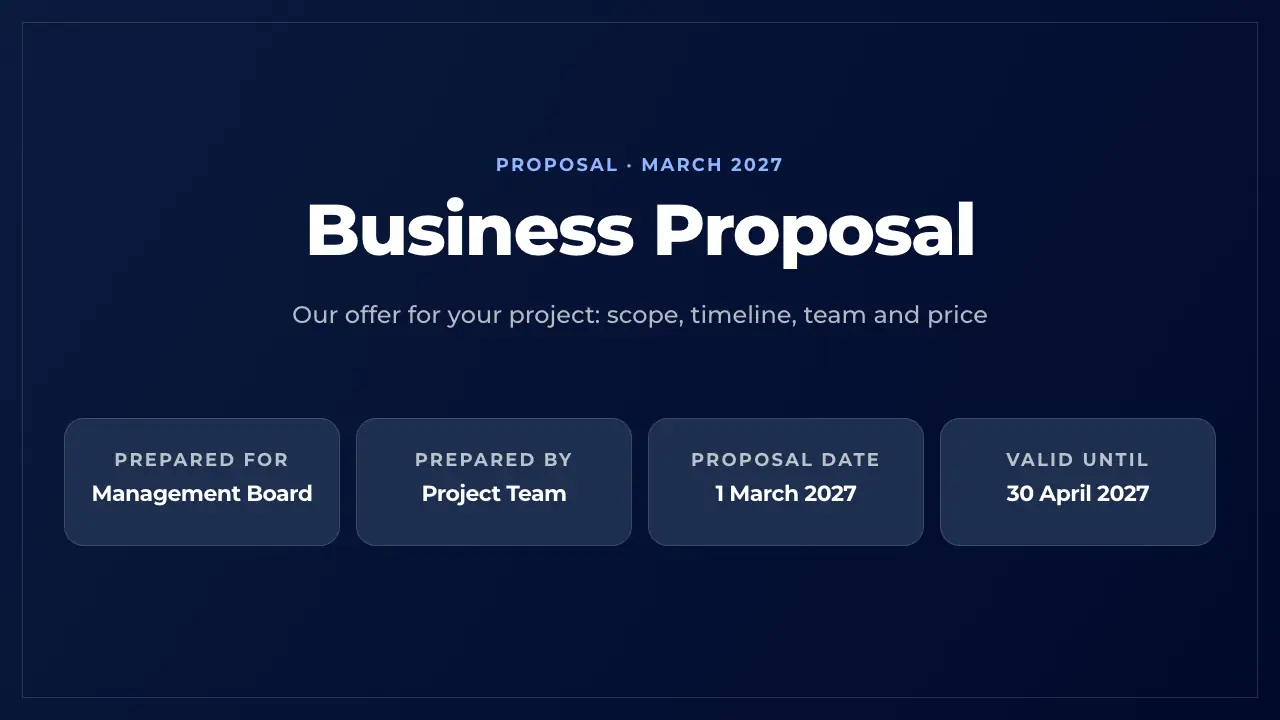
1 · Proposal Cover With Four FactsThe cover of a business proposal: kicker, headline and lead stand centred over a row of four quiet cards with the facts every cover names — for whom the proposal is prepared, by whom, its date and how long it is valid. Use it to open a proposal, an offer or a quote, and put your own recipient, sender and dates on the cards.
2 · Numbered Contents In Two ColumnsA contents page for a business proposal: eight sections in two columns, each with a large numeral, the section title and a one-line caption on what it holds. Read it down the left column, then down the right. Use it right after the cover and name your own sections in the order of your proposal.
3 · Cover Letter Beside A PhotoThe cover letter of a business proposal on one slide: a tall photo on the left, on the right three short paragraphs along a thin margin line — why we write, what we offer and what comes next — and the sender's line under them. Use it as the personal opening of a proposal and sign it with a role and a date.
4 · Zigzag Summary In Four PointsThe executive summary of a business proposal in four numbered points on one zigzag line: the need, the solution, the result and the investment, by turns below and above the line. The last marker is filled and marks the investment. Use it to tell the whole offer in half a minute and put your own key figure into each point.
5 · Progress Track With Current StepWhere a business proposal stands in its process: one thick track with six markers from the first talk to the kick-off, filled up to the current step, which is larger and wears the pill We Are Here. Under each marker stand a date, a title and a short caption. Use it early in a proposal to show what is done and what follows the decision.
6 · Statement Beside Four Figure TilesA statement of three lines and a quiet note stand on the left; on the right four pale tiles in two rows each carry one very large figure, a bold title and a one-line caption. Use it for the About Us section of a business proposal. Put in one sentence about your team and the four numbers that prove it: years, projects, people and reliability.
7 · Three Key Figures Beside A PhotoA tall photo fills the right of the slide from edge to edge; on the navy ground three rows divided by hairlines each show one large figure with a bold title and two lines of text. Use it in a business proposal to show the client where they stand today. Put in three figures from your needs analysis and say in one sentence what each means.
8 · Four Cards With A Foot BandFour equal white cards stand side by side, each with a white icon in a blue disc, a bold title and three lines of text; a pale blue band at the foot of each card names what the challenge costs today. Use it in a business proposal for the challenges your offer answers. Put in four challenges and one short fact for each band.
9 · Six-Hexagon Requirements ChainSix hexagons stand in one row on a thin line, each with a white icon, a small numeral above and a bold title with a two-line caption below. Use it in a business proposal for the requirements the client named, which the offer is measured against. Put in up to six requirements in the client's own words.
10 · Three Big Figures Over An AxisThree very large figures stand side by side over one thin axis; a ring marker sits under each figure, and a bold title with two lines of text follows below. Use it in a business proposal for the objectives both sides share. Put in three measurable targets and say in one sentence what each means.
11 · Five Level GaugesFive upright gauges stand side by side on one baseline, each filled from the bottom to its target, with the target as a large figure above it. Use it in a business proposal to show how success will be measured: the share of milestones on time, user adoption, satisfaction, automation and data accuracy. Put one measure with its target and a short explanation into each column.
12 · Four Pillars Under One RoofA temple seen front-on: a roof band with the goal of the solution, four equal pillars with an icon, a title and three lines each, and a base band that carries the promise of delivery. Use it in a business proposal to present the proposed solution and what it rests on. Put the goal into the roof, one building block into each pillar and the delivery promise into the base.
13 · Three Slanted BandsThree parallelograms lean to the right, side by side, and grow deeper in tone from the first step to the last. Each carries a small label and a very large numeral; a title and three lines stand under each band. Use it in a business proposal to explain how the proposed solution works in three steps.
14 · Four Benefits Beside A PhotoFour benefits stand in two rows of two beside a tall photo: a blue disc with a white icon, a large figure, a bold title and two lines each. Use it in a business proposal to show what the client gains from the solution, in figures. Put one benefit with its figure into each field and choose a photo of people at work.
15 · Four Arrows From Today To TomorrowFour rows compare today with the time after the project: a pale band with the state of today leads into a blue arrow with the new state. Use it in a business proposal to show what changes with the proposed solution, row by row. Put one before and after pair into each row and keep both sides short.
16 · Four Rising ArrowsFour upward arrows of growing height stand on one baseline, each with a large figure above it and a title with a short caption below. Use it in a business proposal to show why a decision now pays: what each quarter of waiting costs in savings not made. Put your own amounts over the arrows and the points in time under them.
17 · Five Arrow Blocks With EffortFive arrow blocks in one row, in tones from light blue to navy, each pointing into the next and named WP 1 to WP 5 with a bold title. Under each block stands the effort in days and a short note of what the package holds; a band at the foot adds them up. Use it for the scope of work of a business proposal.
18 · Scope Rings Beside Three RowsThree concentric rings on the left — a filled core, a pale middle ring and a thin outer line — each tied by a hairline to a row on the right with a bold title and a two-line text. Use it in a business proposal to draw the limits of the scope: what the price covers, what can be added and what stays outside.
19 · Five Phase Columns On An AxisA row of five header pills on one thin axis, a dot and the weeks under each, and below them five equal white cards with a white icon in a blue disc, a bold title and a short caption. Use it for the approach of a business proposal: how the project runs, phase by phase, and what happens in each.
20 · Two Tracks That MergeTwo horizontal tracks, each with a label pill and three milestones with week, title and note, bend together at the right into one large disc with the go-live and its date. Use it in a business proposal to show two workstreams that run side by side and where they meet.
21 · Five Principles Under A Photo BandA wide photo band across the top, under it the headline and five equal columns, each with a white icon in a blue disc, a bold principle and a two-line caption. Use it in a business proposal to show how you work with the client. Replace the five principles with your own rules of collaboration.
22 · Deliverables Snake In Two RowsEight deliverables on one line that runs left to right through the upper row, turns at the right and comes back through the lower row. Each step has a week pill on the line, a bold title and a one-line note. Use it in a business proposal to list what the client receives and when; the last pill is filled in navy for the final deliverable.
23 · Phase Bands On A Week ScaleA week scale across the top and five rows under it, one per phase: the phase and its weeks at the left, and a band whose length follows its duration and that starts where the band above ends. One vertical line with a pill on the scale marks the go-live in week 22. Use it in a business proposal to show the timeline of the project at a glance.
24 · Seven Milestones On One AxisOne horizontal axis with seven dot markers; the milestones stand by turns above and below the line, each with its week, a bold title and a one-line note. The last marker is larger and filled for the go-live. Use it in a business proposal to show the milestones the client approves on the way to go-live.
25 · Vertical Timeline Beside A PhotoA tall photo on the left and a vertical line with four dot markers on the right; each marker has a week label, a bold title and a two-line body. Use it in a business proposal to show what happens right after the kick-off, week by week.
26 · Round Portraits On One LevelFour round portraits stand on one level, each in a thin ring, with a pill for the years of experience above and the role and a two-line caption below. Use it in the team section of a business proposal to show the people the client will work with. Put a role under each portrait and one sentence on what that person does in the project.
27 · Three Linked CardsThree equal cards stand side by side, joined by double arrows, each with a rhythm pill, a bold title, its members by role and a short line on what is decided there. Use it in the governance section of a business proposal to show who decides what, and how often. Put one level in each card, from the steering level to the daily work.
28 · Two Facing CardsTwo equal cards face each other, the left one filled in blue and the right one white, with a round handshake mark on the gap between them. Use it in a business proposal to set out the responsibilities of both sides at a glance. Put what the provider delivers on the left and what the client provides on the right, four short lines each.
29 · Rhythm Band With Four IconsOne long band in four tones of blue names the rhythms of a project, and under each segment a disc with an icon, a bold title and a two-line caption says what happens then. Use it in the communication section of a business proposal to show how the client is kept informed. Put the rhythm in the band and the meeting or report under it.
30 · Three Option CardsThree cards stand side by side, the middle one taller, filled in blue and marked as recommended; each holds an option's name, one large price, its duration and team, and three lines of what it includes. Use it in the pricing section of a business proposal to let the client choose between three scopes. Put the recommended option in the middle.
31 · Key Figure Beside A ChecklistA large card holds the fixed price of the proposal as one very large figure with a two-line note; beside it five checked rows list what the price covers. Use it in the pricing section of a business proposal to show at a glance that nothing comes on top. Put your total in the card and one included service with a short note in each row.
32 · Budget Band In Five SegmentsOne long band shows the whole budget of the proposal, cut into five segments whose widths follow their shares; under each segment stand the phase, its amount and its days of work. Use it in a business proposal to show where the money goes, phase by phase. Put the total over the band and one phase with its share under each segment.
33 · Four Payment Circles On One LineFour circles stand on one thin line, their sizes following their share of the price; over each stands the amount, under each the milestone, its date and a short note. Use it in a business proposal to tie the payments to milestones. Put one payment step in each circle and the event that triggers it below.
34 · Bars Around A Zero LineOne axis runs through the middle as the zero line with four year pills on it; the first two bars hang below it, the last two rise above it, each with its balance as a bold figure. Use it in a business proposal to show when the investment is paid back. Put the balance at each year's end on the bars and mark the payback point on the line.
35 · Four Key Figures On A Full PhotoA full photo under a navy overlay carries four faint cards in one row, each with one very large figure, a bold title and a one-line caption. Use it in a business proposal to sum up the business case in four numbers. Put the investment, the yearly saving, the payback time and the return in the cards.
36 · Four Chevron StepsFour chevrons in a row, in tones from light blue to navy, carry the numerals 01 to 04; under each stand a one-word title and a two-line caption, and one quiet line closes the slide. Use it in a business proposal to show how change requests are handled, or any short process of four steps. Put one verb in each title and one sentence under it.
37 · Six Reasons Around A Round PhotoA round photo in a thin ring stands in the middle of the slide; six reasons are tied to the ring by hairlines, three on the left and three on the right, each a bold title with one line under it. Use it for the Why Us section of a business proposal. Name each reason in two words and prove it in one short line.
38 · Three Reference Cards With PhotosThree equal white cards stand side by side; each opens with a photo, names the client by its sector, shows one large figure and explains it with a bold title and two lines. Use it for the references of a business proposal: results from projects of the same kind. Put the one figure that proves the result into each card.
39 · Client Voice Over Three RatingsA wide speech bubble holds one client quotation of two lines; under its tail stand the speaker's role and sector, and under them three columns with one large rating figure each. Use it for the references of a business proposal when one voice and a few ratings say more than a list. Name the speaker by role and sector only.
40 · Risks And Answers In Four ColumnsFour columns pair a risk with its answer: the upper card names the risk in a bold title and two lines, the blue card under it gives the answer of the proposal. Use it for the risk section of a business proposal. Keep each risk and each answer to a short title and one sentence.
41 · Center-Axis List Of Five AssumptionsOne vertical axis with five numbered ring markers runs down the slide. Left of each marker stands the assumption as a bold title, right of it a one-line note. Use it in a business proposal for the assumptions behind the price and the dates, or for any five conditions that need one line of explanation each.
42 · Five Quality Checks Beside A PhotoA tall photo with rounded corners fills the right of the slide. On the left five rows stand evenly spaced under the headline, each with a white check in a blue disc, a bold title and a one-line note. Use it in a business proposal for the quality plan, or for any five checks, criteria or promises behind a result.
43 · Curved Road With Five Training PinsA road winds in two soft bends from the lower left to the upper right, with five pins in the order of time. Each pin carries its week in a small pill, a bold title and a one-line note, by turns above and below the road; the last pin is larger and flagged. Use it in a business proposal for the training plan, the change plan or any path of five steps towards one goal.
44 · Support Arc Over A Key FigureA wide half-circle arc with four markers spans the slide, from the first month at its left end to the last at its right. Each marker carries a label, a bold title and a one-line note outside the arc; one very large key figure stands under its middle. Use it in a business proposal for the support after the go-live, a warranty period or any span of time with four fixed points.
45 · Six Term Cards In Two RowsSix equal white cards in two rows of three, each with a white icon in a blue disc, a bold title beside it and a two-line caption under them. Use it in a business proposal for the terms and conditions, read row by row, or for six rules, services or promises. Give every card one sentence with its key figure.
46 · Validity Countdown On A PhotoThe validity of the proposal as a countdown: five very large numbers of days left stand in one row over a full photo, each on one thin axis with its date, a title and a short note; the last one, the day the offer ends, is highlighted. Use it to show how long the prices and dates of an offer are held and what happens until the decision. Replace the days, the dates and the notes with your own.
47 · Rising Stairs To The Kick-OffFive blocks of growing height stand on one baseline like a flight of stairs, in tones from pale blue to navy. Each step carries its date above it, its title in the block and a short note under the baseline; a flag marks the top step. Use it for the next steps after a proposal, from the client's decision to the first project day, and put in your own dates.
48 · Six Numbers On One LineOne thin line runs across the slide with six dots; under each dot stands one large figure in the highlight with a bold label and a two-line caption. Use it as the summary of a proposal: the scope, the time, the team, the support, the price and the payback at a glance. Replace the six figures with the key numbers of your own offer.
49 · Three Signature CardsThree equal pale cards stand side by side, one for each person who signs: a small label says for whom, the role stands as the title, two lines say what the signature approves, and a thin signature line with its date waits at the foot. Use it as the acceptance page of a proposal. Put in the roles that sign on both sides and the date of signing.
50 · Closing With Photo And Three RepliesA tall photo fills the left of the slide from edge to edge; on the navy ground beside it stand the thanks and three ways to reply, each with a white icon in a blue disc, a bold title and two lines of text. Use it as the last slide of a proposal, so that the reader knows exactly what to do next. Put in your own contact roles and dates.
Every Section Of A Business Proposal, In 50 Forms
A cover with four facts, numbered contents in two columns and a cover letter beside a photo; the executive summary on a zigzag line and the process as a progress track with the current step marked; the provider in four key figures; the client's need in three figures beside a photo, four challenge cards with what each one costs, six requirements as a chain of hexagons, three objectives over an axis and five success measures as gauges; the solution as four pillars under one roof, how it works in three slanted bands, four benefits, today and tomorrow in four arrows and the cost of waiting as rising arrows; the scope as five work packages with their days of effort and as rings for what is in scope, optional and out of scope; the approach in five phases, two workstreams that merge into one go-live, five working principles and eight deliverables on a snake line; the timeline as phase bands on a week scale, seven milestones on one axis and the first four weeks; the team as round portraits, governance on three levels, responsibilities in two facing cards and the communication rhythm; three pricing options, what the price includes, the budget in five segments, payment in four circles, the payback around a zero line and the business case on a full photo; change requests as chevrons, six reasons around a round photo, three reference cards, a client's voice with three ratings, risks with their answers, planning assumptions, quality checks, the road of training and an arc of support; six term cards, a validity countdown, stairs to the kick-off, the proposal in six numbers, three signature cards and a closing with three ways to reply. Seventeen slides stand on light blue, seventeen on white and sixteen on navy, twelve of them with a photo.
How To Use This Business Proposal Template
01
Pick Your Sections
Choose the slides your offer needs from the 50 of this business proposal template: a short proposal takes ten to fifteen, a formal answer to a tender the scope, the terms and the signatures as well.
02
Set Colours And Fonts
Pick a palette and a font pair in the bar above the slides, or your own Design Kit. Every slide follows at once.
03
Put In Your Offer
Press Fill With AI and describe your offer, or open the slides in the editor and replace the sample price, dates and roles with yours, slide by slide.
04
Download Or Present
Download the proposal as PowerPoint, every text and shape editable, or present it to the client straight from the browser.
What Each Section Of A Proposal Is For
A business proposal answers five questions in the order a client asks them: do you understand our need, what do you propose, how and when will you deliver it, what does it cost and why should we choose you. The slides of this pack follow that order, and each carries one answer: the need slide three figures on what the problem costs today, the pricing slide one fixed price and what it includes.
Decision makers read the summary, the price and the payback first; the people who will work with you read the scope, the timeline and who does what. Put the executive summary and the investment at the front, keep the terms and the assumptions at the back, and say on the last slide exactly what the client has to do to accept.
How To Use A Business Proposal PowerPoint Template
Download the PPTX and open it in PowerPoint: every text, shape and figure is a native element, so you change a price or a date where it stands and the layout stays. The colours are the theme's, so one change of theme colours recolours all 50 slides.
For the proposals you send again and again, keep one master deck and change only what differs from client to client: the cover, the need, the scope, the price and the dates. The pricing options, the budget band and the payment circles are drawn to be edited, not redrawn.
Questions About The Business Proposal Template
Is This Business Proposal Template Free?
Yes. The business proposal template is free to use on this page, and a free account downloads the 50 slides as a PowerPoint file.
Can I Use It As A Business Proposal PowerPoint Template?
Yes. Download the PPTX and every slide opens in PowerPoint with editable texts, shapes and figures, in the colours of its theme.
Which Slides Does A Short Proposal Need?
Start with the cover (slide 1), the executive summary (4), the need (7), the proposed solution (12), the scope of work (17), the timeline (23), the pricing options (30), the payment terms (33) and the next steps (47). Nine slides carry a whole offer.
Which Slides Show The Price And The Return?
The three pricing options (slide 30), what the price includes (31), the budget by phase (32), the payment terms (33), the payback (34) and the business case (35). The cost of waiting (16) says why the decision should not be put off.
Can The AI Write My Own Proposal?
Yes. Press Fill With AI and describe your offer, or attach the client's brief: the AI builds a proposal deck of your own in the look of this business proposal template. Nothing is made up that you did not give it; check the price and the dates before you send it.
Can I Change The Colours And Fonts?
Yes. Pick a palette and a font pair above the slides, or your own Design Kit with your logo; all 50 slides follow at once.
Does The Pack Fit My Industry?
Yes. The sample content names no company, product or person: it speaks of the solution, the project and the work packages, shows people as roles and uses round figures. Replace them with your own and the slides fit consulting, software, marketing, construction or any other service.
Can The Client Sign The Proposal On A Slide?
Slide 49 holds three signature cards with a line and a date for each signatory, and slide 45 the terms in six cards. Export the deck as PDF or print it to have it signed; for a binding contract, have your own terms checked first.
Try ExpertSlides AI For Free — The Ultimate AI Presentation Maker
Describe any topic or upload a document, and ExpertSlides designs and writes the whole deck — editable in the browser and as a PowerPoint file.