Meeting Template: 50 Editable Slides For Agendas, Decisions And Action Items
Fifty meeting slides in one blue look, each a different form of a meeting: agenda lists and timed bars, attendee roles, team updates, discussion points, decision logs, action items with owners and the next meeting. Change the colours and fonts of all of them at once, let the AI build your own deck in this look, download them as PowerPoint or edit each slide in the editor.
This meeting template holds 50 slides, and each one shows a part of a meeting in a different form: an agenda list with start times and presenters, one hour split into timed blocks, the roles in the room as round portraits, update cards with a status, numbered discussion questions, a decision log, action items with owners and due dates, and the date of the next meeting beside a photo. All of them share one blue look on light, white and navy grounds, so any six of them sit in one deck without looking borrowed.
Most files give you a single agenda with empty lines. Here every slide is a finished meeting slide with neutral sample content that fits any team, roles instead of names and round sample figures. Beside the agenda you find the slides that make a meeting work: objectives and outcomes, ground rules, preparation, the parking lot, the minutes, the follow-up, and the common kinds of meeting, from the kick-off, the daily stand-up and the one-on-one to the board meeting, the workshop, the retrospective, the all-hands and the hybrid meeting.
If you searched for a meeting PowerPoint template free to download, a free account downloads the slides as a PPTX file whose texts and shapes stay editable. You can also stay in the browser: pick your colours and fonts in the bar above the slides, describe your meeting and let the AI build your own deck in this look, or open the slides one to one in the editor.
Your Next Meeting In This Look
Describe the meeting you are running, who attends, the items on the agenda and what has to be decided. Or attach last week's minutes or your notes. ExpertSlides builds your own deck in this look in a few minutes, with your agenda, your decisions and your action items.
Every slide is a complete meeting slide with neutral sample content, short items, roles instead of names and round figures, that fits any team. Replace its texts, times and figures with yours.
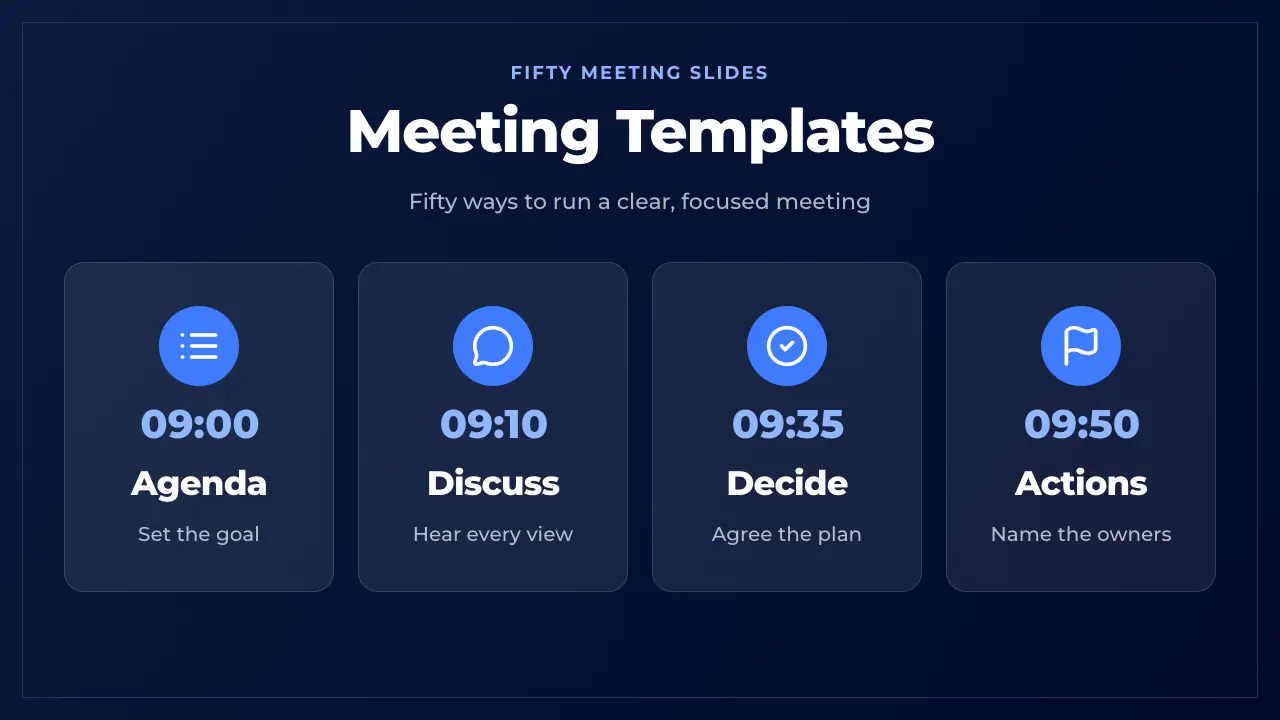
1 · Title Slide With Four Agenda CardsA title slide that is a meeting agenda itself: the kicker, headline and lead stand centred over four equal cards, one for each part of a good meeting. Each card shows a start time, an icon, the part's name and a one-line purpose. Use it to open a team meeting, a review or any meeting deck.
2 · Agenda List With Summary CardA classic meeting agenda: six items run down the slide, each with its start time, its topic and the role who leads it. A navy card on the right sums up the meeting's length, date and attendees. Use it for any weekly or monthly team meeting.
3 · Objectives Beside A PhotoA photo of a team at work stands beside the three objectives of the meeting, each with an icon, a short title and one sentence. Use it at the start of a meeting so everyone knows what it must achieve before the discussion begins.
4 · Attendee Roles With Round PortraitsFive round portraits stand on one line, each with a role, what that role owns and one sentence on its duty. Use it to show who does what in a meeting, or to hand out the roles at the start of a workshop.
5 · Timed Agenda Bar In Four BlocksOne bar stands for the whole hour, split into four blocks whose widths follow their minutes. Start times stand over the bar, and under each block its name and purpose. Use it to show how a meeting's time is shared before you begin.
6 · Team Update Cards With StatusFour equal cards give each team's update at a glance: an icon, the team, its status, one key figure and a short line on what changed. Use it in a weekly or monthly meeting so every team reports in the same shape.
7 · Three Numbered Discussion QuestionsThree tall cards hold the open questions of the meeting, each with a large number, a short title and the question itself. Use it to frame the discussion part of a meeting so everyone knows what has to be settled.
8 · Decision Log In Four CardsA decision log in four cards: each decision stands with a check mark, one line on why it was made and the role that agreed it. Use it near the end of a meeting or in the minutes so every decision is on record.
9 · Action Items With Owners And DatesFive action items run down the slide in calm rows: a number, the action, the role that owns it and the date it is due. Use it at the close of any meeting so nobody leaves without knowing what happens next.
10 · Next Meeting Date Beside A PhotoThe next meeting at a glance: a large day figure with the month, then the time, the format and the topic, and a pill with what to prepare. A photo of colleagues sits beside it. Use it as the last slide of a recurring meeting.
11 · Kick-Off Agenda In Five ChevronsFive chevrons lead from the welcome to the plan, the classic agenda of a kick-off meeting. Under each step its minutes, an icon and one line on what happens in it. Use it to open any new project with the team and its sponsor.
12 · Vertical Agenda With Duration CardSix agenda items stand on a vertical line, each with its start time, a short title and one line on what happens. A navy card beside it gives the meeting's length and rhythm. Use it for a weekly team meeting that must stay short.
13 · One-On-One Split In Two HalvesThe slide splits a one-on-one into two halves: on the left what the team member brings, on the right what the manager brings, each in three icon rows. A pill at the top gives the length. Use it to prepare or explain regular one-on-ones.
14 · Board Agenda Beside A Photo BandA tall photo of a board room runs down the left edge; beside it five numbered agenda items, each with its topic, one line on what it covers and its start time. Use it for board meetings, steering committees or any formal meeting with a fixed order.
15 · Stand-Up Questions In Three CardsThree cards hold the three questions of a daily stand-up, each with an icon, the question and a sample answer under a hairline. A pill sets the rule of fifteen minutes. Use it to introduce stand-ups to a team or to keep them short.
16 · Objectives Linked To OutcomesThree objectives on the left lead by arrows to what each one changes on the right. Use it at the start of a meeting to show why each item on the agenda matters, or at the end to check what was reached.
17 · Ground Rules In Six CardsSix white cards set the ground rules of a meeting, each with an icon, a short name and one sentence. Use it at the start of a workshop or a new team's first meeting, and keep it on the wall for every meeting after.
18 · Workstream Progress BarsFour progress bars show how far each workstream has come, each with its share done and one line on where it stands. A navy card on the right gives the overall progress. Use it in a weekly or monthly project meeting.
19 · Four KPI Cards With ChangeFour cards give the key numbers of the month, each with its name, the figure, the change against last month in a pill and a short note. Use it at the start of a monthly review so the discussion begins from the same facts.
20 · Workshop Agenda Under A Photo StripA wide photo of a workshop stands under the title; under it four columns give the morning's agenda, each with a start time, a short name and one line on what happens. Use it for workshops, offsites and training mornings.
21 · Decision Cards With Two OptionsThree cards each hold one decision: the question, the two options with the chosen one filled in blue, and one sentence on why it won. Use it when a meeting had to choose between options and the team should see what was weighed.
22 · Four-Week Follow-Up On An AxisOne axis runs through four weeks after the meeting; under each week a card holds the action due and the role that owns it. Use it to close a meeting with a clear follow-up plan, or to open the next one by checking it.
23 · Five Hexagons Of Good MeetingsFive royal blue hexagons, each with a white icon, name what every good meeting needs: a purpose, an agenda, the right people, a firm time and a follow-up. Use it in a training on meetings or at the start of a team's working agreement.
24 · Minutes In Three Sections With PhotoThe minutes of a meeting in three short sections: the key points, the decisions and the actions, each with an icon and two lines. The date, time and attendees stand under the headline, a photo of note-taking beside it. Use it to share the record after any meeting.
25 · Parking Lot Of Five NotesFive note cards hold the topics that came up but did not belong on today's agenda, each with a short name and one line. Use it to keep a meeting on track without losing good ideas, and review it at the end of every meeting.
26 · Preparation Countdown On An AxisOne axis counts down to the meeting: three days, one day and one hour before, then the start. Under each moment a card with an icon names what to do. Use it to set the preparation rules of a team or a series of meetings.
27 · Meeting Time As A DonutA donut divides the hour of a meeting into its parts, each arc as long as its minutes, with the total in the middle. The legend beside it names each part with its minutes and purpose. Use it to plan a meeting's time or to show where time goes today.
28 · Meeting Purpose On A Full PhotoA full photo of a meeting room under a navy overlay carries one clear statement of why the meeting takes place, with its three goals in outlined pills. Use it as the opening slide of an important meeting so everyone starts from the same purpose.
29 · Arguments For And AgainstOne question stands in a blue bar at the top; under it the arguments for and against in two columns, each led by a plus or a minus. Use it to prepare a discussion so the meeting weighs both sides before it decides.
30 · Risk Cards With Levels And OwnersFour cards list the risks and blockers raised in a meeting: a coloured bar and a word give the level, then the risk, one sentence on it and the role who owns it. Use it in project and steering meetings to keep risks visible.
31 · Quarterly Review In Four ColumnsFour columns, one for each quarter, give the large quarter label, its key figure and one line on what drove it; the best quarter stands on a faint card. Use it in a quarterly business review or a board meeting.
32 · Agenda As Rising StairsFive blocks rise like stairs from a review to a commitment, each with its number and name, and one line above it on what that step covers. Use it for a decision meeting whose agenda builds step by step towards one outcome.
33 · Retrospective In Three ColumnsThree columns hold the classic questions of a retrospective, what went well, what to improve and what to try next, each with two short points. A tall photo of a team at work stands beside them. Use it at the end of a project or a sprint.
34 · Workshop Arc Over A Key FigureFive markers on a wide arc mark the stages of a workshop with their start minute and name, and the total time stands large under the arc. Use it to give a workshop or a long meeting its shape before you begin.
35 · Attendees In Three GroupsThree cards sort the invitations of a meeting: the roles who must attend, those who may, and those who only receive the notes, each with a large count and a stack of role chips. Use it to plan who to invite and keep meetings small.
36 · Questions And Answers In BubblesQuestions from the team stand in navy bubbles on the left, the answers in pale blue bubbles on the right, each marked with a Q or an A. Use it for a question round in a team meeting, an all-hands or a client meeting.
37 · Next Steps In Three ArrowsThree arrows set the horizon of the next steps, this week, this month and this quarter, each with three short actions under it. Use it to close a meeting so everyone leaves with the same picture of what comes next.
38 · Full-Day Schedule Beside A PhotoSeven sessions of a full workshop day run down the slide, each with its start time in a pill, its name and a short note; the lunch break sits on a pale band. A tall photo of a workshop fills the right edge. Use it for offsites, strategy days and training days.
39 · Meeting Cadence In Four CardsFour cards set out a team's meeting rhythm: each meeting with an icon, how often it takes place as a large figure, and how long it lasts. Use it to agree a meeting cadence or to cut the number of meetings in a team.
40 · Vote Result With Request CardA card on the left holds what was put to the vote, its amount and the result; on the right three bars count the votes for, against and abstaining, with the quorum under them. Use it for board meetings, committees and any decision taken by vote.
41 · Follow-Up Summary As A MessageOne large card is laid out like the message that goes out after a meeting: a subject line with the date, then the decisions, the actions and the next meeting side by side. Use it to show what the follow-up note contains, or as the last slide of the meeting.
42 · All-Hands Agenda On One LineFive icon discs stand on one line, the agenda of an all-hands meeting from the welcome to the questions, each with its minutes above and a short note below. Use it for town halls, company meetings and quarterly kick-offs.
43 · Client Meeting Brief With PhotoFour rows sum up a client meeting, its purpose, the client's needs, what we offer and the next step, each with an icon. A photo of a handshake stands beside them. Use it to prepare a sales or partner meeting, or to report on one.
44 · Meeting Feedback As Score ColumnsFive columns show how attendees scored the meeting on clear goals, the right people, timing, discussion and clear actions, each filled to its score. A navy card gives the overall rating and the number of responses. Use it to review and improve recurring meetings.
45 · Brainstorming Funnel In Three StepsA funnel of three steps shows how a brainstorming meeting narrows its ideas: from all ideas collected, to a shortlist after a vote, to the few chosen to test. Each step has its count in the funnel and a line beside it. Use it for workshops and idea sessions.
46 · Three Outcomes Over A PhotoThree large figures sum up what a meeting achieved, the decisions made, the actions assigned and the plan agreed, each with an icon, on a photo under a navy overlay. Use it as the last content slide of a meeting or a workshop.
47 · Action Board In Three ColumnsAction items from the last meeting are sorted into three columns, to do, in progress and done, each card with the action, its owner and its date. Use it at the start of a recurring meeting to check the open actions in a minute.
48 · Hybrid Meeting Rules With PhotoFour simple rules make a hybrid meeting work for people in the room and online, each with an icon and one line on why it matters. A photo of a video call fills the right edge. Use it at the start of hybrid and remote meetings.
49 · Two-Day Agenda In Two TracksTwo vertical tracks, one per day, list the sessions of a strategy offsite with their start times. Use it for leadership offsites, two-day workshops and planning retreats where the days build on each other.
50 · Closing Slide With Next MeetingThe closing slide of a meeting thanks the attendees, gives the date and time of the next meeting in a navy card and lists three things to bring. A photo fills the right edge. Use it as the last slide of any recurring meeting.
Fifty Forms Of A Meeting Slide In One Blue Look
A title slide that is a meeting agenda itself; the agenda as a list with a summary card, as one hour in timed blocks, as five chevrons for a kick-off, as a vertical line for a Monday meeting, as rising stairs, as an arc over the minutes of a workshop, as discs on one line for an all-hands, as a full day beside a photo and as two days in two tracks; the objectives beside a photo and linked to their outcomes, the purpose on a full photo, five keys to good meetings as hexagons and six ground rules; the attendees as round portraits and in three groups; team updates with a status, a status report as progress bars, four KPI cards and a quarterly review; discussion questions, arguments for and against, decisions with two options, a decision log, a vote result, risks and blockers and a parking lot; action items with owners and dates, an action board by status, a four-week follow-up and next steps in three arrows; the stand-up, the one-on-one, the board meeting, the client meeting, the retrospective, the brainstorming funnel and the hybrid meeting; the minutes, the summary to send, questions and answers, feedback scores, a preparation countdown, a meeting rhythm, the time as a donut, the outcomes in three figures and a closing slide with the next meeting. Seventeen slides stand on navy and thirty-three on light blue or white, thirteen of them with a photo.
How To Use This Meeting Template
01
Pick Your Meeting Slides
Look through the 50 slides and note the ones your meeting needs: an agenda, the objectives, the updates, the discussion points, the decisions and the action items. Most meetings need five to eight of them.
02
Set Colours And Fonts
Choose your colours and your font in the bar above the slides. The whole meeting template changes at once, so you see your brand on every slide before you download anything.
03
Put In Your Agenda
Press Fill With AI and describe your meeting, or press Edit Slides and replace the sample items, times, roles and figures by hand, slide by slide, in the editor.
04
Download Or Present
Download the slides as a PPTX file with a free account and copy them into your own PowerPoint deck, or present them in the meeting straight from the browser.
Which Slide Fits Which Part Of Your Meeting
Open with the agenda. The agenda list with a summary card (slide 2) gives the items, start times and presenters of a weekly meeting; the timed agenda bar (5) shows how the hour is shared, and the objectives beside a photo (3) or the objectives linked to outcomes (16) say what the meeting must achieve. When the people matter, the attendee roles with round portraits (4) and the attendees in three groups (35) show who is in the room and why.
In the middle of the meeting, the team update cards (6), the progress bars (18) and the KPI cards (19) bring everyone to the same facts; the numbered discussion questions (7), the arguments for and against (29) and the decision cards with two options (21) frame the talk. Close with the decision log (8), the action items with owners and dates (9), the next steps in three arrows (37) and the next meeting beside a photo (10) or the closing slide (50).
Slides For Every Kind Of Meeting
Some meetings have their own shape. A project starts with the kick-off chevrons (11), a team keeps its rhythm with the daily stand-up (15), the Monday agenda on a line (12) and the meeting cadence (39), and a manager prepares the one-on-one split in two halves (13). Formal meetings use the board agenda beside a photo (14), the quarterly review (31) and the vote result (40).
Workshops have their own slides too: the workshop morning under a photo strip (20), the arc over ninety minutes (34), the full day beside a photo (38), the two-day agenda in two tracks (49), the brainstorming funnel (45) and the retrospective (33). For the work around a meeting, take the preparation countdown (26), the minutes in three sections (24), the summary to send (41) and the four-week follow-up (22).
Questions About The Meeting Template
Is This Meeting Template Free?
Yes. All 50 slides of the meeting template are free. You can look at every slide and try colours and fonts on this page without an account; a free account, with no credit card, downloads the PPTX file or opens the slides in the editor.
Is There A Meeting PowerPoint Template To Download?
Yes. With a free account you download the slides as a PPTX file that opens in PowerPoint, Keynote and Google Slides. Texts, shapes and icons stay editable, and the photos can be replaced with your own.
What Should A Meeting Agenda Slide Contain?
The items in order, a start time or the minutes for each, and who leads each item. Add the goal of the meeting at the top and end with decisions and next steps, as the agenda list (slide 2) and the timed agenda bar (5) do.
Which Slides Do I Need For A Weekly Team Meeting?
Most weekly meetings need four: an agenda, the team updates, the decisions and the action items with owners. This meeting template has several forms of each, so you can keep the same order every week and still change the look of a slide.
Can The AI Build My Meeting Deck From My Notes?
Yes. Press Fill With AI, describe the meeting or attach your notes, last week's minutes or an action list, and ExpertSlides builds your own deck in this look. You can then ask for more slides, such as a vote result or a parking lot.
Can I Change The Colours And Fonts?
Yes. The colour and font bar above the slides changes all 50 slides at once, and in the editor you can change any single slide. The slides use roles for their colours, so your brand colours reach every chart, card and icon.
Are The Slides Neutral Or Tied To One Company?
They are neutral. The sample content names no company or person: it uses roles such as chair, note-taker and CFO, general agenda items and round figures, so every slide fits your team after a few edits.
Try ExpertSlides AI For Free — The Ultimate AI Presentation Maker
Describe any topic or upload a document, and ExpertSlides designs and writes the whole deck — editable in the browser and as a PowerPoint file.

 Organizational Chart Presentation Templates50 slides
 Executive Summary Presentation Templates50 slides
 Business Case Presentation Templates50 slides
 Dashboard Templates50 slides
 OKR Presentation Templates50 slides
 Business Presentation Templates50 slides
 Human Resources Presentation Templates50 slides
 Annual Report Presentation Templates50 slides