Fifty product roadmap slides in one blue look, each a different form of a product plan: version stairs, a release train, theme lanes across quarters, epic progress bars, a status track, a beta curve and a public roadmap by status. Change the colours and fonts of all of them at once, let the AI build your own product roadmap deck in this look, download them as PowerPoint or edit each slide in the editor.
This product roadmap template pack holds 50 slides, and each one shows the plan for a product in a different form: three version badges on one arrow, Now, Next and Later with feature cards, themes as lanes across the four quarters of a year, versions as rising stairs from 1.0 to 3.0, a release train with one carriage a quarter, epics as bars filled to their progress, a status track from shipped to planned and a rollout from 1 % to 100 % of users. All of them share one blue look on light, white and navy grounds, so any five of them sit in one deck without looking borrowed.
Every slide is a finished product roadmap, written out with neutral sample content that fits any product team: releases and their dates, features and epics, themes and goals, the stages of a release and the beta programme, with roles instead of names, round sample figures and years from 2027 on. You see how many releases, features and quarters each form carries before you choose it.
If you are looking for a product roadmap template PowerPoint can open and change, a free account downloads the slides as a PPTX file whose texts and shapes stay editable. You can also stay in the browser: pick your colours and fonts in the bar above the slides, describe your product plans and let the AI build your own roadmap deck in this look, or open the slides one to one in the editor.
Your Product Plans In This Roadmap Look
Describe your product, its next releases and the features they carry, or attach a backlog export, a release plan or last quarter's review. ExpertSlides builds your own product roadmap deck in this look in a few minutes, with your versions, your themes and your dates.
Every slide is a complete product roadmap with neutral sample content — general releases, features and themes, roles instead of names and round figures — that fits any product team. Replace its versions, features and dates with yours.
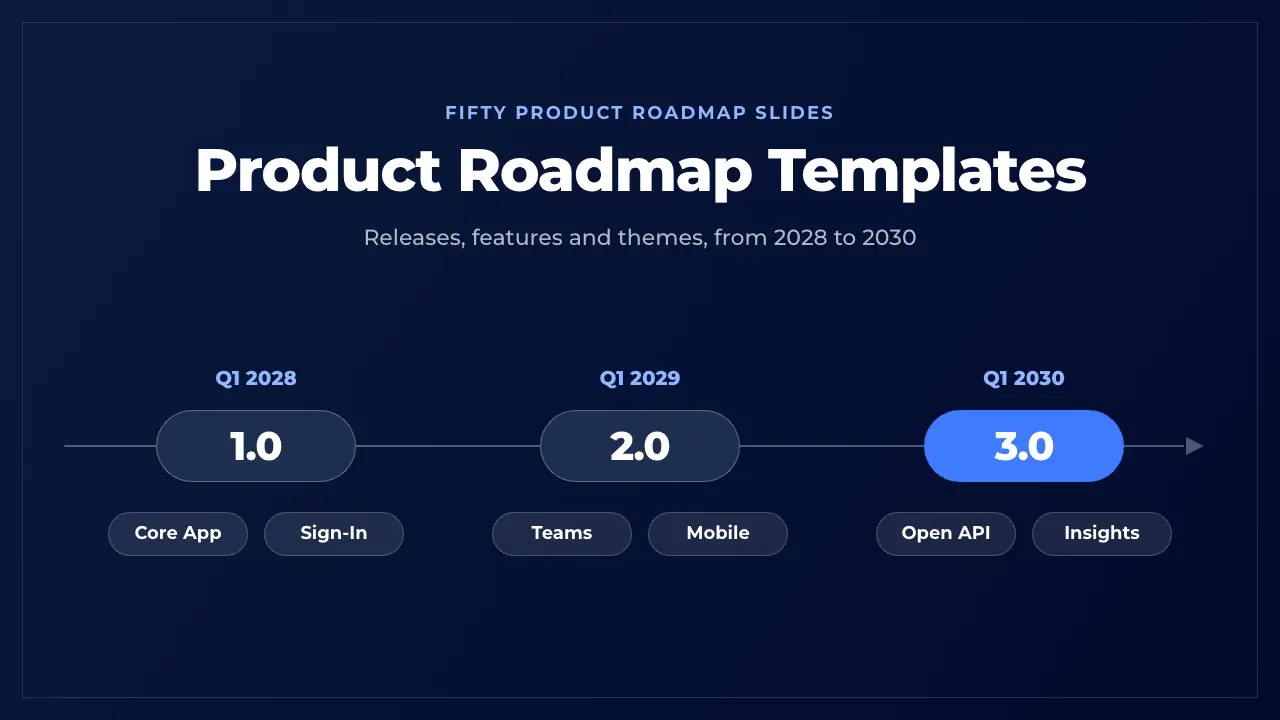
1 · Version Badges On One ArrowThe title slide of the pack: three releases of a product as large version badges on one arrow, the next release highlighted in royal blue. Each version carries its quarter and two feature chips. Use it to open a product review or a planning meeting.
2 · Now, Next, Later Feature CardsA Now, Next, Later roadmap: three columns with a horizon header, its period and two feature cards each. The horizons darken from royal blue to navy as the work gets further away. Use it when exact dates matter less than the order of work.
3 · Theme Lanes Across Four QuartersA product roadmap by theme: one lane for each theme, its icon and name at the left, and pill bars for the features at their place in the four quarters. The bar length shows how long a feature takes. Use it to show the balance of a year between user-facing work, platform work and growth.
4 · Version StairsFive versions as rising steps on one baseline, from 1.0 to 3.0, the next version in white. Under each step its quarter, a short name and what it brings. Use it to show how a product grows release by release.
5 · Release TrainA release train: four carriages on one track, one release a quarter, each with its date and the features on board. The navy engine is the first release. Use it to explain a fixed release rhythm in which features join the next train when they are ready.
6 · Release List Beside A PhotoA release plan beside a tall photo: four major versions one under the other, each with its badge, quarter, name and one line on what it brings. Use it to give a quick overview of two years of releases with a human touch.
7 · Epic Progress BarsFive epics as bars across the months of a half-year, each bar filled in royal blue as far as the work has come, the per cent at the right. A light blue line marks today. Use it in a product review to show at a glance what is done, what is behind and what has just started.
8 · Quarter Pills Over Feature CardsA one-year feature plan: four quarter pills on one axis and under each a card with an icon, the feature and a two-line note. Use it when each quarter has one headline feature to present to users, sales or the board.
9 · Three Stages On Rising PanelsThe three stages of a new product as panels that grow from left to right: MVP, Beta and general availability, each with its quarter and what it means. Use it to explain how a product goes from a first test to a full release.
10 · Now, Next, Later On A PhotoThree horizons on a full photo under a navy overlay: Now, Next and Later, each with its period and three features. Use it to open a roadmap discussion with the big picture before the details.
11 · Status Track With Six FeaturesA status track for six features: the axis is filled up to the feature in progress, shipped features carry a check, planned ones an empty marker. Each stop shows the feature and its month. Use it in a weekly or monthly product update.
12 · Releases Above And Below One AxisEight monthly releases on one axis, the labels alternating above and below so that each has room. Every release names its month and its headline feature. Use it for a steady release rhythm over most of a year.
13 · Hexagon Capabilities On One LineFive capabilities as hexagons with icons on one line, one for each quarter, the one in build highlighted in royal blue. Each has a short name and a two-line note. Use it for a platform or technology roadmap that the product depends on.
14 · Two Tracks Around A Quarter BarTwo tracks around one bar of quarters: product milestones above, platform milestones below, each card joined to its place in time. Use it to show how the work users see depends on the work underneath, and when both land.
15 · Three Years As Large FiguresThree years side by side as large figures, each with the theme that leads it and the three features that carry the theme. Use it for a long-range product roadmap that board members or investors read in seconds.
16 · Release Cards In Two RowsSix releases as cards in two rows, read from left to right and joined from the end of the first row to the start of the second. Each card shows the version, the quarter, a name and one line. Use it for a two-year release plan with minor and major versions.
17 · Version History Beside A Key FigureFour major versions on a vertical line, each with its quarter and what it brought, beside a card with the key figure the versions serve. The bar shows how far the product is to its goal. Use it to tell the story of a product with one number that matters.
18 · Chevron Chain Of Release StagesThe stages of one release as a chain of five chevrons that darken towards the launch, with the weeks above and an icon and two lines below each. Use it to show how a single version moves from the first idea to the release day.
19 · Arc Over The Target VersionFour releases on an arc that leads around the next major version, shown as a large figure in the middle with its quarter and its promise. Use it when a series of small releases builds towards one big version.
20 · Round Photo With Three HorizonsA round photo beside the three horizons of a product roadmap: committed work now, planned work next and ideas to explore later. Use it to explain how sure each part of the roadmap is before showing the features.
21 · Bars Of Features Per QuarterSix bars show how many features the team ships each quarter, the last one outlined as the forecast, beside the total as a key figure. Use it to show that the roadmap is delivered and that the pace is rising.
22 · Launch Countdown On A PhotoA countdown to a launch on a photo under a navy overlay: five large figures for the weeks left, each with the gate the team passes then. Use it in the last quarter before a major release to keep everyone on the same dates.
23 · Theme Pillars With QuartersThree themes as tall cards, each with its icon, a short promise and three features with the quarter in which they arrive. Use it when the roadmap is organised by outcome rather than by date.
24 · Snake Road In Two RowsEight releases on one road that runs left to right, turns and comes back: four in the first half of the year, four in the second. Each stop names its month and its headline feature. Use it for a full release year that is too long for one line.
25 · Feature Bars With A Today LineSix features as bars at their place in the months of a half-year: done ones in royal blue, the one in build in deep royal, the ones ahead outlined. A line marks today. Use it in a monthly review to show what is behind us and what comes next.
26 · Photo Band Above A Release AxisA photo band carries the title; under it four steps to a launch stand on one axis, each with its date, an icon, a name and two lines. Use it for the last months before a new app or a major version goes out.
27 · Rising Cascade Of Release NotesFour release-note cards that rise step by step from the first to the latest release, each with its version, its month, a name and two notes. Use it to show users or customers what a year of releases has brought.
28 · Vertical Years Beside A PhotoFive years of a product on a vertical line beside a tall photo: each year with its stage and one line. Use it for the long view of a product, from the first test of the idea to an open platform.
29 · Effort Bubbles On A Quarter AxisFour features on one axis of quarters, each drawn as a disc whose size shows the effort: S, M or L. A legend explains the sizes. Use it to make the cost of a roadmap visible next to its order.
30 · Milestone Flags On One AxisFive milestones as flags on poles that stand on one axis, each with its month, its name and one line. Use it to present the moments a team celebrates: the first test, the launch, a user goal, the next major version.
31 · Three Big Numerals Over An AxisThree large figures over one axis show how the release rhythm speeds up: four, six and eight releases a year. Use it to promise customers or a board a faster pace of delivery, or to show the result of a new way of working.
32 · Goal Card With A Feature AxisA goal card with one key figure stands beside an arrow of four features, one a quarter, each with a short note on how it serves the goal. Use it to tie a roadmap to an outcome instead of a list of outputs.
33 · Launch Checklist Beside A PhotoHalf the slide is a photo, the other half a launch checklist: five dated steps on one line, the done ones checked, the ones ahead marked with a clock. Use it in the weeks before a major release to show what is done and what is left.
34 · Rising Beta CurveOne rising curve carries the four stages of a beta programme, each with the number of users it opens to; under the baseline each stage has its quarter and a short note. Use it to show how a new product is opened to more users step by step.
35 · Feature Cards With Progress BarsFour key features hang from an axis of quarters, each as a card with its status, a short note and a progress bar with the per cent done. Use it for a product status report that shows both the plan and the progress.
36 · Release Year As A Month StripThe twelve months of a year as one strip, the six release months highlighted in royal blue and joined to their release above or below. Use it to show a release calendar at a glance, with the quiet months as clearly visible as the busy ones.
37 · Three Photo Cards With ArrowsThe next three releases as cards with a photo, a version badge, the quarter, a name and two lines, joined by arrows. Use it to make the near future of a product tangible for customers, sales or the whole company.
38 · Crossing Version BarsTwo bars cross over the year: the old version fades out while the new one grows, and under them four steps take every user across. Use it for a migration, a replatforming or the end of life of an old version.
39 · Version Pennants On A RailFive versions hang like pennants from one rail, each with its number and quarter, the planned one in white. Under each pennant a name and one line say what it brings. Use it for a two-year version plan that reads at a glance.
40 · Vertical Themes With Large YearsFour years as large figures beside one vertical line, each with the theme that leads it, a short title and one line on what it means. Use it for a long-range product strategy that a board reads in seconds.
41 · Quarter Rows Beside A PhotoFour quarters as rows, each with an arrow tag, the theme of the quarter and one line on what it means, beside a photo that runs to the edge. Use it when each quarter of a product year has one clear focus.
42 · Zigzag Of Six VersionsSix versions on one zigzag line, the labels alternating above and below, each with its number, its month and its headline feature. Use it for a lively view of a year of minor releases.
43 · Product Vision On A PhotoThe product vision in one sentence on a full photo, beside three horizons that lead to it, each with its year, a name and one line. Use it to open or close a roadmap with the reason behind every release.
44 · Six Week Columns To A ReleaseOne release cycle as six week columns on one axis, each a card with an icon, the work of that week and its result. Use it to explain a team's release rhythm to new colleagues or to stakeholders.
45 · Product Lifecycle CurveOne curve shows the life of a product: a slow start, fast growth, a calm mature phase and a new rise with the next generation. Under each stage its years and what the roadmap focuses on. Use it to explain why priorities change over the years.
46 · Round Portraits Of OwnersFive round portraits on one line, each under the stage of a release that the person owns and above their role. Use it to show who leads which part of the roadmap, so that everyone knows whom to ask.
47 · Rollout In Growing PercentagesA staged rollout as four growing figures over one filling axis: 1, 10, 50 and 100 per cent of users, each with its day, a name and one line. Use it to explain how a team releases a risky feature safely.
48 · Year Strips Beside A PhotoThree years as strips beside a tall photo, each with its year, the goal of that year and two feature chips. Use it for a product strategy over several years that a leadership team agrees on.
49 · Public Roadmap By StatusA public roadmap in four status columns, from shipped to exploring, each with the number of features and three examples. An arrow under the columns shows the direction of work. Use it to show customers openly what is done, what is coming and what is still an idea.
50 · Next Version Beside A PhotoThe next major version as a large figure with its release date and three headline features, beside a photo that runs to the edge. Use it to close a roadmap presentation with what users get next.
Fifty Forms Of A Product Roadmap In One Blue Look
A title slide with three version badges on one arrow; the horizons: Now, Next and Later as columns of feature cards, on a full photo and beside a round photo; plans by quarter: theme lanes across four quarters, quarter pills over feature cards, two tracks of product and platform work, theme pillars with quarters, effort bubbles on a quarter axis and quarterly themes beside a photo; versions and releases: version stairs, a release train, version pennants on a rail, six release cards in two rows, a version history beside a key figure, an arc over the target version, a zigzag of six versions, a cascade of release notes and a release year as a strip of twelve months; progress and status: epic progress bars, feature bars with a today line, a status track, feature cards with progress bars, a public roadmap by status and the features shipped per quarter; the way to a launch: from MVP to general release, the stages of a release as a chevron chain, a launch countdown on a photo, a launch checklist, six weeks to a release, a rising beta curve, a staged rollout and a migration from one version to the next; and the long view: years as large figures, themes by year, a product lifecycle curve, a product vision on a photo, a strategy to 2035 and the next major version beside a photo.
How To Use This Product Roadmap Template
01
Pick The Forms You Need
Choose the slides that fit your audience: a Now, Next and Later view for the whole company, theme lanes or epic bars for the product team, years as large figures or a vision for the board.
02
Set Your Colours And Fonts
Use the bar above the slides to change the colours and fonts of the whole product roadmap template at once, or apply your own Design Kit.
03
Fill In Your Releases
Replace the sample versions, features, quarters and figures with your own, or describe your plans and let Fill With AI build your own deck in this look.
04
Present Or Download
Present in the browser, share a web link or download a free PPTX file whose texts and shapes stay editable in PowerPoint.
What A Product Roadmap Shows
A product roadmap shows what a product will gain and roughly when: the releases and versions, the features they carry, the themes and goals behind them and how far each piece of work has come. It looks forward and is ordered by value and by horizon, so a team can change the details without losing the direction.
Different readers need different views. Engineers want epics and dates, as in the epic progress bars of slide 7; leaders want themes and goals, as in the goal card of slide 32; customers want to know what is shipped and what is coming, as in the public roadmap of slide 49.
Choosing The Right Product Roadmap Slide
When dates are still open, a Now, Next and Later view such as slide 2 or slide 20 keeps the promise honest. For a fixed release rhythm the release train of slide 5 or the release year of slide 36 shows when each release leaves.
For the last weeks before a launch, the countdown of slide 22, the launch checklist of slide 33 and the rising beta curve of slide 34 show what is done and what is left. For the long view, the version stairs of slide 4 and the product lifecycle curve of slide 45 tell the story over several years.
Frequently Asked Questions
Is This Product Roadmap Template Free?
Yes. You can look at all 50 slides, change their colours and fonts and edit them in the browser for free. A free account downloads the product roadmap template as an editable PPTX file.
Can I Use This Product Roadmap Template In PowerPoint?
Yes. The download is a PPTX file: every text, shape and bar stays editable in PowerPoint, so you can change versions, features, quarters and colours there as well.
Which Slide Is Best For A Now, Next, Later Roadmap?
Slide 2 shows Now, Next and Later as three columns with two feature cards each. Slide 10 puts the three horizons on a full photo, and slide 20 explains them beside a round photo.
What Is The Difference Between A Product Roadmap And A Release Plan?
A product roadmap shows the direction: themes, goals and the features that serve them over months or years. A release plan shows which features go into which release and when. This product roadmap template covers both, from theme lanes to a release train and a release year.
Can The AI Build My Own Product Roadmap?
Yes. Describe your product, your releases and your features, or attach a backlog export or a release plan, and Fill With AI builds your own deck in this look with your versions and dates.
Can I Change The Colours And Fonts?
Yes. The bar above the slides changes the colours and fonts of all 50 slides at once, and you can apply your own Design Kit to keep your brand.
Is There A Product Roadmap Slide With Photos?
Yes. Thirteen slides carry photos, for example the release list beside a photo on slide 6, the three photo cards on slide 37 and the round portraits of the owners of each stage on slide 46.
Try ExpertSlides AI For Free — The Ultimate AI Presentation Maker
Describe any topic or upload a document, and ExpertSlides designs and writes the whole deck — editable in the browser and as a PowerPoint file.

 Artificial Intelligence Presentation Templates50 slides
 Artificial Intelligence Presentation50 slides
 Business Plan Presentation Templates50 slides
 Timeline Templates50 slides
 SWOT Analysis Presentation Templates50 slides
 Gantt Chart Templates50 slides
 Organizational Chart Presentation Templates50 slides
 Flowchart Templates50 slides