Project Proposal Template: 50 Editable Slides For PowerPoint
Fifty project proposal slides in one blue look, each a different form of one part of a proposal: the problem and its causes, objectives, scope, schedule, team, budget, business case, risks and the decision you ask for. Change the colours and fonts of all of them at once, let the AI build your own deck in this look, download them as PowerPoint or edit each slide in the editor.
This project proposal template pack holds 50 slides, and each one shows a part of a proposal in its own form: the executive summary in four large numerals, the root causes as arrows pointing at one result, the objectives as from-to cards, the scope as two facing cards, the schedule as phase bands on a month scale, the budget as one ring, the payback as an arc over a key figure and the approval as three signature cards. All of them share one blue look on light, white and navy grounds, so any ten of them sit in one deck without looking borrowed.
A proposal is read by people who have to say yes or no, so every slide says one thing at a glance: at most a few lines of text, figures written on their bars, and never a dense table. Every slide is written out with the same neutral sample project — a $500,000 project of 36 weeks with a core team of eight, which goes live in November 2027 and pays back in 20 months — in the sections every project proposal has, from the background to the sign-off. You see how much each form carries before you choose it.
If you are looking for a project proposal PowerPoint template, a free account downloads the slides as a PPTX file whose texts and shapes stay editable. You can also stay in the browser: pick your colours and fonts in the bar above the slides, describe your project and let the AI build your own proposal deck in this look, or open the slides one to one in the editor.
Your Project In This Proposal Look
Describe your project, its goal, its budget and the decision you need, or attach the brief or the business case you already have. ExpertSlides builds your own project proposal deck in this look in a few minutes.
Every slide is a complete part of a project proposal with neutral sample content — one round sample budget, schedule, team and business case, roles instead of names, and years from 2027 to 2030 — that fits any project. Replace its words and figures with yours.
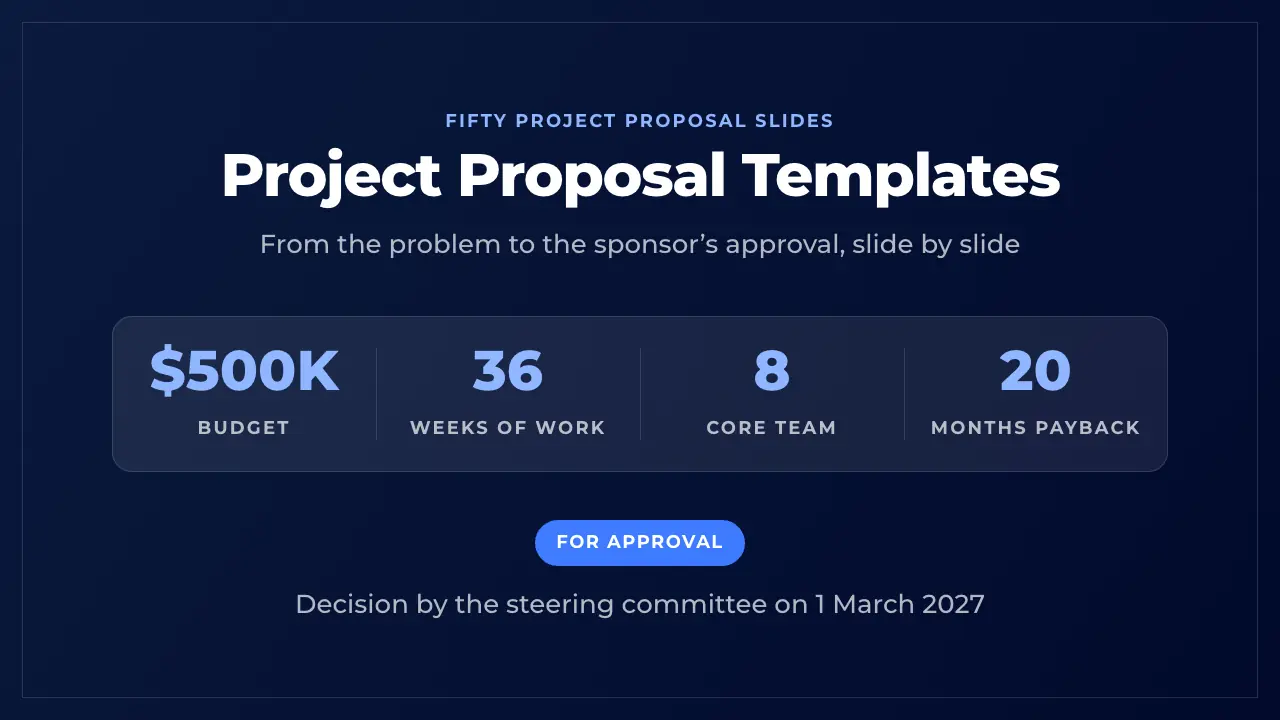
1 · Proposal Cover With Four Key FactsThe cover of a project proposal: its title, a one-line promise and the four facts a sponsor asks first — budget, duration, team and payback — in one calm band. A pill marks the proposal as up for approval, with the day of the decision under it. Put your own project’s four figures and decision date into it.
2 · Contents As A Two-Row PathThe contents of a project proposal as one path: eight numbered markers run along the top row, turn at the right and come back along the bottom row to the approval. Each section has a short title and a one-line caption. Use it after the cover to show the audience where the proposal will take them.
3 · Executive Summary In Four NumeralsThe executive summary of a project proposal in four points: the problem, the project, the cost and the benefit. Four large numerals stand over one thin line, each point with a bold title and a short body. Use it as the one slide a busy sponsor reads, and keep each body to one sentence.
4 · Background Beside A PhotoThe background of a project proposal in three short paragraphs: where the organization stands, what is changing and why it should act now. A tall photo fills the left side, the three numbered rows the right. Use it to set the scene before the problem statement.
5 · Problem Statement Over Three FiguresThe problem statement of a project proposal: one bold sentence names what holds the organization back, and three large figures prove it. Use it right after the background, and keep the statement to two lines a sponsor can repeat.
6 · Four Root Causes Pointing At One ResultThe root causes behind the problem of a project proposal: four arrow blocks, each with an icon, a short title and one line, all point at one navy card with the result they cause. Use it after the problem statement to show why the problem exists, and keep each cause to one line.
7 · Rising Bars Of The Cost Of InactionWhat the problem costs when nothing is done, added up year by year: four bars on one baseline grow from left to right, each with its total over it and its year under it. Use it to show the sponsor that waiting is also a decision, and one with a price.
8 · Three Key Figures On A Full PhotoThe size of the opportunity in three large figures on a full photo: how many requests, how many colleagues and how much can be saved. A navy overlay keeps every figure readable. Use it to show that the project is worth the effort before you present the objectives.
9 · Three From-To Objective CardsThe objectives of a project proposal as three cards that read from today to the target: an icon, the measure, today’s value in a quiet line and the target as one large figure, with the due date at the foot. Use it to set out what the sponsor can check once the project is done.
10 · SMART Objective In Five LettersThe main objective of a project proposal tested letter by letter: five large letters spell SMART, each with its word and one short line on how the objective meets it. Use it to show the sponsor that the objective is specific, measurable, achievable, relevant and time-bound.
11 · Four Success Measures As Progress BarsHow the success of the project will be measured: four rows, each with the measure, today’s value and one long track filled up to the target. The targets stand as large figures at the right. Use it to agree with the sponsor on what will be checked after the project, and when.
12 · Solution In Four Rows Beside A PhotoThe proposed solution of a project proposal in four building blocks: each row has an icon in a blue tile, a bold name and one line on what it changes, with a tall photo beside them. Use it to show how the solution answers each root cause.
13 · Three Options With The Chosen OneThe options a project team compared, as three cards from doing nothing to the full project: each with a letter, a name, one line on its effect and its one-time cost. The recommended option stands out in navy. Use it to show that the proposal was weighed against cheaper choices.
14 · In Scope And Out Of Scope CardsThe scope of a project proposal as two facing cards: what the project covers, with checks, and what it leaves out, with crosses. Both cards hold three short lines each. Use it to draw a clear line before the plan, so that nobody expects what the budget does not cover.
15 · Five Deliverables As Document CardsThe deliverables of a project proposal as five document cards with a folded corner: a number, a short name, one line on what it holds and the month it is due. Use it to show the sponsor exactly what the project hands over, and when.
16 · Work Packages As Effort BarsThe work packages of a project proposal and the effort each one takes: five bars start at one edge, their length shows the person-days, the largest package in navy. A card at the right adds them up. Use it to show where the team’s time goes and why the budget is the size it is.
17 · Five Phase Chevrons On A PhotoThe approach of a project proposal in five phases: one row of chevrons runs across a full photo, each with the phase’s name, its duration and one line on its result. Use it to show the sponsor how the work is split up before you show the dates.
18 · Phase Bands On A Month ScaleThe schedule of a project proposal as five phase bands on a scale of nine months: each band is as long as its phase, the bands step down from the kick-off to the closure, and one line marks the go-live. Use it to show the whole timetable on one slide, with the date that matters most marked.
19 · Vertical Timeline Beside A PhotoThe first month of the project as a vertical timeline beside a photo: four ring markers on one thin line, each week with a short title and one line on what is done. The last marker is filled for the signed charter. Use it to show the sponsor that the project starts fast and with a clear first result.
20 · Seven Milestones Above And Below An AxisThe milestones of a project proposal on one axis: seven ring markers, their labels by turns above and below the line, each with a date, a title and one line. The go-live marker is filled. Use it to give the sponsor the dates the project will report on.
21 · Four Decision Gates On One LineThe decision gates of a project proposal: four numbered diamonds on one line, each with its date above and the decision it stands for below. The first gate, the one this proposal asks for, is navy. Use it to show the sponsor where the steering committee keeps control of the project.
22 · Core Team In Four Round PortraitsThe core team of a project proposal in four round portraits on one level: each with its role, one line on what it owns and a pill with the time it gives to the project. Roles only, no names. Use it to show the sponsor who carries the project and how much of their time it takes.
23 · Stakeholder Rings Beside Three RowsThe stakeholders of a project proposal as rings of reach: a core in the middle and three rings around it, with the three groups beside them from the inside out, each with its size and its part. Use it to show who builds the project, who works with it and who only needs to be kept informed.
24 · Three Role Cards In Three TonesThe roles of a project proposal in three tall cards, from pale blue to navy: who decides, who leads and who delivers, each with an icon, one large word, the role and three lines on what it does. Use it to make clear who is responsible for what before the project starts.
25 · Governance Pyramid With Three LevelsThe governance of a project proposal as a stepped pyramid of three levels, from the steering committee at the top to the project team at the base. Beside each level stands how often it meets and what it decides. Use it to show the sponsor how decisions are made and escalated.
26 · Meetings As Growing Circles On A LineThe communication plan of a project proposal as four circles on one line, growing with the length of each meeting: a short daily meeting, a weekly review, a monthly committee and a half-day review at every gate. Use it to show who meets how often, and for how long.
27 · Four Resources Under A Photo BandThe resources a project proposal asks for, in four large figures under a wide photo band: the people, the person-days, the licences and the room. Thin hairlines keep the four columns apart. Use it to show the sponsor exactly what the project needs besides money.
28 · Budget Ring With A LegendThe budget of a project proposal at a glance: one ring split into five cost types, the total in its middle, and a legend beside it with each amount and its share. The contingency is part of the total. Use it to answer the first question a sponsor asks: where does the money go?
29 · Cost And Benefit Bars Around ZeroThe business case of a project proposal by year: the one-time cost hangs below the axis, the yearly savings stand above it, and a card adds up the net gain. Use it to show when the project pays back and what it is worth over four years.
30 · Payback Arc Over A Key FigureThe payback of a project proposal as one arc over a key figure: the arc runs from the go-live to the break-even, four markers stand on it with their dates, and the payback time sits large under its crown. Use it to show the sponsor how soon the money comes back.
31 · Funding Request In Three TranchesThe funding request of a project proposal: the total stands large in a navy card, and three rows beside it show how the money is released, tranche by tranche, at the gates. Use it to make the request concrete and to show the sponsor that every payment is tied to a decision.
32 · Five Risks In A Row Of HexagonsThe main risks of a project proposal in one row of five hexagons, each with an icon, the risk’s name and one line on how it would hurt the project. Use it to show the sponsor that the team knows what could go wrong before asking for the money.
33 · Three Risks Linked To Their ResponsesThe largest risks of a project proposal, each linked to its response: a white card names the risk and how it shows, an arrow leads to a blue card with what the team will do about it. Use it after the list of risks to show the sponsor that each one has an owner and a plan.
34 · Assumptions Checklist Beside A PhotoThe assumptions a project proposal rests on, as a checklist of five short sentences beside a tall photo. Each line is one condition the plan needs, so the sponsor sees at once what must hold true. Use it before the risks, and review the plan if one of them falls.
35 · Time, Cost And Scope TriangleThe constraints of a project proposal as one triangle: time, cost and scope stand on its corners, each with its figure, and quality sits in the middle. Use it to show the sponsor what is fixed and what would move if one corner changes.
36 · Four Dependency Cards With Due DatesThe dependencies of a project proposal in four cards: who the project relies on, what it needs from them and, in a band at the foot of each card, when it needs it. Use it to make the sponsor aware of what other teams must deliver so the plan holds.
37 · Benefits With A Photo And Key FigureThe expected benefits of a project proposal: a photo with the yearly saving as a key figure under it, and three rows beside them with what changes for customers and staff. Use it to show the sponsor what the money buys, in figures that can be checked later.
38 · Benefits In Four Year CardsWhen the benefits of a project proposal arrive, in four year cards: each year as a large figure, a short title and one line on what happens. The last card is filled to mark the goal. Use it to give the sponsor a benefits plan that can be checked year by year.
39 · Six Groups Around A Round PhotoWho gains from a project proposal: one round photo in the middle and six groups around it, three on each side, each with one line on what it gets. Use it to show the sponsor that the project helps many people at once, from customers to finance and IT.
40 · Strategic Fit In Three Slanted BandsHow a project proposal fits the strategy: three slanted bands name three goals of the organization, and under each one a large figure says what the project adds to it. Use it to show the sponsor that the project is not a side job but part of where the organization wants to go.
41 · Four Rising Steps To AdoptionThe change plan of a project proposal as four rising steps: inform, involve, train and support. Each step carries how many people it reaches or how long it lasts, and one line on when it happens. Use it to show the sponsor how the users are won for the new way of working.
42 · Quality Checks In Pill ColumnsThe quality plan of a project proposal: four pills on one axis name the moments, and under each a card with an icon names the check and who does it. The last check before the go-live is filled. Use it to show the sponsor that quality is built into the plan, not tested in at the end.
43 · Training Formats In Three Photo CardsThe training plan of a project proposal in three photo cards: workshops, online lessons and coaching at the desk, each with one line on how it works and how many sessions or people it takes. Use it to show the sponsor that every user is ready on the first day.
44 · Handover As One Band In Four ArrowsWhat happens after the go-live of a project proposal, as one band of four arrows: go-live, hypercare, handover and the benefit review, each with its date above and one line below. Use it to show the sponsor that the project hands over cleanly and that its benefits are still checked.
45 · Two Tracks: Approve Now Or WaitWhy a project proposal should be approved now: two tracks show the same project started now and a year later, with kick-off, go-live and break-even level with each other, and a navy card names the cost of waiting. Use it to close the business case with the price of delay.
46 · Path To Approval With The Current StepWhere a project proposal stands on its way to a decision: six steps on one thick track, the done part filled, the current step marked with a pill. Each step has its date, a one-word name and who it involves. Use it to show the committee what has been done and what still comes.
47 · Three Decisions On A Full PhotoThe decision a project proposal asks for, in three numbered columns on a full photo: approve the budget, release the team and name the sponsor. Use it as the slide the steering committee votes on, and keep each decision to one line.
48 · Next Steps On A ZigzagThe next steps after a project proposal is approved, on one zigzag line: five markers by turns low and high, each with its date, a short title and one line. The kick-off at the end is filled. Use it to show the committee that the project is ready to move the day it says yes.
49 · Three Signature Cards For ApprovalThe sign-off of a project proposal in three cards: who approves, who confirms the funding and who accepts the assignment, each with a line to sign and date. Use it as the last formal slide of the proposal, or print it for the meeting where the decision is taken.
50 · Closing Slide Beside A PhotoThe closing slide of a project proposal: three checked rows say the plan, the team and the budget are ready, a tall photo of the team stands beside them, and one quiet line says where questions go. Use it to end the proposal on the decision and the start date.
Fifty Forms Of A Project Proposal In One Blue Look
A cover with the four key facts of the project; the contents as one path in two rows and the executive summary in four large numerals; the case for the project as the background beside a photo, the problem statement over three figures, four root causes pointing at one result, the cost of doing nothing as rising bars and the size of the opportunity on a full photo; the goals as three from-to cards, one SMART objective in five letters, four success measures as progress bars and the strategic fit in three slanted bands; the answer as the solution in four rows beside a photo, three options with the chosen one in navy, the scope as two facing cards, five deliverables as document cards and the work packages as effort bars; the plan as five phase chevrons on a photo, phase bands on a month scale, the first 30 days as a vertical timeline, seven milestones above and below one axis, four decision gates as diamonds, the next steps on a zigzag and the path to approval with the current step marked; the people as four round portraits, rings of stakeholders, three role cards, a governance pyramid, meetings as growing circles and four dependency cards; the money as the resources under a photo band, a budget ring, cost and benefit around a zero line, a payback arc, the funding request in three tranches, the benefits beside a key figure, four year cards and two tracks that show the cost of waiting; the risks as five hexagons, three risks linked to their responses, the assumptions as a checklist and time, cost and scope as a triangle; the change as rising stairs to adoption, four quality checks, three training formats and the handover as one band of arrows; and the close as three decisions on a photo, three signature cards and a closing slide beside a team photo. Sixteen slides stand on navy, eighteen on light blue and sixteen on white, thirteen of them with a photo.
How To Use This Project Proposal Template
01
Pick Your Proposal Slides
Look through the 50 slides and note the forms that fit your proposal: a summary for the busy reader, the problem and its causes, the plan, the budget and the decision. Most proposals need ten to fifteen of them.
02
Set Colours And Fonts
Choose your colours and your font in the bar above the slides. The whole project proposal template changes at once, so you see your brand on every form before you download anything.
03
Put In Your Project
Press Fill With AI and describe your project, or press Edit Slides and replace the sample words, dates and figures by hand, slide by slide, in the editor.
04
Download Or Present
Download the slides as a PPTX file with a free account and copy them into your own PowerPoint deck, or present them straight from the browser.
Which Proposal Slide Fits Which Part
Why should we do it wants the case. The background beside a photo (slide 4) sets the scene, the problem statement over three figures (5) names what holds the organisation back, and the four root causes (6) show why it happens. The cost of doing nothing as rising bars (7) and the opportunity on a full photo (8) turn the problem into money and people.
What exactly will we get wants goals and limits. The three from-to cards (9) and the SMART objective (10) set targets a sponsor can check, the progress bars (11) say how success is measured, the two facing cards (14) draw the line of the scope, and the five document cards (15) name what the project hands over.
How and when wants the plan. The five phase chevrons (17) show the approach, the phase bands on a month scale (18) the whole timetable, the seven milestones (20) the dates to report on and the four diamonds (21) the gates where the steering committee keeps control. The team portraits (22), the role cards (24) and the governance pyramid (25) say who carries it.
What does it cost and what does it bring wants the business case. The budget ring (28) shows where the money goes, the bars around a zero line (29) and the payback arc (30) when it comes back, and the funding request (31) ties every tranche to a gate. Close with the risks and their responses (33), the decision you ask for (47) and the signature cards (49).
How To Use A Project Proposal PowerPoint Template
Download the pack as a PPTX file and open it in PowerPoint. Every text is a text box and every bar, band, card and marker is a shape, so you change a figure by typing over it and move a phase band by dragging it. Copy the slides you need into your own presentation and delete the rest.
Keep each slide to the part it was drawn for. A steering committee reads three to six lines in a few seconds, but nobody reads a full page of the written proposal on a slide. Put the key figures on the slides — the budget, the duration, the payback, the date of the decision — and the detailed plan into the appendix or a handout.
Set colours and fonts before you download. The bar above the slides recolours all 50 at once, which is quicker than changing shape after shape in PowerPoint. If your organisation has a Design Kit in ExpertSlides, the slides take its colours, fonts and logo instead.
Questions About The Project Proposal Template
Is This Project Proposal Template Free?
Yes. All 50 slides of the project proposal template are free. You can look at every slide and try colours and fonts on this page without an account; a free account, with no credit card, downloads the PPTX file or opens the slides in the editor.
Can I Use It As A Project Proposal PowerPoint Template?
Yes. Press Download PPTX and open the file in PowerPoint. Texts stay text boxes and bars, cards and markers stay shapes, so you edit the project proposal template there like any slide of your own, and you can copy single slides into an existing presentation.
Which Slides Belong In A Short Proposal?
For a proposal of ten slides, take the cover (slide 1), the executive summary (3), the problem statement (5), the objectives (9), the scope (14), the schedule (18), the team (22), the budget ring (28), the payback arc (30) and the decision you ask for (47).
Which Slides Show The Business Case?
The cost of doing nothing (slide 7) shows what waiting costs, the budget ring (28) where the money goes, the bars around a zero line (29) cost and savings year by year, and the payback arc (30) when the project has paid for itself. The two tracks of slide 45 compare approving now with waiting a year.
How Is A Project Proposal Different From A Business Proposal?
A project proposal asks your own organisation to approve, fund and staff one project: a sponsor, a steering committee, a budget, gates and a sign-off. A business proposal offers a service or a product to a client. The slides of this pack are written for the first case.
Can The AI Build My Own Proposal In This Look?
Yes. Press Fill With AI and describe your project, its goal, its budget and its timeline, or attach a brief or a business case. ExpertSlides builds your own deck in this blue look with your words and figures, and you can change any slide afterwards.
Does The Template Name A Company Or A Person?
No. Every slide is written with neutral sample content: general sections, round sample figures and roles such as project sponsor, project manager and steering committee instead of names. Replace them with your own project, your team and your dates.
Try ExpertSlides AI For Free — The Ultimate AI Presentation Maker
Describe any topic or upload a document, and ExpertSlides designs and writes the whole deck — editable in the browser and as a PowerPoint file.