Sales Funnel Template: 50 Editable Sales Funnel Slides For PowerPoint
Fifty sales funnel slides in one blue look, each a different form of the funnel: stacked stages, conversion rates, drop-off, an hourglass, funnels by channel and pipeline value. Change the colours and fonts of all of them at once, let the AI build your own funnel deck in this look, download them as PowerPoint or edit each slide in the editor.
This sales funnel template shows the path of your buyers from the first contact to the signed deal in 50 different forms. Every slide is a complete funnel with its stages, and most carry sample counts, conversion rates or values that you replace with your own.
It also works as a marketing sales funnel template: one slide splits the stages between the two teams, others name an owner, a tactic, a content type or a metric for each stage. The sample content is general, with roles instead of names and round figures, so it fits any team in any organisation.
Your Numbers In This Funnel Look
Describe your offer, your stages and the figures you have, or attach a sales report or a spreadsheet. ExpertSlides builds your own funnel deck in this look in a few minutes, with your stages, your counts and your conversion rates.
Every slide is a complete funnel with neutral sample content: general stages, roles instead of names and round figures that fit any organisation. Replace its stages and numbers with yours.
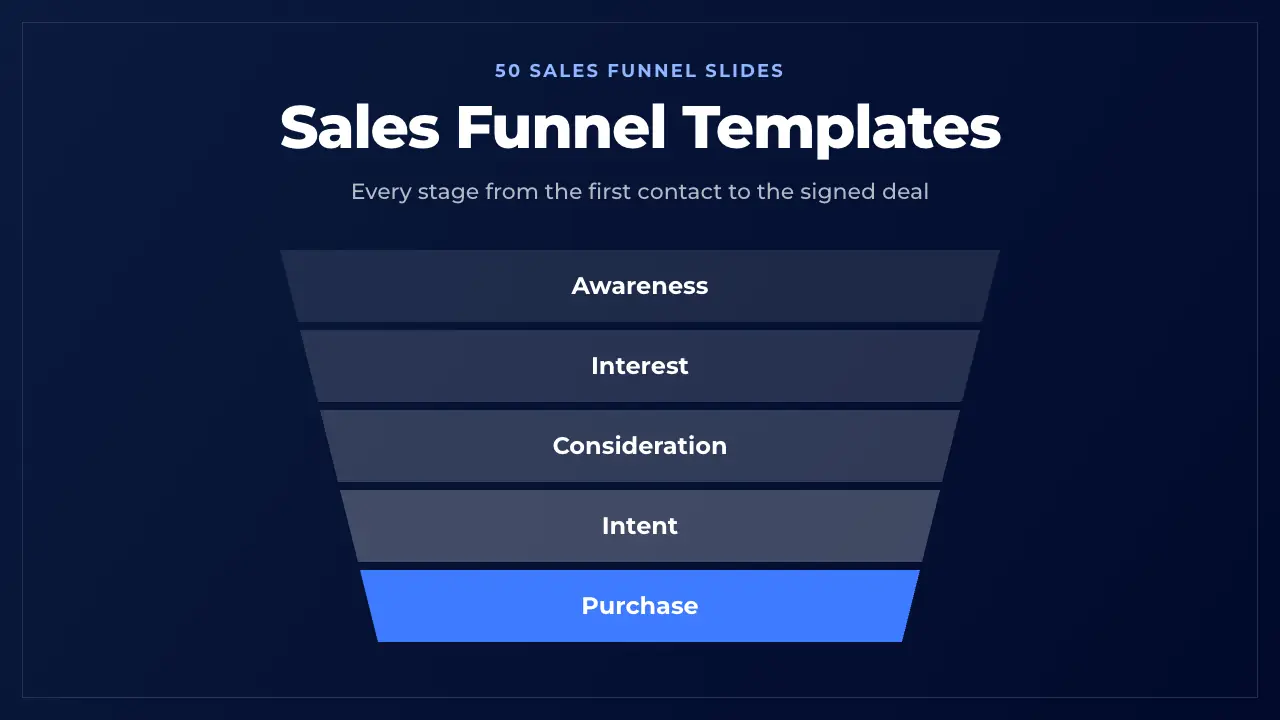
1 · Five-Stage Funnel CoverThe title slide of the pack: one calm funnel of five stacked stages, from Awareness at the top to Purchase at the bottom, the last stage in the bright highlight. Use it to open a talk on marketing, sales or growth; retitle the stages to the ones your team uses.
2 · Classic Funnel With Side LabelsThe classic five-stage funnel with each stage named and explained on the right, joined to it by a thin line. Use it to introduce the stages before you show figures; keep each description to one short line.
3 · Four-Stage Funnel Beside A PhotoA four-stage funnel from visitors to customers with the count of each stage as a large figure, beside a photo of a team at work. Use it for a quarter's funnel in round figures; swap the photo for one of your own team.
4 · Horizontal Funnel Of BarsThe B2B lead funnel read from left to right: five bars that shrink with the number of buyers left, from leads to customers, each with its count. Use it when the stages read better side by side than stacked.
5 · Funnel With Conversion RatesA five-stage funnel with the count of each stage on the left and, on the right of each stage, the share of the stage above that reached it. Use it to show where the funnel converts well and where it loses most.
6 · Stacked Bars With Large FiguresFour bars stacked and centred, each as long as the share of buyers left at that stage, with the stage's count as a large figure on the right. Use it when the numbers are the message; keep the stage names to one word.
7 · Outline Funnel On A PhotoThe four classic stages, Awareness, Interest, Desire and Action, drawn as one outlined funnel over a full photo under a navy overlay. Use it as an opener for the funnel part of a talk; keep a calm photo behind it.
8 · Six Pills With A Share ScaleSix stages as pills that narrow from Awareness to Purchase, each joined to a vertical scale with the share of buyers that is still in the funnel. Use it for a detailed funnel when the drop between stages matters more than the counts.
9 · Funnel Of Shrinking CirclesFive stages as circles on one line, each as large as the number of buyers still in the funnel, with its count inside and the stage name and its share under it. Use it for a lighter, more open view of the funnel.
10 · Three-Part Funnel Beside A PhotoThe funnel in its three classic parts, top, middle and bottom of funnel, each with the job it does, beside a tall photo of a team at work. Use it to explain which content and which team serve which part.
11 · Funnel With Icon DiscsFive stages, each with its own symbol on the edge of the funnel and its share of the start inside. Use it to explain the buyer journey at a glance; swap the icons and captions for your own stages.
12 · Funnel With Drop-Off ArrowsFive bars with their counts and, beside each, an arrow with the share lost after that stage. Use it to show where a funnel leaks and which stage to fix first.
13 · Hourglass FunnelThe funnel goes on after the sale: four stages narrow to the purchase, three widen again below it. Use it when retention and referrals matter as much as winning new customers.
14 · Chevron Funnel Under A PhotoA campaign in four chevrons, each lower than the last, with its count and conversion rate under it. Use it to report a single campaign from the first impression to the last order.
15 · Funnel Dashboard With KPIsA compact five-stage funnel beside the four numbers a sales meeting asks for: conversion rate, cost per lead, average deal and sales cycle. Use it as the one-page status of a funnel.
16 · Before And After FunnelsThe same four stages side by side, with the stage names between them. The after funnel stays wider towards the bottom, so the gain reads at once. Use it to report the effect of a change to the process.
17 · B2B Lead Funnel With PhotoThe five B2B stages with their counts, and a marked line where marketing hands over to sales after MQL. Use it to agree on definitions between the two teams.
18 · Funnel Per Quarter On An AxisFour small funnels on one axis, one a quarter, each with the customers it produced as a large figure. The lower stages widen from quarter to quarter. Use it for a yearly review of a funnel.
19 · Inverted Funnel Of ReferralsThe funnel turned over: one happy customer at the top, their reviews and referrals below, new leads at the wide end. Use it to show the value of customers after the sale.
20 · Eight Thin StagesThe full buyer journey in eight thin bars, each with its share of the start, the names stepping down the funnel on alternate sides. Use it when a five-stage funnel is too coarse.
21 · Pill Funnel With Goals And PhotoFour pills narrowing from Awareness to Purchase, each with what that stage must achieve in one short line. Use it to agree on the job of each stage before talking about numbers.
22 · Marketing And Sales FunnelOne funnel, two teams: the upper three stages in light blue belong to marketing, the lower two in royal blue to sales. Use it to show who owns what and where the hand-over lies.
23 · Right-Aligned Funnel StepsFive steps stacked against the right edge, each shorter than the one above and each carrying the share of buyers still left. Use it when the percentages matter more than the counts.
24 · Three Stages Beside A Round PhotoAttract, convert and close, each with the one task the team does there, next to a round photo. Use it for a short introduction to how the funnel works.
25 · Funnel With Stage OwnersEach stage is paired with the role responsible for it, from the Marketing Lead at the top to Customer Success at the bottom. Use it to make ownership clear across teams.
26 · Tapering Band In Four PartsA single band narrows from left to right and is divided into four stages, with the names above and the counts below. Use it on a wide screen when a horizontal funnel reads better than a vertical one.
27 · Funnel With Tactic CardsEach of the four stages is paired with a card of what the team does there, from ads and content at the top to offers at the bottom. Use it to turn a funnel into a plan of action.
28 · Funnel With Days Per StageSix stages with the average days a buyer stays in each, 48 days in all. The longest stage stands out in the highlight. Use it to find where deals stall and to shorten the sales cycle.
29 · Funnel With Target And ActualEach stage with what was planned and what was reached, the actual figure in bold. Use it in a monthly or quarterly review to see at once which stage is behind its target.
30 · Pipeline Value By StageThe money in the funnel: each stage with its pipeline value as a large figure, from all open opportunities to the deals won. Use it for a revenue forecast or a board update.
31 · Outlined Funnel Over A City PhotoFive outlined stages on the dark side of a photo that opens up towards the right, the last stage filled in the highlight. Use it as a calm section opener in a sales presentation.
32 · Funnel With One Metric EachEach stage is measured by a single number, from reach at the top to win rate at the bottom. Use it to agree on the one metric each team reports.
33 · Funnel Of Downward ChevronsFive chevrons point downwards and nest into each other, so the eye runs from Awareness to Purchase. Use it when the movement through the funnel matters more than the figures.
34 · Three Funnels By ChannelSearch, social and email as three small funnels with their counts and overall conversion rate. Email stands out in the highlight. Use it to decide where the next budget should go.
35 · Launch Funnel Over A Photo BandA launch from the first view to the first order in five bars, each lower than the last, above a wide photo. Use it to report how a launch performed.
36 · Funnel With Buyer QuestionsEach stage answers one question in the mind of the buyer: what is it, why care, why us and why now. Use it to check whether your messages fit the stage they are used in.
37 · Funnel With Cost Per StageThe cost of moving a buyer through each stage, adding up to one figure: the cost per customer. Use it in budget talks to show where the money goes and what a new customer really costs.
38 · Stacked Circles Beside A PhotoFour circles shrink from top to bottom with the share of buyers left in each, the stage names beside them. Use it for a softer, more visual take on the funnel.
39 · Funnel Inside Its TargetToday's funnel in solid colour inside the pale outline of the goal, with both sets of figures beside it. Use it to show how much wider each stage has to become.
40 · Funnel With Conversion TracksSix bars narrow from visitors to customers, each with a track showing the share passed on to the next stage. Use it to compare conversion rates between stages at a glance.
41 · Funnel With A Three-Year PlanThe funnel above and, on one axis below it, three years of work on it: content in 2027, sales enablement in 2028 and retention in 2029. Use it to present a long-term plan for growth.
42 · Hourglass Beside A PhotoThree stages narrow down to the moment of conversion, two widen again as customers stay and recommend. Use it to show the whole customer journey rather than the sale alone.
43 · Funnel With Content TypesEach stage with the kind of content that moves a buyer on, from a blog post at the top to an offer at the end. Use it to plan a content calendar around the funnel.
44 · Four Numbered Funnel StagesFour wide stages numbered 01 to 04, each with what happens there, from the first contact to the signed deal. Use it to walk an audience through the sales process step by step.
45 · Funnel Of Bars On A PhotoThe year in four numbers: four narrowing bars with white figures on a full photo under a navy overlay. Use it as a strong summary slide in an annual review.
46 · Funnel With A Marked BottleneckOne stage lights up as the bottleneck, joined to a card with the conversion rate, the cause and the fix. Use it to focus a meeting on the one problem worth solving first.
47 · Two Years Of One FunnelThe same five stages in two years, one above the other, so each column compares directly. Use it to show growth from one year to the next.
48 · Budget Shares In Three StagesTop, middle and bottom of the funnel with the share of the whole budget each takes and what it pays for. Use it to explain or challenge how a marketing budget is split.
49 · Funnel With Progress MarkersThe funnel as a project: three stages built, the fourth in progress and the fifth next. Use it in a status update when a team is setting up its funnel step by step.
50 · Funnel Summary With TakeawaysThe closing slide: the five-stage funnel in the centre, three takeaways in cards around it and the overall conversion as a key figure. Use it to end a talk with what the audience should remember.
Fifty Forms Of A Sales Funnel In One Blue Look
A title slide that is a funnel itself and the classic five stages with a line for each; funnels of stacked trapezoids, narrowing bars, pills, circles, chevrons pointing down and one band that tapers to the right; conversion rates between the stages, a share scale, progress tracks and arrows for the buyers lost after each stage; the hourglass that goes on after the sale, an inverted funnel of referrals and eight thin stages for the full journey; the B2B stages from Lead to Customer with the hand-over to sales, and marketing and sales in two colours; an owner, a tactic, a content type, a key question, a metric, a cost and the average days for each stage; target against actual, today inside the outline of the goal, before and after, a funnel per quarter, two years compared and a plan from 2027 to 2029; pipeline value, budget shares, funnels by channel, a dashboard with four key figures, a marked bottleneck with its cause and fix, a status of the stages and a closing summary. Seventeen slides stand on navy, seventeen on light blue and sixteen on white, fourteen of them with a photo.
How To Use This Sales Funnel Template
01
Pick Your Funnel Slides
Look through the 50 slides of the sales funnel template and note the forms that fit your talk: the classic five stages to explain the path, conversion rates for a review, the marked bottleneck for a decision. Most decks need three to five of them.
02
Set Colours And Fonts
Choose your colours and your font in the bar above the slides. All 50 funnels change at once, so you see your brand on every form before you download anything.
03
Put In Your Numbers
Press Fill With AI and describe your funnel, or press Edit Slides and replace the sample stages, counts and rates by hand, slide by slide, in the editor.
04
Download Or Present
Download the slides as a PPTX file with a free account and copy them into your own PowerPoint deck, or present them straight from the browser.
What A Sales Funnel Slide Should Show
A good funnel slide answers three questions at a glance: how many buyers enter, how many reach each stage and where the most are lost. Keep to four to six stages, name them the way your team does and show one number for each.
Then add the one thing your audience has to decide on. That may be the weakest conversion rate, the cost of a new customer or the value still open in the pipeline. The other figures can wait for the appendix.
Which Funnel Form Fits Your Meeting
To introduce the idea, use the classic funnel (slide 2) or the top, middle and bottom of funnel (10). For a sales review, take the conversion rates (5), the drop-off arrows (12) or target against actual (29).
For a budget talk, the cost per stage (37), the channels side by side (34) and the budget shares (48) make the case. For a board update, the dashboard (15), the pipeline value (30) and the marked bottleneck (46) say the most on one slide.
Questions About The Sales Funnel Template
Is This Sales Funnel Template Free?
Yes. All 50 slides of the sales funnel template are free. You can look at every slide and try colours and fonts on this page without an account; a free account, with no credit card, downloads the PPTX file or opens the slides in the editor.
Can I Use It In PowerPoint?
Yes. Press Download PPTX and open the file in PowerPoint. Texts stay text boxes and most funnel stages stay shapes, so you can edit this sales funnel template there like your own slides and copy single slides into an existing presentation.
Is It Also A Marketing Sales Funnel Template?
Yes. Slide 22 splits one funnel between marketing and sales, slide 17 marks the hand-over from MQL to SQL, and slides 25, 27 and 43 give each stage its owner, its tactics and its content.
Which Slide Shows Conversion Rates And Drop-Off?
The funnel with conversion rates (slide 5) puts the rate of each step beside its stage, the conversion tracks (40) draw them as bars, and the drop-off arrows (12) show the share lost after each stage. The bottleneck slide (46) marks the weakest stage with its cause and fix.
Which Stages Do The Slides Use?
The general ones: Awareness, Interest, Consideration, Intent and Purchase on most slides, the B2B stages Lead, MQL, SQL, Opportunity and Customer on slide 17, and the full journey with Evaluation, Retention and Advocacy on slide 20. Every label is a text you can overwrite.
Can The AI Build My Own Sales Funnel?
Yes. Press Fill With AI and describe your funnel, or attach a report or a spreadsheet. The AI builds your own funnel deck in this look, with your stages and your figures, and you can ask for changes slide by slide afterwards.
Can I Change The Colours And Fonts?
Yes. The bar above the slides sets the colours and the font of all 50 slides at once, and the download and the editor take over what you chose. In the editor you can also change a single slide, or put your own Design Kit on the whole deck.
Are There Sales Funnel Slides With Photos?
Yes. Fourteen slides carry a photo, among them the funnel beside a photo (slide 3), the outline funnel on a full photo (7), the chevrons under a photo band (14), the round photo (24) and the funnel over a city view (31). Replace each picture with your own in the editor or in PowerPoint.
Try ExpertSlides AI For Free — The Ultimate AI Presentation Maker
Describe any topic or upload a document, and ExpertSlides designs and writes the whole deck — editable in the browser and as a PowerPoint file.