Fifty time management slides in one calm blue look, from an urgent and important matrix and a time-blocked day to a weekly planner, an energy curve and a habit streak. Change the colours and fonts, fill them with your own content, and download them as PowerPoint.
This time management template pack gives you 50 slides on where the working week goes and how to win hours back: priorities, time blocks, focus, meetings, delegation, habits and the weekly review. Every slide carries round sample figures and 24-hour clock times that fit anyone, so you can replace them in minutes.
Use it as a time management PowerPoint template or edit it right here. The forms range from a 2 x 2 priority matrix, a donut of the week and a vertical day schedule to a priority pyramid, five day columns, an 80/20 bar, the 1-3-5 rule, a checklist of today's top five and focus bands across the week, on navy, light and white grounds.
Your Own Time Plan In This Look
Describe your topic and the AI builds a deck of your own in this blue time management style, with your priorities, your hours and your words.
Every slide with its words. Open one in the editor to change it 1:1.
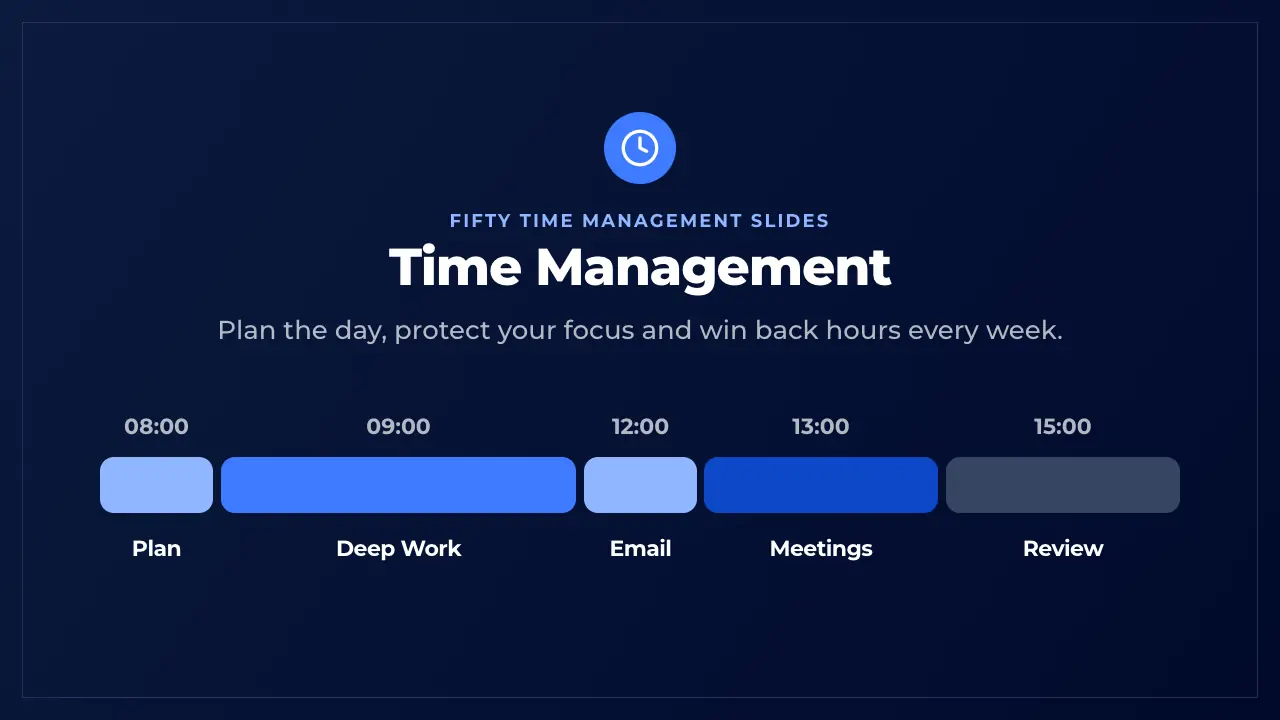
1 · Time-Blocked Day Title SlideThe opening slide of the pack: the title, a short promise and a working day from 08:00 to 17:00 cut into five time blocks. The widest block is the deep work of the morning, the other blocks hold planning, email, meetings and the review. Change the hours and labels to the day you want to show.
2 · Urgent And Important MatrixThe classic priority matrix: every task is sorted by whether it is urgent and whether it is important. The top-left field is done first, the important but not urgent work is scheduled, urgent trifles are delegated and the rest is dropped. Fill each field with examples from your own week.
3 · Week In Hours DonutA donut chart of a time audit: how the 40 hours of an ordinary week split between meetings, deep work, email, admin and interruptions. The legend at the right gives each share in hours. Track one real week and enter your own hours.
4 · Vertical Day Schedule With PhotoA day planned in time blocks from 08:00 to 17:00, each block as tall as it is long. The two deep work blocks stand out in blue, the rest of the day fits around them. Use it to show a model day or to plan your own.
5 · Focus Blocks As A Proportional BarOne round of timed focus work drawn to scale: four blocks of 25 minutes, a five-minute break after each of the first three and a long break after the fourth. Three key figures under the bar explain the rules. Change the minutes if your team works in longer blocks.
6 · ABC Priority PyramidA three-level pyramid that sorts tasks into A, B and C: the few tasks that must be done today at the top, the important ones that can wait a day in the middle and the nice-to-do tasks at the base. Use it to teach a simple daily priority habit.
7 · Weekly Planner In Five ColumnsA week planned by kind of work: every weekday has a morning and an afternoon block, coloured by what fills it. Deep work takes the mornings, meetings are grouped on Tuesday and Thursday afternoons and Friday closes with planning and the review. Swap the blocks for the pattern of your own week.
8 · Four Delegation Steps With PhotoFour numbered steps to hand off a task: choose the right task, pick the right person, explain the outcome and check in once. The photo at the left sets the scene of a calm hand-over. Use it in a training on delegation or before you assign new work.
9 · Hours Won Back As BarsFour levers of time management as horizontal bars: delegation, shorter meetings, batched email and fewer interruptions, each with the hours it gives back every week. A blue card at the right adds them up. Put in the hours your own team could win.
10 · Energy Curve Through The DayA curve of energy through a working day: high in the morning, low after lunch and rising again in the late afternoon. Three markers name the work that fits each phase. Use it to show why deep work belongs in the morning.
11 · Seven-Day Habit StreakA habit tracked through one week: six days ticked off and today still open. Under the streak a key figure says how long a habit takes to stick, and two short rules help to keep it. Use it to start any daily routine, from planning the day to a weekly review.
12 · Three Key Figures On A PhotoThree key figures on a full photo: the hours won back each week, the growth of deep work and the meeting hours saved. The navy overlay keeps every figure readable. Use it to open or close a talk on better time management with the results that matter.
13 · Daily Top Five ChecklistA to-do list that does more than list: five tasks for today, each with a priority letter and a time estimate, the finished ones ticked off. The note under the card adds up the planned time. Use it to show how a realistic daily list looks.
14 · The 1-3-5 Rule In Three ColumnsThe 1-3-5 rule as three columns: one big task in a large blue card, three medium tasks in white cards and five small tasks in slim bars. Each column is as tall as the others, so the slide shows that a day is full with nine tasks. Fill in the tasks of your own day.
15 · Time Wasters With Their FixesFour common time wasters at the left, each with an icon, and the fix for each at the right, marked with a tick. The arrows make the slide read as a plan of action. Replace the rows with the wasters your own team names most often.
16 · The 80/20 Rule As Two BarsTwo bars show the 80/20 rule at a glance: one fifth of the tasks is linked to four fifths of the results. Two short rules under the bars say what to do with it. Use it to argue for doing the vital few tasks before everything else.
17 · Week Of Focus Blocks As BandsA week drawn like a small Gantt chart: one row a day, an hour scale from 08:00 to 18:00 and a band for every block of deep work or meetings. The total of focus hours stands at the end of each row. Use it to show how deep work is planned before meetings are fitted around it.
18 · Meeting Audit Beside A PhotoThe result of a meeting audit in two figures, the weekly meeting hours before and after, with the three rules that made the difference. The photo of a short stand-up sets the tone. Put in your own hours and the rules your team agreed on.
19 · Two-Minute Rule DecisionThe two-minute rule as a tiny decision: one question at the top and two answers below it. A task that takes less than two minutes is done at once; any other goes into the plan or is handed off. Use it to teach a habit that keeps small tasks from piling up.
20 · Vertical Day Timeline With PhotoA working day as a vertical timeline: six time markers from the morning plan to the review at the end of the day, beside a photo of someone planning. Each step is one short line. Use it to show a model day or a team's agreed rhythm.
21 · Time Audit As One Stacked BarOne working week tracked in half-hour slots and drawn as a single bar: each activity takes its share of the 40 hours. A legend names the five parts, and a note at the foot gives the one rule of a time audit. Use it as the first step of any time management plan.
22 · Goals From Year To Day As StepsFive steps that come down from the year to the day: one big goal for the year, three results for the quarter, a milestone a month, the top three tasks of the week and one focus block a day. Use it to show how long-term goals turn into today's plan.
23 · Weekly Review In Five RowsThe weekly review as five numbered rows: clear the inbox, check the calendar, review the goals, pick next week's top three and close open loops. Each card gives the minutes it takes, thirty in all. Use it to start a Friday habit in your team.
24 · Scattered And Planned Day BandsTwo bands of the same working day from 08:00 to 17:00: above it falls apart into twelve fragments, below it is planned in four calm blocks. The figures at the right show what that means for focus. Use it to make the case for time blocking.
25 · Four Batching Cards With IconsFour cards, one for each kind of task worth batching: email, calls, admin and errands. Each gives its slot and how it is used. Use it to show how grouping alike tasks saves the time lost in switching.
26 · Day Theme Cards On An AxisFive day pills on one axis with a card under each: Monday plan, Tuesday create, Wednesday meet, Thursday build, Friday review. Each card has an icon, the theme and a two-line caption. Use it to show how one kind of work a day cuts the cost of switching.
27 · Three Answers Under A Photo BandA wide photo band over three columns, each a way to turn down a request: not now, not me, not this way. Every column has a sample answer and a short note on when to use it. Use it to show how to protect planned time without saying a hard no.
28 · Arc Over A Key FigureA wide arc frames the key figure: about 20 minutes to refocus after an interruption. At its sides the interruptions a day before and after quiet hours, under it the focus won back each week. Use it to make the hidden cost of interruptions visible.
29 · Four Quarter ChevronsFour chevrons in stepping blue tones carry the quarters of 2027, each with a theme and a two-line caption: set up, focus, delegate, review. Use it to turn better time habits into a plan for the year.
30 · Delegation Levels As Rising StairsFive steps rise from left to right, one for each level of delegation: do as asked, look into it, suggest a plan, decide and report, own it. Each step carries its number, the level's name and a one-line caption. Use it to agree how much freedom a task comes with.
31 · Email Routine Beside A PhotoFour stacked cards set out a simple email routine: three fixed checks at 09:00, 13:00 and 16:00 and an empty inbox every Friday. The photo at the right fades into the navy ground. Use it to agree on email habits in a team or to plan your own day.
32 · Planned Against Actual BarsFive everyday tasks as paired bars: a pale bar for the planned minutes and a blue bar for the real ones. The card at the right turns the gap into one rule, a 25 % buffer on every estimate. Use it to show why plans slip and how to estimate better.
33 · Interruptions As LollipopsFive lollipops rise from one baseline, one for each source of interruptions, with the count a day in each disc. The largest source stands out in blue. Use it in a time audit to show where focus is lost and which source to tackle first.
34 · Impact Against Effort MapSix tasks placed on a map of impact against effort, with the quick wins of high impact and low effort marked in the top-left corner. The legend at the right says what to do with each group. Use it to sort a task list before you plan a week.
35 · Shutdown Routine Beside A PhotoA 20-minute shutdown routine in four timed rows: note open tasks, pick tomorrow's top three, block them in the calendar and close the laptop. The photo at the left shows a tidy desk at the end of the day. Use it to close a talk on daily planning.
36 · Time Budget As Progress RingsA weekly time budget as four ring gauges: for deep work, meetings, email and learning the ring fills with the hours already used against the hours planned. The figure in each ring and the caption under it show what is left. Use it in a weekly review or a team check-in and enter your own planned hours.
37 · Kinds Of Rest As Four Tall CardsFour kinds of rest as tall cards, each with its length as a large figure, an icon, a title and a short rule. It shows that breaks belong in the plan just like work blocks. Use it in a talk on focus, energy or a healthy working week.
38 · Four Time Rules As Large FiguresFour rules of good time management as very large figures: two hours of deep work a day, three top tasks, 25-minute meetings and an empty inbox on Friday. Thin hairlines keep the columns calm. Use it as a summary slide or to set the rules of a team.
39 · Vertical Horizons Beside A PhotoFive planning horizons on a vertical line, from today down to the whole year, each with one short rule. The photo at the left shows planning at work. Use it to explain how the plan of a day connects to the goals of a quarter and a year.
40 · Deadline Countdown On A PhotoA deadline planned backwards: five checkpoints on one axis at 28, 21, 14, 7 and 0 days before the due date, each with a title and a short rule. The navy overlay keeps the countdown readable over the photo. Use it to plan any project, report or launch from its due date.
41 · Butterfly Chart Of Now And GoalA butterfly chart with five activities in the centre: bars to the left show the hours of the week as it is now, bars to the right the goal week. Deep work grows from 10 to 16 hours while meetings, email and interruptions shrink. Use it to show where a team wants to move its time.
42 · Habit Stacking In Three RowsThree rows, each linking a habit you already have to a new one with an arrow: after the first coffee pick three tasks, after lunch clear the inbox, before logging off plan tomorrow. Use it to show how a new routine sticks when it rides on an old one.
43 · Five Rules With Large NumeralsFive columns with large numerals give five rules for meetings: an agenda first, 25 minutes as the default, only the people who decide, one owner and notes within a day. A closing line shows the hours a team can win back. Use it to agree on meeting rules with a team.
44 · Quiet Hours With A Photo BandA photo band over three cards that set the shared rules of a team's day: focus time from 09:00 to 11:00, an open door from 11:00 to 12:00 and a meeting window from 14:00 to 16:00. Use it to agree on quiet hours that protect everyone's focus.
45 · Four Chevron Steps To StartFour chevrons lead from a hard task to its start: shrink it, set a timer, clear the desk and start now. Each step has a short caption under it, and the last chevron stands out as the moment of starting. Use it to help a team beat putting things off.
46 · Weekly Workload ColumnsA column chart of the hours worked in six weeks, with a thin line at the 40-hour mark. The weeks above the line stand out in bright blue. Use it to show where the workload peaks and to plan those weeks ahead.
47 · Half Donut Of The 168-Hour WeekA half donut splits the 168 hours of a week into sleep, work, family and friends, free time, health and learning. The legend under the arc gives each share in hours. Use it to show that work is only part of the week and to plan the rest with the same care.
48 · Delegation List With PhotoFour routine tasks, each joined by a thin line to the role that takes it over, with the hours it saves each week. A photo at the right gives the slide a human face. Fill in your own tasks and the roles in your team.
49 · Key Takeaways With NumeralsFour key takeaways, each under a large numeral with a bold title and a two-line body, divided by thin hairlines. Use it at the end of a talk to sum up the main points in the order you made them.
50 · First Week Plan With PhotoA plan for the first week after the talk: one small step for each working day, from tracking time on Monday to the first weekly review on Friday. A photo at the left keeps it personal. Use it as the closing call to action.
What Is Inside The Pack
An urgent and important matrix, a donut of where the week goes, time-blocked days, timed focus blocks, a priority pyramid, a weekly planner, delegation steps, hours won back as bars, an energy curve from 08:00 to 18:00, a habit streak, the 1-3-5 rule, the 80/20 rule, time wasters with their fixes, a meeting audit and key figures on photos. Every block, bar, text and colour stays editable.
How To Use This Time Management Template
01
Pick A Form
Choose the time management template that fits your point: a matrix for priorities, a day schedule for time blocks, bars for hours won back.
02
Set Your Colours
Use the colour and font bar to match your brand; every slide follows at once.
03
Enter Your Hours
Replace the sample times, tasks and figures with your own day, week or quarter, and drop the rows you do not need.
04
Present Or Download
Present straight from the browser or download the slides as a PPTX file for PowerPoint.
Which Time Management Form To Choose
An urgent and important matrix sorts tasks into four groups, a priority pyramid shows what comes first, and the 1-3-5 rule or a top-five checklist turns priorities into a plan for one day.
Use a vertical day schedule or proportional focus blocks to show how hours are spent, a weekly planner or focus bands for the week, and a donut, bars or the 80/20 split when the share of time carries the message.
Tips For Clear Time Management Slides
Write times as 24-hour clock times and keep every figure round, so the audience reads the plan rather than the numbers. Keep to five rows or blocks a slide and give each a short name.
Mark the block or habit that matters most with the strongest colour, and keep the same sample week across the deck so that hours, meetings and breaks add up from slide to slide.
Frequently Asked Questions
Is this time management template free?
Yes. You can view and edit every slide of this time management template for free, and download the deck as PPTX with a free account.
Can I use it as a time management PowerPoint template?
Yes. Download the slides as a PPTX file and open them in PowerPoint; the blocks, bars and texts stay editable there.
Which slides help me prioritise tasks?
The urgent and important matrix, the priority pyramid, the 1-3-5 rule, the 80/20 bars and the checklist of today's top five each show a way to decide what comes first.
Can I plan a day or a week with these slides?
Yes. The time-blocked day lists hours down a line with blocks sized by their length, and the weekly planner and focus bands spread the work over five days.
Can I change the colours and fonts?
Yes. The colour and font bar changes every slide of the time management template at once, and you can still adjust single shapes in the editor.
Can the AI build a deck from my topic?
Yes. Fill With AI takes your topic and builds a new deck of your own in this look, with your priorities, hours and words.
Are the sample figures and times consistent?
Yes. The figures are round and agree across the pack, and every time is a 24-hour clock time, so a sample week reads the same from slide to slide.
Try ExpertSlides AI For Free — The Ultimate AI Presentation Maker
Describe any topic or upload a document, and ExpertSlides designs and writes the whole deck — editable in the browser and as a PowerPoint file.