
Gamma Alternative
A Gamma alternative built around slides
Gamma and ExpertSlides both turn a prompt into a presentation. They take different paths to get there. Here is a fair look at both, so you can pick the one that fits your work.
Why people look for a Gamma alternative
Gamma is a popular AI tool for making presentations, documents and simple web pages from a prompt. Its content is built from flexible cards that can grow with their content, which works well for things read on a screen and scrolled. People who look for an alternative usually do so for one of a few reasons — and those reasons decide which alternative fits.
The most common one is the destination. If a deck has to end up in PowerPoint, on a projector in 16:9, in a client’s template or in a company’s brand, a tool built around fixed slides tends to fit better than one built around cards. Others want the deck built from their own documents and data, or want to keep editing with AI after the first draft. This page compares the two honestly, as we read Gamma’s public product pages — check Gamma’s own site for its current features and prices.
ExpertSlides and Gamma side by side
What each tool is built around, as we read its public product pages.
| Compared | ExpertSlides | Gamma |
|---|---|---|
| Format | Slides in 16:9, laid out like a PowerPoint deck | Flexible cards that can be a presentation, a document or a web page |
| Starting point | A prompt, or files: PDF, Word, CSV, pictures and your own PowerPoint | A prompt, pasted text or imported files |
| Designs | Each design is a full set of slide layouts in several colour styles | Themes that style the cards |
| Editing | Free placement of every element, instructions in plain words, Magic Fix to tidy a slide | Editing inside cards, with AI help for rewriting and restyling |
| PowerPoint | Native .pptx with editable text, charts, tables and animations (Pro and Business) | Export to PowerPoint is offered; cards are converted into slides |
| Brand | Brand kits read from your PowerPoint, PDF or website (Pro and Business) | Custom themes with your own fonts and colours |
| Sharing | A read-only web link with present and presenter view | Sharing and publishing as a web page |
| Free start | A Free plan, no credit card | A free plan is available |
Features and prices change. Check Gamma’s own site for its current plans before you decide.
When each one fits
Both are good tools. The better one is the one that matches where your deck ends up — the screen it is read on, the file it has to become, the brand it has to wear.
ExpertSlides fits when…
the deck ends in PowerPoint or on a projector, it must follow a brand, or it is built from documents and data you already have.
Gamma fits when…
the result is read on a screen and scrolled, or should become a document or a simple web page as much as a presentation.
How to switch from Gamma to ExpertSlides
You do not have to start over. A deck you already made comes along as a PowerPoint file.
Export your Gamma deck as PowerPoint
In Gamma, use its export to download the presentation as a .pptx file. Cards are converted into slides on the way, so expect some layouts to change.
The exported PowerPoint file. Open the file in ExpertSlides
Open the .pptx in the ExpertSlides editor. Its slides, pictures, tables, charts and notes are read into an editable presentation in your account.
Your own PowerPoint file opens as an editable deck. Tidy the converted slides
Slides converted from cards can come out crowded. Select one and use Magic Fix to set its elements into a clean layout, or ask: “split this into two slides”.
Magic Fix composes a crowded slide. Bring it into your brand
On Pro and Business, read a brand kit from your company’s PowerPoint template, a PDF or your website — new decks are then made in it from the start.
A brand kit read from your own files. Make the next deck from a prompt
For new presentations, type the topic or attach the documents on the home page, pick a design or your kit, and the deck is written in 16:9 slides from the start.
A new deck, made in slides from the first step.
Gamma vs Beautiful.ai — and where ExpertSlides stands
People comparing Gamma with Beautiful.ai usually weigh freedom against structure.
Structure
ExpertSlides keeps slides in a design’s layouts, so a deck stays consistent without manual alignment.
Freedom
Every element can still be moved, resized and restyled; Magic Fix brings a slide back into order when it needs it.
Content first
The AI writes the whole deck from your prompt or documents, then lets you edit it by hand or by asking.
The file at the end
Whichever you compare, open the exported PowerPoint file: on Pro and Business ExpertSlides writes editable text, native charts and tables.
Beautiful.ai alternative
If you like smart layouts but want the AI to write the whole deck from your documents first, ExpertSlides is worth a test.
How to test any Gamma alternative fairly
A comparison table can only tell you what a tool is built for. Whether it suits you shows in an hour with your own material. Take a topic you really have to present, and make the same deck in each tool you are considering.
Use the same input
The same prompt, the same document, the same number of slides. Otherwise you are comparing your prompts, not the tools.
Judge the deck you would present
Read it as your audience would: is the content right, is the structure clear, does slide eight still look like slide one? Count how many slides you would have to rebuild.
Make three real changes
Change a headline, add a chart from your data, move a picture. How long did each take, and did the slide still look right afterwards?
Open the exported file
If the deck goes on in PowerPoint or Google Slides, open the export there. Editable text and native charts, or pictures of slides — this is often what decides it.
One topic, made in ExpertSlides
Who switches — and why
Common reasons to look beyond a card-based tool, and what ExpertSlides does about each.
Consultants and agencies
Client decks have to arrive as PowerPoint files in the client’s template. Native .pptx export and brand kits cover both.
Corporate teams
Company decks live in 16:9 slides and in the company brand, and they are presented in meeting rooms.
Analysts and researchers
Decks built from reports and data, where every figure has to come from the source.
Teachers and trainers
Lessons shown on a projector, slide by slide, with speaker notes and a presenter view.
Founders
Pitch decks sent as PDF and presented in 16:9, with the traction chart built from their own figures.
Teams with a template
A company PowerPoint template read into a brand kit, so every new deck starts in it.
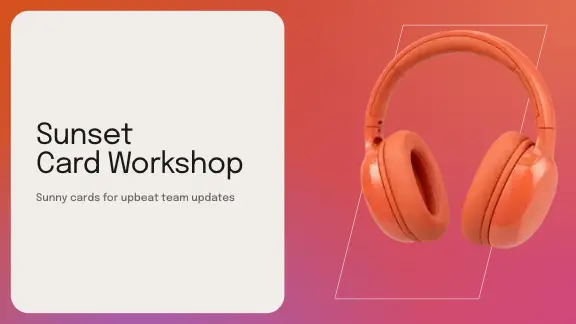
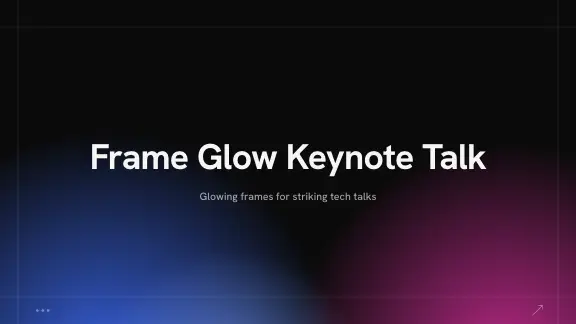
See the designs before you switch
Real covers of the designs a deck is made in.






For teams moving their decks
Shared folders
On Business a team keeps presentations in shared folders and edits them together, live.
One brand for everyone
Brand kits on Pro and Business hold the colours, fonts, logo and your own slides.
Files that leave cleanly
PowerPoint export on Pro and Business. Every plan exports PDF; on Free a PDF carries the ExpertSlides mark.
Questions, answered
Is ExpertSlides a good Gamma alternative?
If you need slide decks that open in PowerPoint, follow your brand or come from your own documents, yes. If you mostly publish scrollable pages, Gamma may suit you better.
Can I move a deck from Gamma to ExpertSlides?
Export it from Gamma as a PowerPoint file and open that file in the ExpertSlides editor.
Is ExpertSlides free?
Start free — no credit card required. The PowerPoint export is part of Pro and Business.
What about Beautiful.ai?
Beautiful.ai is known for smart slide templates that keep a layout in order as you add content. ExpertSlides also keeps slides in a design’s layouts, and writes the whole deck from a prompt or documents first.
Does ExpertSlides make web pages or documents like Gamma?
No. ExpertSlides makes slide decks. A deck can be shared as a read-only web link and exported as PowerPoint, PDF or a single HTML file, but it stays a presentation.
Can I try both on the same topic?
Yes, and we recommend it. Use the same prompt and the same document in both, and compare the decks you would actually present.
Is ExpertSlides affiliated with Gamma or Beautiful.ai?
No. ExpertSlides is an independent product.
Gamma is a trademark of its owner. Beautiful.ai is a trademark of its owner. ExpertSlides is not affiliated with either.

Create Slides in Under 90 Seconds
No credit card required · Instant access