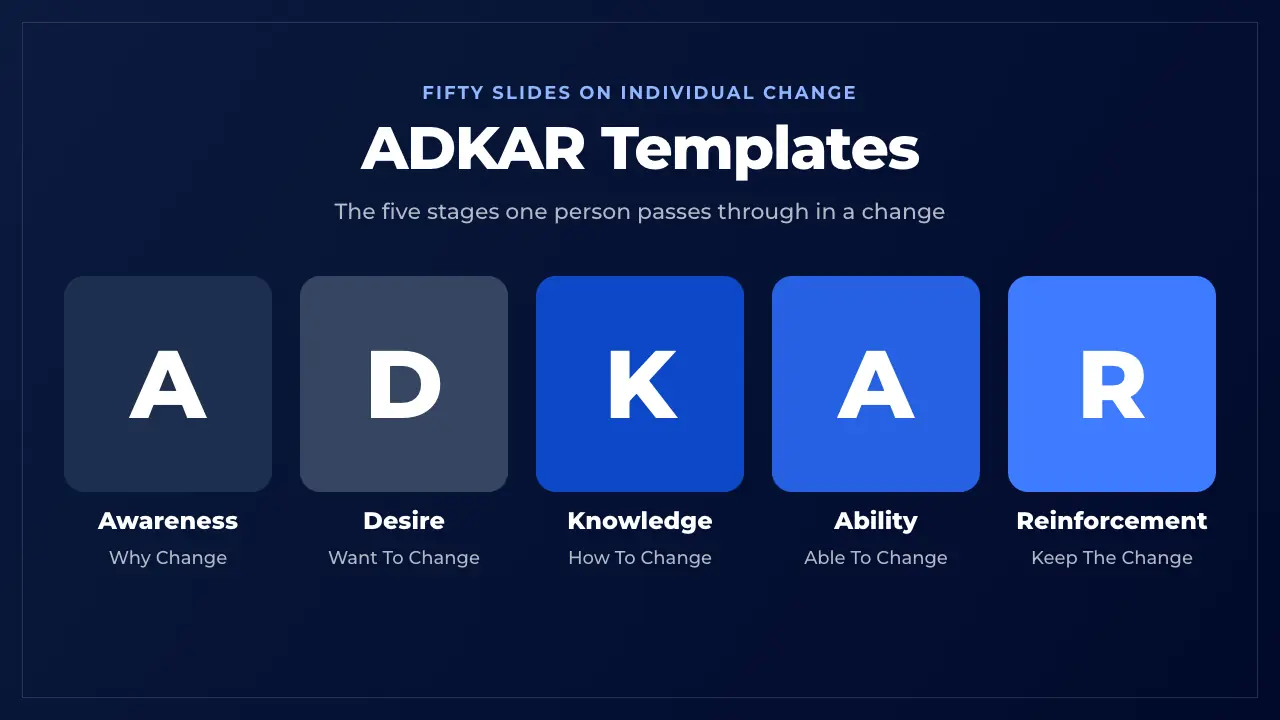
Fifty slides on the five stages one person passes through in a change: Awareness, Desire, Knowledge, Ability and Reinforcement. Change the colours and fonts, add your own scores and download the deck as PowerPoint.
This ADKAR template gives you 50 slides on how one person moves through a change, in the order Awareness, Desire, Knowledge, Ability and Reinforcement. It explains each stage, shows the signs that someone is at it, scores a person or a team from 1 to 5 and marks the first low stage as the barrier point.
From there the slides turn the score into action: what to do at each stage, who helps, what to say, when to train, how to track a rollout, how to read resistance and how to keep the change in place. The forms range from stairs, padlocks and a balance beam to scorecards, a heat map, real charts and swimlanes, on navy, light and white grounds.
Your Own ADKAR Deck In This Look
Describe the change and the people it affects, and the AI builds a deck of your own in this blue style, with your stages, your scores and your words.
Every slide with its words. Open one in the editor to change it 1:1.
1 · Cover With The Five ADKAR LettersThe opening slide of the pack: the five letters of the ADKAR model in large tiles, each with its stage beneath it. Use it to open a talk or a workshop on how one person moves through a change.
2 · Five Rising StairsThe five stages as stairs: each step rests on the one before it and adds what the person gains. Use it to introduce the model in one view.
3 · Vertical Acrostic With PhotoThe letters of the model read downwards, each with its word and a one-line definition, beside a photo of people at work. Use it when the audience meets the model for the first time.
4 · Statement On A Full PhotoA statement slide on a full photo: change happens one person at a time, and each person passes through the same five stages. Use it to move the talk from the organisation to the individual.
5 · Letter Disc With Three QuestionsThe first stage in depth: a person has Awareness when they can answer three questions about the change. Use it to prepare the first communication.
6 · Balance Of Reasons For And AgainstA balance beam weighs what pulls a person towards the change against what holds them back. Use it to talk through motivation with a team or a single person.
7 · Split Panel: Know What, Know HowKnowledge has two halves: what is new, and how to do it. Use this slide to plan the content of training for one group.
8 · Bridge From Knowing To DoingKnowing how is not yet being able to. Four kinds of practice form a bridge across that gap. Use it to plan coaching and time for practice.
9 · Foundation Layers With PhotoFour layers hold a change in place, from a word of praise up to routines built into daily work. Use it to plan what happens after go-live.
10 · Descending Path Of Five PadlocksEach stage is a lock that opens the next one. Open locks show what a person has reached; the first closed lock is where to work. Use it to explain why no stage can be skipped.
11 · Five Staggered Speech BubblesWhat a person says tells you where they stand. Each bubble carries a typical sentence for one of the five stages. Use it to train line managers to listen for the stage.
12 · Measuring Ruler From 1 To 5A ruler explains the scale used for every stage: from 1, not at all, to 5, fully. A score of 3 or below is low. Use it before a team scores itself.
13 · Rating Scorecard Of One PersonA scorecard for one team member, with up to five dots per stage. The first stage at 3 or below is the barrier point. Use it in a one-to-one conversation.
14 · Threshold Bars With PhotoFive bars show a team's scores with a line at 3. The first bar under the line is the barrier point, and everything after it waits. Use it to explain where to act first.
15 · Column Chart With Key FigureA real, editable column chart of the team's average score per stage, beside a card naming the barrier point. Replace the five values with your own survey results.
16 · Donut Of Barrier PointsA real, editable donut chart shows at which stage the 120 people are stuck, beside the largest group as a key figure. Replace the counts with those of your own assessment.
17 · Stage Funnel With CountsA real, editable funnel chart counts how many of the 120 people are past each stage. The steepest drop shows where the change is losing people.
18 · Heat Map Of Teams By StageA heat map of four teams across the five stages, shaded by score, with each team's barrier point in navy. Use it to decide which team needs which kind of support.
19 · Three Portraits With Stage MetersThree people in one team stall at three different stages, so each needs different help. Use it to show why a single message or training cannot reach everyone.
20 · Butterfly Chart Of Two TeamsTwo teams mirrored around the five stages: one stalls at Desire, the other at Ability. Use it to show that teams in the same change need different support.
21 · Decision Path With No ExitsFive questions asked in order find a person's barrier point: the first No is the stage to work on, and it names the action. Use it as a guide for line managers in a one-to-one.
22 · Five Chevrons With ActionsFive chevrons carry the stages from left to right and name the single most useful action for each. Use it as the short version of a change plan.
23 · Personal Plan Form With PhotoA one-page plan for one person: the barrier, the goal, the next action, who helps and by when. Print it or fill it in together in a one-to-one.
24 · Swimlanes Of Who Leads Which StageThree lanes show who leads at which stage: the sponsor early, the line manager throughout and the coach during learning and practice. Use it to agree roles before a rollout.
25 · Orbit Of Three RolesOne person in the centre with the three roles around them: sponsor, line manager and change coach. Use it to show that support is organised around the individual.
26 · Segmented Bar Of 15 MinutesA weekly talk of 15 minutes between a line manager and a team member, split by stage with one question each. Use it as the agenda of a regular check-in.
27 · Chat Bubbles Beside A PhotoFour short exchanges show how a coach finds a person's barrier point by asking instead of telling. Use it to train coaches and line managers.
28 · Alternating Messages On One AxisThe message that fits each stage, in order along one line. Use it to plan what the sponsor and line managers say, and when.
29 · Stacked Bars Of Who CommunicatesA real, editable stacked chart of who carries the message at each stage, as a share of all communication. Early stages lean on the sponsor, later ones on line managers and coaches.
30 · Gantt Bands Of Training SessionsBriefings for Awareness and Desire, then four sessions of 2 hours at the Knowledge and Ability stages, on a scale of twelve weeks. Use it to plan training only once Awareness and Desire are in place.
31 · Key Figure And Sessions On A PhotoOne large figure on a photo under a navy overlay, with the four training sessions on a line beneath it. Use it to announce the training that builds Knowledge and Ability.
32 · Kanban Board Of People By StageA board with one column per stage: each token stands for six people whose barrier point is there. Use it in a weekly rollout meeting to see where the group stands.
33 · Line Chart Of People ThroughA real, editable line chart counts the people through all five stages, week by week. Use it to report progress to the sponsor.
34 · Grouped Bars Of Three WavesA real, editable chart compares three waves of 40 people on each stage at week 12. Earlier waves have had more time, so they score higher.
35 · Vertical Milestones With PhotoFive milestones of a rollout on one vertical line: the first score, the three waves and the second score. Use it to show the plan of a 12-week rollout.
36 · Dumbbell Chart Before And AfterEach stage shows two points joined by a line: the score at the start and at week 12. The longest lines show where the work paid off most.
37 · Large Donut Over A Key MessageA real, editable donut shows how many of the 120 people are through all five stages at week 12, with one key message beneath it. Use it as the headline of a progress report.
38 · Objections Mapped To StagesEach typical objection points to one stage, so resistance can be read as a diagnosis. Use it to help managers respond to the cause and not the symptom.
39 · Round Photo Between Hear And ReplyThree common sentences on the left and the reply that fits the stage behind them on the right, around a round photo. Use it to prepare line managers for difficult conversations.
40 · Three Brackets Over Five StagesThe five stages fall into three questions: why change, how to change, and how to keep it. Use it as a simple way to explain the model to a large group.
41 · Nested Arches Of The Five StagesFive nested arches show that each stage rests on the one before it, so a weak early stage weakens all that follow. Use it to explain why order matters.
42 · Mistake And Better Way PairsFour mistakes that stall a change, each paired with what works better. Use it in a briefing for managers before a rollout.
43 · Photo Beside Four Day CardsFour fixed moments after go-live keep the new way in place: 30, 60, 90 and 180 days. Use it to plan what happens once the project team has moved on.
44 · Two Smooth Lines Over TimeA real, editable chart compares the share of people still working the new way, with and without reinforcement. Use it to win time and budget for the weeks after go-live.
45 · Staggered Hexagons Of Six WaysSix ways to reinforce a change, each in its own hexagon. Pick the two or three that fit your culture and use them every week.
46 · Four Large Figures On HairlinesThe rollout in four numbers: people, weeks, helpers and the share through all five stages. Use it as a one-glance summary for a sponsor.
47 · Wide Photo Over A ChecklistFour steps for the first thirty days, in a two-by-two checklist under a wide photo. Use it as the practical close of a training or kick-off.
48 · Two Columns Of Numbered RulesSix rules that keep the model honest in daily use. Use it as a closing reference or a printed handout.
49 · The Whole Model On One PageThe whole model on one page: for each stage the goal, the main action and who helps. Use it as a summary slide or a handout.
50 · Closing With Three Next StepsA closing slide with three next steps and the five letters of the model as a reminder. Use it to end a talk with a clear call to action.
What Is Inside The Pack
A cover with the five letters, a slide for each stage, signs to listen for, a scale from 1 to 5, a scorecard for one person, team scores as real charts, a heat map of four teams, a decision path of five questions, swimlanes of who helps, a weekly check-in, messages and training by stage, a rollout board, before and after scores, objections mapped to stages and ways to reinforce, with photos on several slides. Every text, shape and chart stays editable.
How To Use This ADKAR Template
01
Pick Your Slides
Choose the slides of the ADKAR template you need: the five stages to explain the model, the scoring slides to assess people, the plans to act.
02
Set Your Colours
Use the colour and font bar to match your brand; every slide follows at once.
03
Add Your Scores
Replace the sample figures with your own scores from 1 to 5, and mark the first stage at 3 or below as the barrier point.
04
Present Or Download
Present straight from the browser or download the slides as a PPTX file for PowerPoint.
What An ADKAR Deck Should Cover
Start with the five stages and why their order matters: nobody can build Ability before they have the Knowledge, or Knowledge before they have the Desire to learn. Slide 2 shows this as stairs and slide 10 as a path of locks.
Then measure and act. Score each stage from 1 to 5 (slides 12 and 13), find the first low stage (slide 14), choose the action and the helper for it (slides 22 and 24), and track the group by stage as the rollout goes on (slide 32).
Tips For Clear ADKAR Slides
Work on one barrier at a time. Training someone who does not yet want the change rarely helps, so let the score decide what comes next. The five questions on slide 21 make this easy to do in a short talk.
Treat resistance as a sign of a missing stage rather than a problem with the person. Slide 38 links typical objections to their stage, and slide 43 plans the moments after go-live that keep the new way in place.
Frequently Asked Questions
Is this ADKAR template free?
Yes. You can view and edit every slide of this ADKAR template for free, and download the deck as PPTX with a free account.
What do the five letters of ADKAR stand for?
Awareness of the need to change, Desire to take part, Knowledge of how to change, Ability to do it in real work, and Reinforcement that keeps the change in place. A person passes through them in that order.
What is the barrier point?
It is the first stage in the order that scores 3 or below on a scale of 1 to 5. Work on that stage first, because the stages after it depend on it.
How do I score a person or a team?
Rate each of the five stages from 1 to 5 by what you see at work. The ADKAR template has a scale on slide 12, a scorecard for one person on slide 13 and team scores as an editable chart on slide 15.
How is ADKAR different from a change management plan?
A change management plan covers the whole organisation's programme. ADKAR looks at the individual and asks which of the five stages each person has reached, so the two work well side by side.
Can I change the colours and fonts?
Yes. The colour and font bar changes every slide at once, and you can still adjust single shapes, texts and charts in the editor.
Can the AI build a deck from my topic?
Yes. Fill With AI takes your topic and builds a new deck of your own in this look, with your stages, figures and words.
Try ExpertSlides AI For Free — The Ultimate AI Presentation Maker
Describe any topic or upload a document, and ExpertSlides designs and writes the whole deck — editable in the browser and as a PowerPoint file.