Agenda PowerPoint Template: 50 Editable Slides For Talks, Meetings And Event Days
Fifty agenda slides in one blue look, each a different form of an agenda: numbered lists, timed programmes with breaks, workshop and conference days, section dividers that show where the audience stands and a closing recap. Change the colours and fonts of all of them at once, let the AI build your own deck in this look, download them as PowerPoint or edit each slide in the editor.
This agenda PowerPoint template holds 50 slides, and each one shows an agenda in a different form: a numbered list in two columns, a timed list beside a photo, a conference day with its coffee break and lunch, a webinar drawn to scale, a two-day programme, a table of contents with slide numbers and a divider that marks the current section. If you were looking for an agenda template that does more than list six lines, every slide here is a finished agenda you can show as it is. All of them share one blue look on light, white and navy grounds.
The sample content is neutral: general sections such as introduction, key findings, proposal, discussion and next steps, round times and roles instead of names, so each slide fits a team meeting, a board meeting, a training, a workshop, a launch briefing or an event evening after a few edits. Beside the opening agenda you find the slides you show again during a talk, from the progress stepper and the progress ring to the tabs with an open section, and a recap for the end.
A free account downloads the slides as a PPTX file whose texts and shapes stay editable in PowerPoint, Keynote and Google Slides. You can also stay in the browser: pick your colours and fonts in the bar above the slides, describe your talk and let the AI build your own deck in this look, or open the slides one to one in the editor.
Your Next Agenda In This Look
Describe the talk, meeting or event you are planning, its sections, its times and who leads each part. Or attach your notes or a draft programme. ExpertSlides builds your own deck in this look in a few minutes, with your agenda and the slides that follow it.
Every slide is a complete agenda with neutral sample content, general sections, round times and roles instead of names. Replace its items, times and figures with yours.
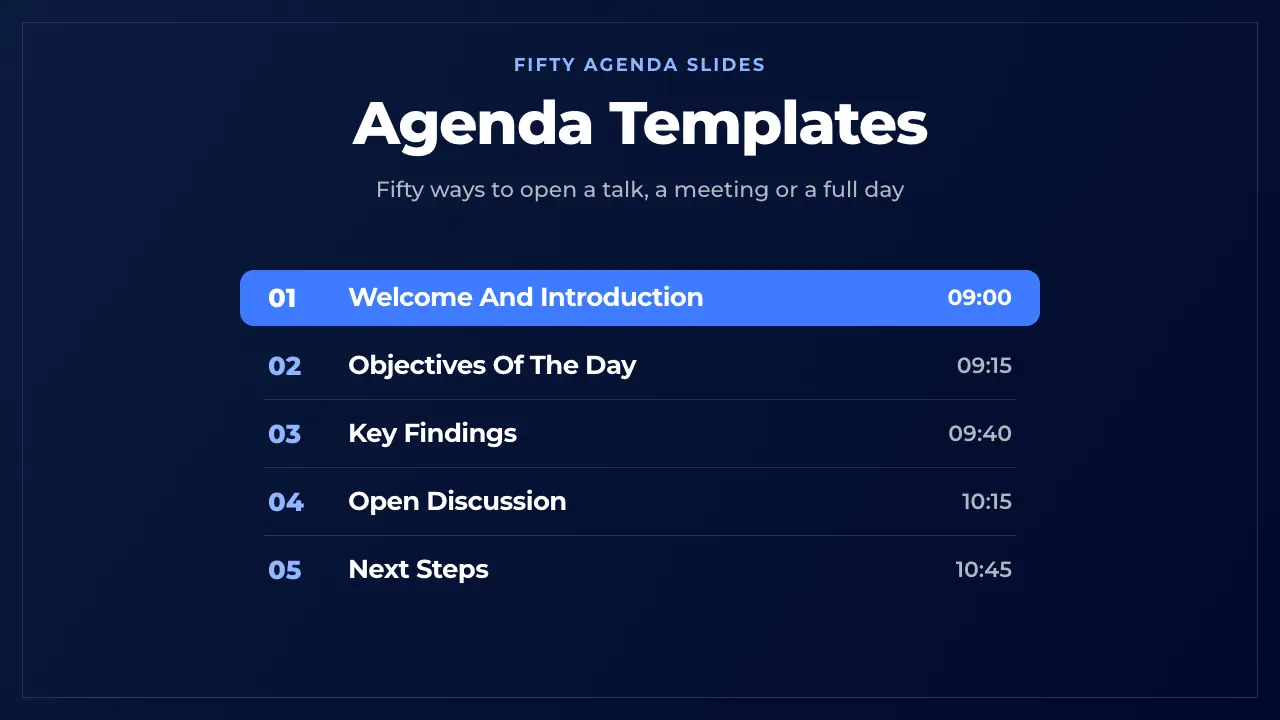
1 · Title Slide With A Five-Item AgendaThe opening slide of the pack is an agenda itself: a centred kicker, headline and lead over five numbered items with their start times. The first item sits on a bright bar to mark where the session begins. Use it to open any talk, meeting or workshop.
2 · Numbered Agenda In Two ColumnsA classic agenda: six numbered sections in two columns, each with a large royal blue number, a bold title and a one-line caption. It reads at a glance from 01 to 06. Use it at the start of any presentation of about an hour.
3 · Timed Agenda Beside A PhotoA photo fills the left side of the slide; on the right five agenda items run down with their start times, titles and one-line captions. Use it for a team session or a workshop of two hours and swap the photo for one of your own.
4 · Section Divider With Current ItemThe agenda shown again between sections: five rows, the finished ones ticked, the current one on a bright bar and the coming ones with an empty ring. Each row gives its minutes. Repeat it before every section so the audience always knows where it stands.
5 · Conference Programme With BreaksA full conference day as a programme: seven rows from registration at 08:30 to the closing keynote, each with its time, session and who leads it. The coffee break and lunch stand out as quiet tinted bands. Use it for any event day with several sessions.
6 · Five Agenda Cards With IconsFive equal cards show the parts of a presentation from opening to close. Each card has its part number, a white icon centred in a blue disc, a bold title and a short line on its purpose. Use it when the agenda should look as clear as the talk itself.
7 · Four Big Numerals Over RulesFour agenda topics stand side by side as large numerals 01 to 04 over thin rules, each with its start time, a bold title and a two-line body. The first rule is bright to show where the hour begins. Use it for a review or an update with a few equal topics.
8 · Morning And Afternoon ColumnsA one-day workshop shown in two halves: a morning card and an afternoon card, each under its own pill with its hours, with three timed sessions and a line on what happens in each. Use it for any workshop, training or offsite day with a lunch break.
9 · Proportional Time Bar Of A WebinarThe minutes of a webinar shown to scale: one bar in five parts whose widths match their minutes, with a colour key, a title and a short line for each part below. Use it for a webinar, a pitch or any talk with a strict time limit.
10 · Event Programme On A Full PhotoAn event programme laid over a full photo under a navy overlay: a centred heading and four glass cards, each with its number, start time, title and a short line. Use it to open a conference evening, a launch event or a celebration.
11 · Two-Day Programme In Two PanelsA two-day programme in two coloured panels, each under a day pill with its theme and four timed sessions. The panels make it easy to see what happens on which day. Use it for an offsite, a retreat or a two-day training.
12 · Numbered Vertical Agenda With PhotoFive numbered circles run down a vertical line, each with a bold title and a one-line caption, beside a tall rounded photo. The line makes the order of the session easy to follow. Use it for a training, a course day or an onboarding session.
13 · Course Modules In Two RowsThe agenda of a course as six module cards in two rows, each with its module number, a bold title and when it runs. The first module is highlighted as the starting point. Use it for a training programme, a course outline or a learning path.
14 · Five Chevrons From Context To DecisionFive numbered chevrons lead from context to decision, each a shade darker than the one before, with a start time, a title and a short line below. The arrows show that every part builds on the last. Use it for a decision paper, a proposal or a board presentation.
15 · Agenda Rows With Duration BarsSix agenda items with their start times, each followed by a bar as long as its minutes and the minutes at the end of the row. The longest bar shows at once where most of the time goes. Use it for a meeting or a session where timing matters.
16 · Agenda With Round PortraitsFour round portraits stand on one line, each over a start time, a session title and the role that presents it. It shows the audience who will speak and when. Use it for a meeting or an event with several presenters and put in your own photos.
17 · Half-Day Schedule With BreaksA half-day schedule in six timed rows: the sessions on white bars, the two breaks as quiet outlined rows. A navy card on the left gives the total time at a glance. Use it for a morning workshop, a training or a planning session.
18 · Agenda Tabs With An Open SectionThe agenda as five vertical tabs; the open tab flows into a large card that shows what the current section covers, how long it takes and its three main points. Repeat the slide with the next tab open as you move through the talk.
19 · Five Hexagons On One LineFive numbered hexagons stand on one line, the first one bright, each over a start time, a title and a short caption. It suits a short, regular meeting such as a weekly project update. Change the five steps to the items of your own meeting.
20 · Four Sessions In Photo ColumnsFour tall photos stand in a row, each with a numbered badge and under it the room and time, the session title and one line on what happens. Use it for an event day, a fair or a conference with sessions in different rooms.
21 · Board Agenda With Purpose TagsA formal board agenda: six numbered items, each with the role that presents it and a tag that says whether the board is asked to decide, discuss or only take note. Use it for board, committee or steering group meetings where the purpose of each item must be clear.
22 · Agenda Stepper With Current SectionA stepper of six agenda sections on one line: the finished ones ticked, the current one ringed, the coming ones quiet. A wide card below says what the current section covers and how long it takes. Show it between sections of a long presentation.
23 · Start Times Over CardsA day in four blocks: large start times stand over one thin axis with a dot for each block, and under them four white cards with an icon, a title and a short caption. Use it for a workshop day, an offsite or a training with a few long blocks.
24 · Agenda List With A Facts BandSix numbered topics run down the left with the role that presents each; a navy band on the right shows the number of topics, the length, the attendees and the time. Use it for a recurring review or a regular team meeting.
25 · Icon Agenda With MinutesFive agenda items run down the slide, each with a white icon in a blue disc, a bold title, a one-line caption and its minutes on the right. The minutes stand out so everyone sees how the time is shared. Use it for planning meetings and reviews.
26 · Three Day Columns With PillsA three-day programme in three columns: each day has a pill with its theme in a deeper shade of blue, and three timed sessions run under it, split by thin rules. Use it for offsites, retreats, summits or a training week.
27 · Agenda Along A Winding RoadA morning agenda as a winding road with five numbered stops; each stop has its time, a title and a short caption, set above or below the road by turns. It turns a plain list into a journey the audience can follow. Use it for workshops and kick-offs.
28 · Six Items Around A Round PhotoA round photo stands in the middle of the slide with three numbered agenda items on its left and three on its right, each with a title and a short line. The order runs down the left, then down the right. Use it for team meetings and reviews with six points.
29 · Stacked Session Cards With KeynoteA conference morning as five stacked cards, each with its start time in a tinted block, the talk title and the speaker role. The keynote card is filled in royal blue so it stands out. Use it for conferences, summits or internal events with several speakers.
30 · Agenda Items With Their QuestionsFour numbered agenda items stand in tinted cards on the left, each linked by an arrow to the question it answers on the right. The audience sees not only what comes but why. Use it for strategy talks, proposals and any presentation that should answer clear questions.
31 · Agenda List With Section PreviewFive numbered sections run down the left with their minutes; the next one sits on a bright bar. On the right a photo, a title and two lines preview what the section is about. Use it as a divider before each main part of a presentation.
32 · Table Of Contents With LeadersA table of contents in the classic form: seven numbered sections, each with a fine leader line running to the slide it starts on. It helps readers find their way through a long report or a deck that is sent rather than presented.
33 · Two Parts With A Break BetweenA long session split into two parts that stand side by side, each with its hours and three timed items with a caption. A tinted band between them marks the break. Use it for half-day sessions, trainings or any agenda with one main break.
34 · Evening Programme On A PhotoAn evening programme laid over a full photo: a navy gradient keeps the left side calm for five timed items with titles and short captions, while the photo shows on the right. Use it for celebrations, gala dinners, award nights and launch events.
35 · Progress Ring Beside The AgendaA large ring shows how far the presentation has come, four of six sections, beside the agenda list where the done sections are ticked and the current one is highlighted. Use it as a divider in long presentations and trainings.
36 · Vertical Timed Agenda Beside A PhotoFive timed sessions run down a vertical line, the times on its left and the titles with a short caption on its right, while a tall photo fills the right edge. Use it for a hybrid workshop, a training morning or any session that runs by the clock.
37 · Alternating Agenda On One AxisSix numbered markers stand on one horizontal axis; the items sit above and below it by turns, each with its start time, a title and a short caption. The alternation gives every item room. Use it for a project kick-off or any meeting of five to seven items.
38 · Stepped Cards Of A Sales MeetingFive numbered cards step down from left to right like a staircase, each with its start time, a title and a short caption; the last card, the actions, is highlighted. Use it for weekly sales meetings, team check-ins and short reviews.
39 · Four Blocks Under A Photo BandA wide photo band runs across the slide; under it four blocks of the day stand in columns, each with an icon, a start time, a title and a short caption. Use it for a training day, a seminar or a course day of four parts.
40 · Objective Card Linked To Five ItemsA bright card on the left states the one objective of the meeting; five numbered agenda items on the right are each joined to it by a short line and show their minutes. It keeps the meeting on its goal. Use it for planning, decision and strategy meetings.
41 · Two Tracks Around Shared TimesTwo tracks of a conference afternoon run side by side, with the shared start times in a column between them. Each row shows what happens in both rooms at the same hour. Use it for events with parallel sessions, breakouts or two streams.
42 · Eight Sessions In Two ColumnsA full day of eight sessions in two columns: the morning on the left, the afternoon on the right, each with a large start time and the session title over a fine rule. Lunch is shown in a quieter tone. Use it for a conference, a summit or an all-day workshop.
43 · Three Session Cards With PhotosThree cards stand side by side, each with a photo on top and under it the session number and time, a title and a two-line caption. The photos make each session easy to remember. Use it for a short programme, an event or an internal day of three parts.
44 · Five Bands Narrowing DownFive full-width bands run down the slide from the problem to the plan, each a shade darker than the one above and pointing to the next. Each band holds a number, a title and one line of what the part covers. Use it for problem-solving talks, reviews and proposals.
45 · Flags On A Gentle CurveFive flags fly at one height on poles that stand along a gently rising curve; each flag shows the start time, and the title and a short caption sit beside its pole. The rising line gives the agenda a sense of moving towards a goal. Use it for launch briefings, kick-offs and planning talks.
46 · Agenda Rows Under A Photo BandA photo band under a light navy tint runs across the top; under it the heading and five numbered agenda rows show the topic, the role that presents it and the start time. Use it for a quarterly business review, a board update or any formal review meeting.
47 · Five Colour Bands Of An All-HandsFive tall bands stand side by side as one strip, from light to deep blue, each holding an agenda item with its number, title, a short line and its minutes in large figures. Use it for all-hands meetings, town halls and team days of about an hour.
48 · Recap Agenda With Open Next StepsThe agenda shown once more at the end: four items ticked in blue discs, the fifth marked as still open, and a deep blue card below with the next steps and the date of the next meeting. Use it as the closing slide of a meeting or workshop.
49 · Numbered Agenda Beside A Bleeding PhotoFive numbered agenda items run down the navy left half, each with a title and a short line, while a photo fills the right half to the edge. Use it for a strategy session, a leadership offsite or a planning workshop.
50 · Closing Agenda With Open QuestionsThe closing slide of an agenda: the finished items sit as quiet pills along the top, and the last item, questions and answers, fills a large royal blue card beside a photo. Use it to open the floor at the end of a talk, a training or a meeting.
Fifty Forms Of An Agenda Slide In One Blue Look
A title slide that is an agenda itself; numbered lists in two columns, beside a photo, with icons and minutes, beside a band of meeting facts and under a photo band; a conference day with tinted breaks, a half-day workshop with outlined breaks, a morning and afternoon in two cards, a two-day programme in two panels and a three-day offsite in three columns; a 45-minute webinar as one bar drawn to scale and ninety minutes as duration bars; five cards with icons, four big numerals, five chevrons, five hexagons, five stepped cards, five bands narrowing down and five colour bands of an all-hands; a winding road, flags on a rising curve and items alternating above and below one axis; section dividers with the current item, a stepper, tabs with an open section, a preview of the next section and a progress ring; a board agenda with purpose tags, a table of contents with leader lines, two tracks in parallel, presenters as round portraits, questions each item answers, one objective linked to five items, an evening programme on a photo and a recap with the next steps. Seventeen slides stand on navy and thirty-three on light blue or white, fourteen of them with a photo.
How To Use This Agenda Template
01
Pick Your Agenda Slides
Look through the 50 slides of this agenda PowerPoint template and choose one agenda for the start, one divider to show between sections and, if you like, a recap for the end.
02
Set Colours And Fonts
Choose your colours and your font in the bar above the slides. The whole agenda template changes at once, so you see your brand on every slide before you download anything.
03
Put In Your Sections And Times
Press Fill With AI and describe your talk or event, or press Edit Slides and replace the sample sections, times, roles and minutes by hand, slide by slide, in the editor.
04
Download Or Present
Download the slides as a PPTX file with a free account and copy them into your own PowerPoint deck, or present them straight from the browser.
Which Agenda Fits Which Occasion
For a presentation, start with a numbered list: the two columns of six sections (slide 2), the five cards with icons (6), the four big numerals (7) or the table of contents with slide numbers (32) for a report that is sent rather than shown. A decision paper reads well as five chevrons (14), a problem-solving talk as five bands narrowing down (44), and a strategy talk as items paired with the questions they answer (30).
Meetings need times and owners. The board agenda with purpose tags (21) marks what is for decision, the monthly review (24) sets the facts beside the list, and the presenters as round portraits (16) show who speaks when. Event days have their own forms: the conference programme with breaks (5), the two tracks in parallel (41), the two-day programme (11), the three-day offsite (26) and the evening programme on a photo (34).
Show The Agenda Again During The Talk
An agenda is not only the second slide of a deck. Shown again between sections, it tells the audience where it stands: the divider with the current item on a bright bar (4), the stepper with three sections done (22), the tabs with an open section (18), the preview of the next section with a photo (31) and the progress ring at four of six (35).
At the end, the recap ticks off what you covered and keeps the next steps open (48), and the closing agenda opens the floor for questions (50). Timing slides help before you start: the 45-minute webinar drawn to scale (9) and the ninety minutes as duration bars (15) show at a glance where the time goes.
Questions About The Agenda Template
Is This Agenda PowerPoint Template Free?
Yes. All 50 slides of the agenda PowerPoint template are free. You can look at every slide and try colours and fonts on this page without an account; a free account, with no credit card, downloads the PPTX file or opens the slides in the editor.
Can I Download The Agenda Template For PowerPoint?
Yes. With a free account you download the slides as a PPTX file that opens in PowerPoint, Keynote and Google Slides. Texts, shapes and icons stay editable, and the photos can be replaced with your own.
What Should An Agenda Slide Contain?
The sections in order, a start time or the minutes for each, and, in a meeting, who leads each item. Mark the breaks and end with questions or next steps, as the timed list beside a photo (slide 3) and the conference programme (5) do.
How Many Items Should An Agenda Have?
Most talks and meetings work best with four to seven items. An agenda PowerPoint template with lists of three to nine items, such as this one, lets you match the slide to your session instead of filling empty lines.
Can I Show Where We Are In The Agenda During The Talk?
Yes. The section dividers mark the current item and tick off the finished ones: the divider with a bright bar (slide 4), the stepper (22), the tabs (18) and the progress ring (35). Copy the slide before each section and move the highlight.
Can The AI Build My Deck From My Agenda?
Yes. Press Fill With AI, describe your talk or attach your draft programme, and ExpertSlides builds your own deck in this look, the agenda and the slides behind each section. You can then ask for more slides, such as a divider or a recap.
Are The Slides Neutral Or Tied To One Company?
They are neutral. The sample content names no company or person: it uses roles such as chair, host and CFO, general sections and round times, so every slide fits your session after a few edits.
Try ExpertSlides AI For Free — The Ultimate AI Presentation Maker
Describe any topic or upload a document, and ExpertSlides designs and writes the whole deck — editable in the browser and as a PowerPoint file.
Pick the agenda slides you need, set your colours and fonts, and let the AI fill them with your sections and times, or download the PPTX and edit it yourself.