Fifty cycle diagrams in one calm blue look, from three-stage loops to rings of eight, double cycles and cycles with a figure at the centre. Change the colours and fonts, put in your own stages and figures, and download them as PowerPoint.
This cycle template pack shows any repeating work as what it really is: a closed loop of three to eight stages in which the last stage hands over to the first. Each slide makes the arrow that closes the loop visible, so an audience sees at once how one turn feeds the next.
Use it as a cycle PowerPoint template for product, budget, content, customer, hiring, service or improvement routines. The rings, arrows, cards and charts are real editable objects, the sample figures are neutral, and no slide tells the story of one company.
Your Own Cycle Deck In This Look
Describe the routine you want to explain, and the AI builds a deck of your own in this blue cycle style, with your stages, your figures and your words.
Every form of a closed loop, with three to eight stages, on navy, light and white grounds.
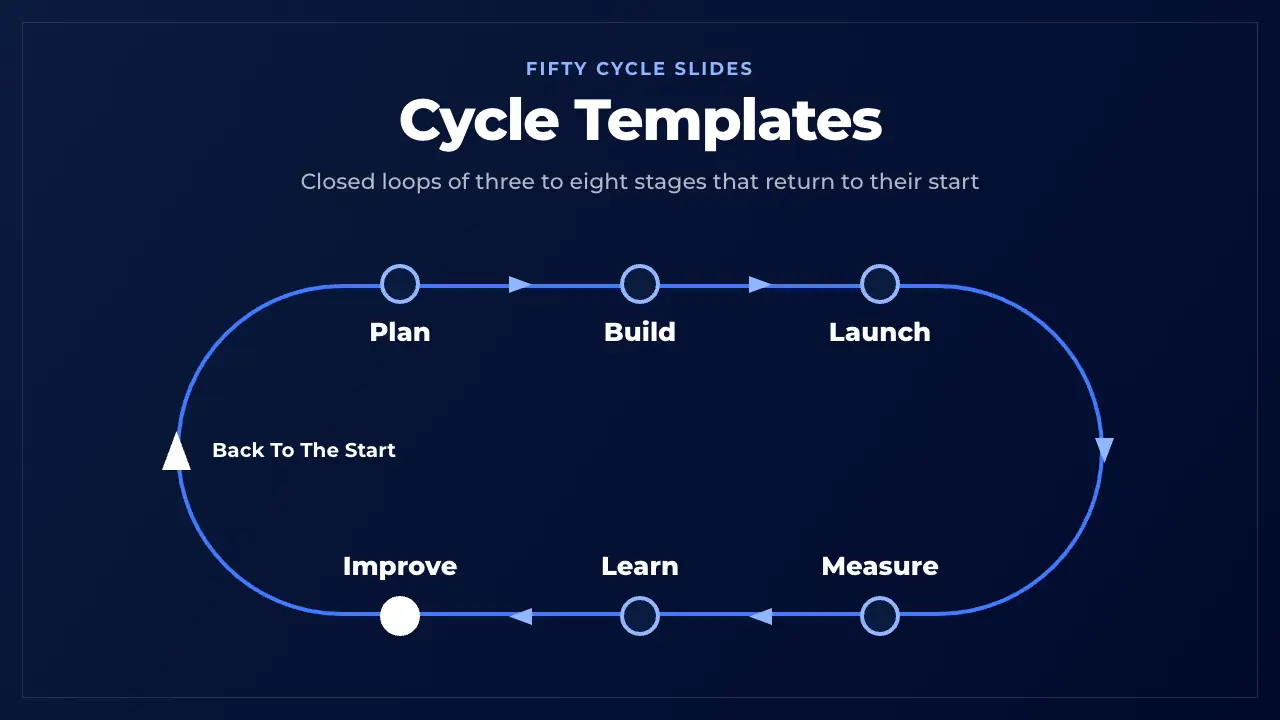
1 · Racetrack Cycle CoverThe title slide of the pack: six stages on one wide closed loop, with the arrow that returns to the start marked. Use it to open a deck on any repeating work and rename the stages to your own.
2 · Classic Five-Stage CycleThe classic cycle diagram: five stages on a closed ring, arrows between them and the length of one turn in the middle. Use it to explain any repeating process at a glance.
3 · Three-Stage Triangle LoopThe shortest cycle: three stages at the corners of a triangle, each straight arrow handing over to the next. Use it for a quick learning loop or any process with three clear beats.
4 · Four-Stage Ring With ListA ring of four stages with icons on the left and the same stages as a numbered list on the right, with the time to hire in the middle. Use it for hiring or any cycle whose stages need a line of explanation.
5 · Ring Around A Round PhotoSix stages of the customer relationship on a closed ring, with a round photo at its heart. Use it to show how a satisfied customer leads to the next one.
6 · Six Hexagons In A RingSix hexagons with icons form one closed ring, with the output of a quarter in the middle. Use it for an editorial or content routine and change the stages to your own.
7 · Double Cycle With Shared StageTwo closed rings that meet in one shared stage: a sales loop on the left and a delivery loop on the right. Use it wherever two teams run their own cycle around the same person or result.
8 · Square Circuit Of Four CardsFour cards at the corners of a square, joined by thin arrows into one closed circuit, with the annual budget in the middle. Use it for budgeting or any routine with four clear hand-overs.
9 · Line With One Large Return ArrowFive stages on a straight line, and one long arrow running under them from the last stage back to the first. Use it to show what turns a process into a cycle.
10 · Ring On A Full PhotoA ring of five stages on a full-slide photo under a navy overlay, with the rhythm of the releases in the middle. Use it as a strong section opener for a delivery or product routine.
11 · Eight-Stage RingA large ring of eight stages, four on each side, from the first idea to the improvement that starts the next round. Use it for a full product life cycle or any routine with many steps.
12 · Ring Beside A Bar ChartA small ring names the four stages, and a real bar chart beside it shows how the length of one turn falls year by year. Change the chart data to your own measure.
13 · Donut Chart As The RingA real donut chart forms the ring: each slice is one stage and its size is the weeks that stage takes in a turn of twelve. Edit the data and the ring follows.
14 · Vertical Loop With PhotoFive stages run down a rail, and a return arrow climbs beside them back to the first. A tall photo balances the slide. Use it for learning, training or coaching routines.
15 · Six Cards In A Closed LoopSix cards in two rows: the top row runs right, the bottom row runs left, and the last arrow climbs back to the first card. Use it for procurement or any long routine with clear hand-overs.
16 · Diamond Loop Of Four StagesFour stages at the points of a diamond, joined by four straight arrows, with the retention rate in the middle. Use it for a sales routine or any cycle with four clear turns.
17 · Nested Double RingTwo closed rings, one inside the other: the year turns through four quarters, and every quarter turns through three short steps. Use it to show how a fast routine sits inside a slow one.
18 · Ring Of Four PortraitsFour round portraits on a closed ring, each with the role that owns one stage of the cycle. Use it to make clear who hands over to whom, and replace the photos with your own team.
19 · Wide Flat OrbitFive stages travel on one wide, flat orbit around the on-time rate. The wide form suits a slide that needs short texts and a calm, open look.
20 · Line Chart Beside A RingA real line chart shows the result rising from one year to the next, and a small ring beside it shows the routine that drives it. Change the chart data to your own measure.
21 · Seven Stages With Detail PanelSeven stages on a closed ring, with the current one marked and explained in a panel beside it. Use it to walk an audience through a longer routine one stage at a time.
22 · Octagon Track Of Eight TilesEight tiles stand on the corners of a closed octagon, with an arrow on each side. Use it for an employee life cycle or any routine of many short stages.
23 · Photo Beside A Five-Stage RingA full-height photo on the left and a five-stage ring on the right. Use it when the people or the place behind the cycle should be seen.
24 · Three Small Rings Side By SideThree closed rings stand side by side, one for each rhythm a team runs at the same time. Use it to show how short and long routines fit together.
25 · Ring Of Six Large NumeralsSix large numerals on a closed ring, and the arrow from the sixth step back to the first picked out in white. Use it when the order of the steps matters most.
26 · Loop Of Arrow PentagonsThree arrows run to the right on top, three run back to the left below, and two return lines close the rectangle. Use it for a campaign or any routine that reads like a production line.
27 · Ring With A Rework ArrowA five-stage ring with one short extra arrow: a failed test goes back to the build rather than to the start. Use it for any cycle that has a quality gate.
28 · Ring With Four Quarter CardsFour cards around a closed ring, one for each quarter and its amount, with the total of the year in the middle. Replace the amounts with your own budget.
29 · Photo Band Over A Flat LoopA wide photo band opens the slide, and under it a flat closed loop carries the four stages of a feedback routine. Use it for customer or employee feedback.
30 · Ring Of Five Large IconsFive large icon tiles on a closed ring, no numbers, only the flow. Use it for the circular economy or any cycle where materials or value come back to the start.
31 · Pentagon Loop Of Straight ArrowsFive stages at the corners of a pentagon, joined by straight arrows into one closed loop. Use it for risk management or any routine that is reviewed on a fixed rhythm.
32 · Ring With Current Stage MarkedA progress view of the cycle: finished stages carry a tick, the current stage stands out and the last one is still open. Use it in a status meeting.
33 · Open Line Against Closed LoopThe same four stages twice: on the left as a line that simply ends, on the right closed into a ring. Use it to argue why a process should feed back into itself.
34 · Ring With A Figure At Each StageA ring of five stages where the figure, not the name, leads each stage. Use it as a dashboard of one turn and replace the measures with your own.
35 · Four-Stage Ring With Tall PhotoA ring of four stages on the left, a tall photo on the right. The last stage turns a new colleague into the person who welcomes the next one.
36 · Closed Snake Of Eight StepsEight steps in two rows: the top row runs right, the bottom row runs back to the left, and a last arrow climbs to the first step. Use it for a project life cycle with many stages.
37 · Ring Of Six QuestionsSix short questions in speech bubbles on one closed ring. Use it to run a review or a workshop: answer them in order, and the last one opens the next round.
38 · Six Periods Of One YearA year cut into six two-month periods on a closed ring, each with its main task. Use it as the planning calendar of a team: December hands over to January.
39 · Photo And Three-Stage RingA photo on the left and a ring of three large stages on the right. Use it for the short everyday cycle of trying something, learning from it and doing it better.
40 · Cash Conversion TriangleThree stages of the cash conversion cycle with their days, joined into a closed triangle, and the result in the middle. Replace the days with your own figures.
41 · Two Interlocked RingsTwo closed rings that overlap, a demand loop and a supply loop, each with three stages. Use it wherever two cycles feed each other and neither can run alone.
42 · Four Block Arrows In A SquareFour large block arrows chase each other around a square, each one starting where the last one ends. Use it when the movement itself is the message.
43 · Ring And Key-Figure Photo CardA five-stage ring on the left, and on the right a card with a photo and the one figure that proves the cycle works. Use it for loyalty or retention topics.
44 · Ring With Leaders To Two ColumnsA compact ring of six stages, with a thin leader running from each stage to its text in two calm columns. Use it when every stage needs a title and a short line.
45 · Oval Loop With Three RulesFive stages on a flat oval loop, with the three rules of the rhythm on cards beneath it. Use it for agile sprints or any short repeating routine.
46 · Four Photo Cards In A LoopFour photos at the corners, each a stage of the cycle, joined by arrows into one closed loop. Use it to show what the stages look like in real work.
47 · Statement, Photo And RingA short statement and a photo on the left, a five-stage ring on the right. Use it when the idea behind the cycle deserves as much room as the cycle itself.
48 · Closed Ring Of ChevronsTwelve chevrons form one closed ring that seems to turn, with the word that matters in the middle and three stages on each side. Use it for routines that build momentum.
49 · Ring, Three Results And PhotoA small ring beside three large results and a tall photo. Use it near the end of a deck to show what running the cycle has achieved.
50 · Next Turn With Three ActionsThe closing slide: a ring with the first stage of the next turn marked, three actions and a photo. Use it to end a deck with clear next steps.
What Is Inside The Pack
Classic rings of three to eight stages, triangle, diamond, pentagon and octagon loops, hexagon nodes, a racetrack, block arrows and a ring of chevrons, double, nested and interlocked cycles, a loop with a rework arrow, a ring with the current stage marked, cycles beside bar, line and donut charts, and cycles with photos and key figures. Every text, shape and chart stays editable.
How To Use This Cycle Template
01
Pick Your Form
Open the cycle template and choose the slide that has as many stages as your process, from a three-stage triangle to a ring of eight.
02
Name The Stages
Replace the sample stages with your own and keep each label short, so that the ring stays calm and easy to read.
03
Mark The Closing Arrow
Say what the last stage hands back to the first. That hand-over is what turns a list of steps into a real cycle.
04
Add Your Figures
Edit the chart data and centre figures, set your colours and fonts, then present in the browser or download the deck as PPTX.
When A Cycle Diagram Is The Right Choice
Choose a cycle when the work repeats and each round depends on the one before: a yearly budget, a release rhythm, a hiring routine or a customer who renews. If the work has a clear end, a timeline or a process flow says more.
Slide 33 sets the two side by side: the same four stages as a line that stops and as a loop that returns. Slide 9 shows the same idea with a single long arrow running back from the last stage to the first.
How To Present A Cycle Clearly
Start at the top and read clockwise, one stage at a time, and keep the words on each stage to a short title and one line. Put the one figure that matters in the middle of the ring, such as the length of a turn.
End on the closing arrow and say what it carries back to the start. For two teams or two rhythms, use the double cycle on slide 7 or the cycle inside a cycle on slide 17, and show the result of repeated turns with the charts on slides 12 and 20.
Cycle Template Questions
What Is A Cycle Template?
A cycle template is a ready-made slide that shows a process as a closed loop, in which the last stage leads back to the first. This pack holds 50 of them with three to eight stages.
Is This A Cycle PowerPoint Template?
Yes. Download the slides as a PPTX file with a free account and open them in PowerPoint, where texts, shapes and charts stay editable.
How Many Stages Can A Cycle Have?
The slides in this pack run from three to eight stages. Most audiences follow four to six most easily, so pick the shortest form that still tells the whole routine.
What Is The Difference Between A Cycle And A Process?
A process runs from a start to an end. A cycle returns to its start, so what the last stage learns improves the next round.
Can I Change The Colours And Fonts?
Yes. The colour and font bar on this page recolours every slide at once, and in the editor you can change any single shape, text or chart.
Can The AI Build My Own Cycle Deck?
Yes. Describe your topic and Fill With AI builds a deck of your own in the look of this cycle template, with your stages and your figures.
Are The Charts Editable?
Yes. The bar, line, area and donut charts are real charts: change their data in the editor, and they stay native charts in the PowerPoint export.
Try ExpertSlides AI For Free — The Ultimate AI Presentation Maker
Describe any topic or upload a document, and ExpertSlides designs and writes the whole deck — editable in the browser and as a PowerPoint file.