Governance Template: 50 Editable Slides For PowerPoint
Fifty governance slides in one blue look, each a different form: the board and its committees, roles, decision rights, policies, the board year, minutes, reporting lines and a governance review. Change the colours and fonts of all of them at once, let the AI build your own deck in this look, download them as PowerPoint or edit each slide in the editor.
This governance template pack holds 50 slides about how an organisation is directed and held to account: who decides and who answers for it. It runs from the board table and its four committees through roles and duties, terms of reference, decision rights and delegated authority to escalation, the life of a policy, the governance calendar, board packs, minutes and actions, reporting lines, assurance in general terms, project, data and IT governance, and a review of how well it all works. All of them share one blue look on light, white and navy grounds, so any five of them sit in one deck without looking borrowed.
The slides stay editable where it counts. Five slides carry real charts that you change through their data, and the steps, cards, bars and connectors are shapes you can move and retype. Every slide is written out with neutral sample content that fits any organisation: roles instead of names, and round figures such as a board of nine, 48 policies on the register or 64 actions from the minutes. The content is general information and no legal or compliance advice.
A free account downloads the slides as a PPTX file. You can also stay in the browser: pick your colours and fonts in the bar above the slides, describe your organisation and how it is run and let the AI build your own governance deck in this look, or open the slides one to one in the editor.
Your Governance In This Blue Look
Describe your board, your committees and who decides what, or attach your terms of reference or a policy. ExpertSlides builds your own governance deck in this look in a few minutes, with your roles, your calendar and your figures.
Every slide is a complete view of one part of how an organisation is directed and held to account, with neutral sample content — roles and round figures — that fits anyone. Replace the words and the data with yours.
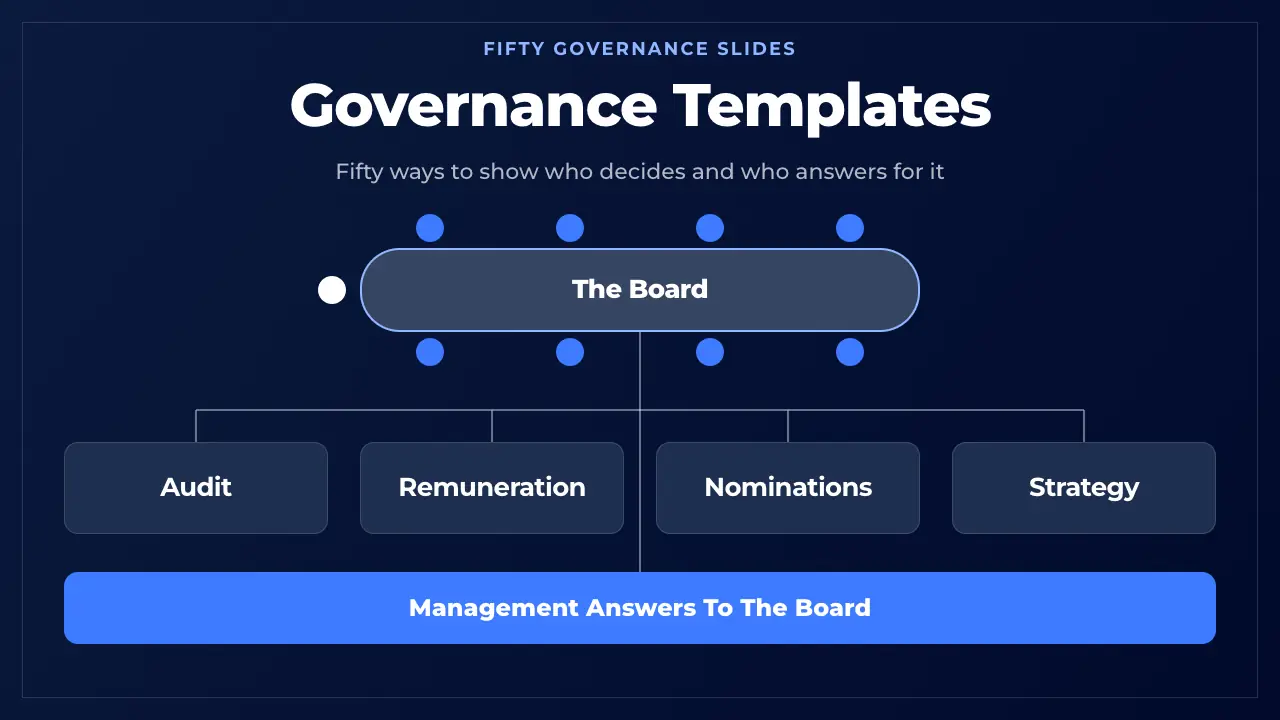
1 · Board Table Above CommitteesThe opening slide of the pack: a board table with nine seats, four committees below it and management at the base, joined by the lines of accountability. Use it to open any presentation about how an organisation is directed and held to account.
2 · The Governance HouseThe governance framework as a house: the board is the roof, four pillars carry it, and purpose and values are the foundation. Use it to introduce how the parts of governance hold together.
3 · Split Panels Around A PhotoTwo panels side by side with a photo between them: what the board does and what management does. Use it to draw the line between directing an organisation and running it.
4 · Hemicycle Of Nine SeatsThe make-up of the board as a hemicycle of nine seats, split into independent and executive directors. Use it to show the size and balance of a board at a glance.
5 · Hub With Four CommitteesThe board in the middle and four committees at the corners, each with what it looks after for the board. Use it to explain which committee covers what.
6 · Round Portraits On One LineThe four key roles around the board table as round portraits on one line, each with what the role is there for. Use it to introduce who does what at board level.
7 · Butterfly Comparison On A SpineFive topics on a central spine, with what the chair leads on the left and what the chief executive leads on the right. Use it to show how the two top roles divide the work.
8 · Duty Cards Beside A PhotoSix duties a director usually carries, as six cards in two columns beside a photo. It is general information and not legal advice; check what applies to your organisation.
9 · Terms Of Reference SheetA committee's terms of reference as one sheet with five numbered clauses, and a note on how the board keeps them current. Use it to explain what a committee is set up to do.
10 · Dot Matrix Of DecisionsFive kinds of decision set against the board, its committees and management, with a mark for who decides, who recommends and who is informed. Use it to make decision rights visible on one slide.
11 · Rising Stairs Of AuthorityDelegated authority as a staircase: each step up raises the spending limit and names the role that may approve it. Use it to explain who can sign off what.
12 · Spectrum From Reserved To DelegatedOne scale from what only the board may decide to what is fully delegated, with five kinds of matter placed along it. Use it to discuss where the line between board and management should run.
13 · Vertical Escalation LadderA concern rises rung by rung from the team to the board, each level with its time limit. Use it to show people how far and how fast an issue should travel.
14 · Six Chevrons With OwnersThe life of a policy in six chevrons, with who owns each stage and what they do. Use it to agree how policies are written, approved, reviewed and withdrawn.
15 · One Segmented BarThe state of the policy register on one bar, with the total and the three statuses above it. Use it for a quick report to a committee.
16 · Stepped Pyramid Of DocumentsThe hierarchy of governing documents as a stepped pyramid, with who approves each level beside it. Use it to explain why a procedure can never overrule a policy.
17 · Twelve-Month StripThe governance calendar on one strip of twelve months, with six board meetings on one line and four rounds of four committee meetings on the other. Use it to plan the year so that each committee reports before the board meets.
18 · Gantt Bands Of The YearThe main pieces of board work as bands across the twelve months of the year. Use it to show when each topic comes up and how they follow one another.
19 · Cascade Of Board PapersA board pack as a cascade of five papers, each with what it holds, and the two deadlines around the meeting. Use it to agree what every pack contains and when it goes out.
20 · Timed Agenda On One StripA board meeting from 09:00 to 12:00 on one strip, each item as long as the time it takes. Use it to plan a meeting so that the most time goes to what matters most.
21 · Photo Band Over Three PhasesA meeting in three phases under a wide photo: the pack seven days before, the decisions in the room and the minutes within five working days. Use it to set the rhythm of every meeting.
22 · Annotated Minutes SheetA page of minutes with four callouts that name what each part must record: who attended, what was discussed, what was decided and who acts by when. Use it to agree a standard for your minutes.
23 · Donut With A Key FigureA donut chart of all the actions that came out of the minutes of 2027, with the share closed as a key figure and the three counts under it. Use it to report to the board how well its decisions are carried out.
24 · Kanban Board Of ActionsThe actions from the board's minutes on a kanban board in three columns, each ticket with its owner. Use it to run through open points at the start of a meeting.
25 · Org Chart With Independent LineWho reports to whom, from the board through the chief executive to the functions, with internal audit answering directly to the audit committee. Use it to explain why some roles stay independent of management.
26 · Stepped Funnel To The BoardHow information narrows on its way up: many data points become a few reports, a summary and one dashboard. Use it to show what the board really needs to see.
27 · Dashboard With Small MetersSix figures that tell a board how its governance is working, each on a tile with a small meter. Use it as the first page of a board report.
28 · Nested Layers Of AssuranceAssurance in general terms as three nested layers: what management checks itself, what oversight functions test and what an independent review confirms. It is general information; the right mix depends on the organisation.
29 · Bar Chart With Key FigureHow much of each area was reviewed in 2027, as a horizontal bar chart beside the average. Use it to show where the board has good sight and where it has less.
30 · Pie Chart With A Key CardHow the board divides its time across strategy, performance, assurance and people, as a pie chart beside a card with the largest share. Use it in a board evaluation to ask whether time follows priorities.
31 · Line Chart With A Photo At LeftAttendance at each of the six board meetings of the year as a line chart, beside a photo of a meeting. Use it to report how well directors keep up their commitment.
32 · Column Chart With A BandHow many decisions were taken at each level in 2027, as a column chart with a key message under it. Use it to show that delegation is working and that the board keeps to what only it can decide.
33 · Diamond Gates With Three AnswersFive gates on one line and the three answers the steering group can give at each of them. Use it to explain how projects are governed from idea to close.
34 · Project Tree Beside A PhotoWho runs a project, as a small tree from the sponsor through the steering group and the project manager to the workstreams. Use it at a project start to agree who decides what.
35 · Pictogram Of Twelve ProjectsThe whole project portfolio as twelve tiles, one for each project, coloured by status. Use it to show the board the state of all projects in a single look.
36 · Honeycomb Of Six DomainsThe six data domains of an organisation as a honeycomb, each with the role that owns it. Use it to make clear that every kind of data has one person who answers for it.
37 · Chain Of Linked RoundsThe four roles that look after data as a chain of linked rounds, from the person who answers for it to the person who uses it. Use it to explain who does what with data.
38 · Stacked Slabs Beside A PhotoThe decisions of IT governance as five stacked layers, from what technology is for down to what keeps it safe. Use it to show that technology choices are decided at the right level.
39 · Two Flows Through Four GroupsTwo long arrows run through the four groups a board answers to: above what the board gives each group, below what it hears back. Use it to talk about accountability beyond the boardroom.
40 · Statement On A Full PhotoA short statement on accountability over a full photo, with three commitments on one line under it. Use it as a section opener or to close a board session.
41 · Bullet Bars Against A TargetA board effectiveness review as five bullet bars, each score set against the same target. Use it to show at a glance where the board is close and where it has work to do.
42 · Maturity Track With Today And TargetGovernance maturity as a track of five levels with a marker where the organisation stands, and two cards for today and the target. Use it to agree where you are and how far you want to go.
43 · Zigzag Of Five StepsA governance review as five steps on a zigzag path, from setting the scope to agreeing the action plan. Use it to explain to directors what a review involves.
44 · Two Panels Around A Round PhotoWhat a governance review found, as two panels of strengths and gaps that meet at a round photo. Use it to report the outcome honestly and to lead into the action plan.
45 · Tenure Lanes For Nine SeatsWhen each of the nine seats comes up for renewal, as lanes over the years from 2027 to 2035. Terms run for three years, at most three terms. Use it to plan succession so that the board never loses all its experience at once.
46 · Now, Next, Later Lanes With PhotoThe improvement plan after a governance review in three lanes: what happens now, next and later, each with a date. Use it to end a review with clear commitments.
47 · Rising Milestones On StemsA five-year governance roadmap as milestones that rise on stems from one base line. Use it to show the board where governance is heading and what each year adds.
48 · Decision Flow With DiamondsA general flow for handling a conflict of interest: declare it, weigh it, step out where needed and record it. It is general information and not legal advice. Use it to remind directors of the routine.
49 · Three Over Two On A Full PhotoThe five principles behind good governance in two staggered rows on a full photo. Use it to close a section or to open a discussion on values.
50 · Questions Around A Round PhotoFive questions a board can ask about any decision, set along the curve of a large round photo. Use it as the closing slide of a governance session or as a standing checklist.
Fifty Forms Of Governance In One Blue Look
A title slide with the board table above four committees and management; the governance house, directing against managing and a hemicycle of nine seats; the committees around the board, four round portraits, the chair and the chief executive on one spine, six duties of a director and a sheet of terms of reference; decision rights as a dot matrix, authority limits as rising stairs, a scale from reserved to delegated and an escalation ladder; the life of a policy in six chevrons, the policy register on one bar and a pyramid from charter to procedure; the year on a twelve-month strip and in bands, a cascade of board papers, a three-hour agenda on one strip, a meeting before, during and after, annotated minutes, a donut and a kanban board of actions; reporting lines with an independent line for internal audit, a funnel from data to the board, a dashboard, nested layers of assurance, charts of coverage, board time, attendance and decisions; five project gates, a project structure and twelve project tiles; six data domains in hexagons, a chain of data roles and an IT governance stack; two flows between the board and those it answers to and a statement on accountability; a review by scores, maturity levels, a zigzag of steps and strengths against gaps; a succession plan to 2035, now, next and later, a roadmap to 2031, a conflict of interest flow, five principles and five closing questions. Seventeen slides stand on navy, seventeen on light blue and sixteen on white, thirteen of them with a photo.
How To Use This Governance Template
01
Pick Your Governance Slides
Look through the 50 slides of the governance template and note the forms your meeting needs: the committees for an induction, the authority limits for a policy briefing, the dashboard for a board report. Most decks need five to ten of them.
02
Set Colours And Fonts
Choose your colours and your font in the bar above the slides. All 50 change at once, so you see your brand on every form before you download anything.
03
Put In Your Own Facts
Press Fill With AI and describe your organisation and how it is run, or press Edit Slides and replace the sample roles, limits and figures by hand. Charts change through their data.
04
Download Or Present
Download the slides as a PPTX file with a free account and copy them into your own PowerPoint deck, or present them straight from the browser.
Which Governance Slide Fits Which Meeting
A new director needs the structure first. The governance house (slide 2) shows how the parts hold together, directing against managing (3) draws the main line, the board of nine (4) and the four committees (5) show who sits where, and the chair and chief executive (7) divide the top two jobs. The six duties (8) close the induction as general information.
A discussion of who decides what needs the rights on one page. The dot matrix (10) marks who decides, recommends or is informed, the stairs (11) set the spending limits, the scale (12) places matters between reserved and delegated, and the escalation path (13) says how a concern rises and how fast.
The company secretary's year runs on the middle of the pack. The calendar (17) and the year of board work (18) plan the meetings, the board pack (19) and the agenda (20) prepare them, and the minutes (22), the action donut (23) and the kanban board (24) make sure that what was decided gets done.
A governance review needs an honest picture. The board effectiveness scores (41) and the maturity track (42) say where you stand, the zigzag (43) explains how the review runs, the strengths and gaps (44) report what it found, and now, next and later (46) with the roadmap (47) turn it into a plan the board owns.
How To Build A Board Deck From These Slides
Download the pack as a PPTX file and open it in PowerPoint. Every text is a text box, the steps, cards and connectors are shapes, and the five charts (slides 23, 29, 30, 31 and 32) are PowerPoint's own, so you open their data and type your figures. Copy the slides you need into your own presentation and delete the rest.
Build the deck in the order a board reads it: how we are doing, what we must decide, who acts next. A short annual report on governance can run on six slides: the dashboard (27), attendance (31), where board time goes (30), the state of the policies (15), the actions from the minutes (23) and the plan for next year (46).
Keep each slide to one message. A full scheme of delegation belongs in a document; on a slide, show the four limits that people ask about. Name roles rather than people where a deck travels widely, and give every action one owner and one date.
Check the content against your own rules. The slides show general practice and name no law, code or regulator, so what applies to your organisation is a question for your own advisers. Set colours and fonts before you download: the bar above the slides recolours all 50 at once.
Questions About The Governance Template
Is This Governance Template Free?
Yes. All 50 slides of the governance template are free. You can look at every slide and try colours and fonts on this page without an account; a free account, with no credit card, downloads the PPTX file or opens the slides in the editor.
Can I Use The Slides In PowerPoint?
Yes. Press Download PPTX and open the file in PowerPoint. Texts stay text boxes, shapes stay shapes and the charts stay PowerPoint charts with their data, so you edit this governance template there like any slide of your own and can copy single slides into an existing presentation.
Is The Content Legal Or Compliance Advice?
No. The slides are general information on how organisations are commonly directed and held to account. They name no law, code, regulator or firm, and their figures are samples. What applies to your organisation is a question for your own advisers.
What Is The Difference To The Risk Management Template?
The risk management pack is about risks and how they are treated. This pack is about who decides and who answers for it: the board, its committees, decision rights, policies, meetings, reporting lines and reviews. Many board decks use both.
Which Slides Show Decision Rights And Delegated Authority?
Slide 10 marks who decides, recommends or is informed for five kinds of decision, slide 11 sets the authority limits as rising stairs, and slide 12 places matters on a scale from reserved to delegated. The escalation path (13) shows what happens when a matter goes beyond a level.
Can The AI Build My Own Governance Deck?
Yes. Press Fill With AI and describe your organisation, or attach your terms of reference, a policy or a spreadsheet. The AI builds your own deck in this look, with your roles, decisions and figures, and you can ask for changes slide by slide afterwards.
Can I Change The Colours And Fonts?
Yes. The bar above the slides sets the colours and the font of all 50 slides at once, and the download and the editor take over what you chose. In the editor you can also change a single slide, or put your own Design Kit on the whole deck.
Are There Governance Slides With Photos?
Yes. Thirteen slides carry a photo, among them directing against managing (slide 3), the four round portraits (6), the duties of a director (8), the escalation path (13), the statement on accountability (40) and the five closing questions (50). Replace each picture with your own in the editor or in PowerPoint.
Try ExpertSlides AI For Free — The Ultimate AI Presentation Maker
Describe any topic or upload a document, and ExpertSlides designs and writes the whole deck — editable in the browser and as a PowerPoint file.

 Organizational Chart Presentation Templates50 slides
 Executive Summary Presentation Templates50 slides
 Business Case Presentation Templates50 slides
 Dashboard Templates50 slides
 OKR Presentation Templates50 slides
 Meeting Presentation Templates50 slides
 Business Presentation Templates50 slides
 Human Resources Presentation Templates50 slides